







Question: When I wrote the code based on the instructions listed on the MIPS Green Card page, I ran into errors when I ran my code
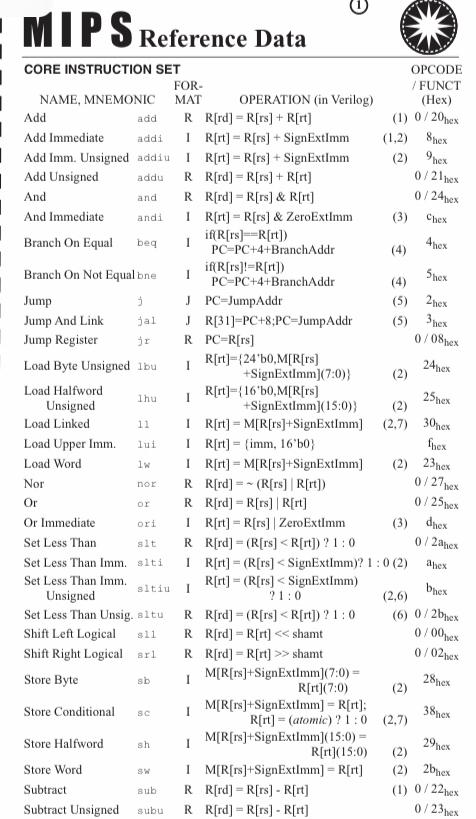
When I wrote the code based on the instructions listed on the MIPS Green Card page, I ran into errors when I ran my code on MIPS Mars Simulator. When I tried to get help, according to a friend of mine, he told me that I didn't include any numbers or values in the code I wrote. This is the code I wrote. Code: # Add
add $rd, $rs, $rt
# Add Immediate
addi $rt, $rs, imm
# Add Unsigned
addu $rd, $rs, $rt
# Add Immediate Unsigned
addiu $rt, $rs, imm
# And
and $rd, $rs, $rt
# And Immediate
andi $rt, $rs, imm
# Branch On Equal
beq $rs, $rt, offset
# Branch On Not Equal
bne $rs, $rt, offset
# Jump
j target
# Jump And Link
jal target
# Jump Register
jr $rs
# Load Byte Unsigned
lbu $rt, offset($rs)
# Load Halfword
lh $rt, offset($rs)
# Load Linked Word (for multiprocessors)
ll $rt, offset($rs)
# Load Upper Immediate
lui $rt, imm
# Load Word
lw $rt, offset($rs)
# Nor
nor $rd, $rs, $rt
# Or
or $rd, $rs, $rt
# Or Immediate
ori $rt, $rs, imm
# Set Less Than
slt $rd, $rs, $rt
# Set Less Than Immediate
slti $rt, $rs, imm
# Set Less Than Immediate Unsigned
sltiu $rt, $rs, imm
# Set Less Than Unsigned
sltu $rd, $rs, $rt
# Shift Left Logical
sll $rd, $rt, shamt
# Shift Right Logical
srl $rd, $rt, shamt
# Store Byte
sb $rt, offset($rs)
# Store Conditional Word (for multiprocessors)
sc $rt, offset($rs)
# Store Halfword
sh $rt, offset($rs)
# Store Word
sw $rt, offset($rs)
# Subtract
sub $rd, $rs, $rt
# Subtract Unsigned
subu $rd, $rs, $rt
After writing the code, I ran into errors on MIPS Mars Simulator and my friend told me to add numbers and values to the code of the 30 instructions from the MIPS Green Card Page. I need you to fix this, so by the time I run on Mars MIPS Simulator, I will have no errors and everything would become a success. Please revise and fix this including my code I wrote listed above.
IL 18 Reference Data
Step by Step Solution
There are 3 Steps involved in it

Get step-by-step solutions from verified subject matter experts
 Study Help