







Question: When the program starts the Timer starts from 00:00 (second's timer using Thread) and ends when the program is exited by showing a JOptionPane.showDialog themessage
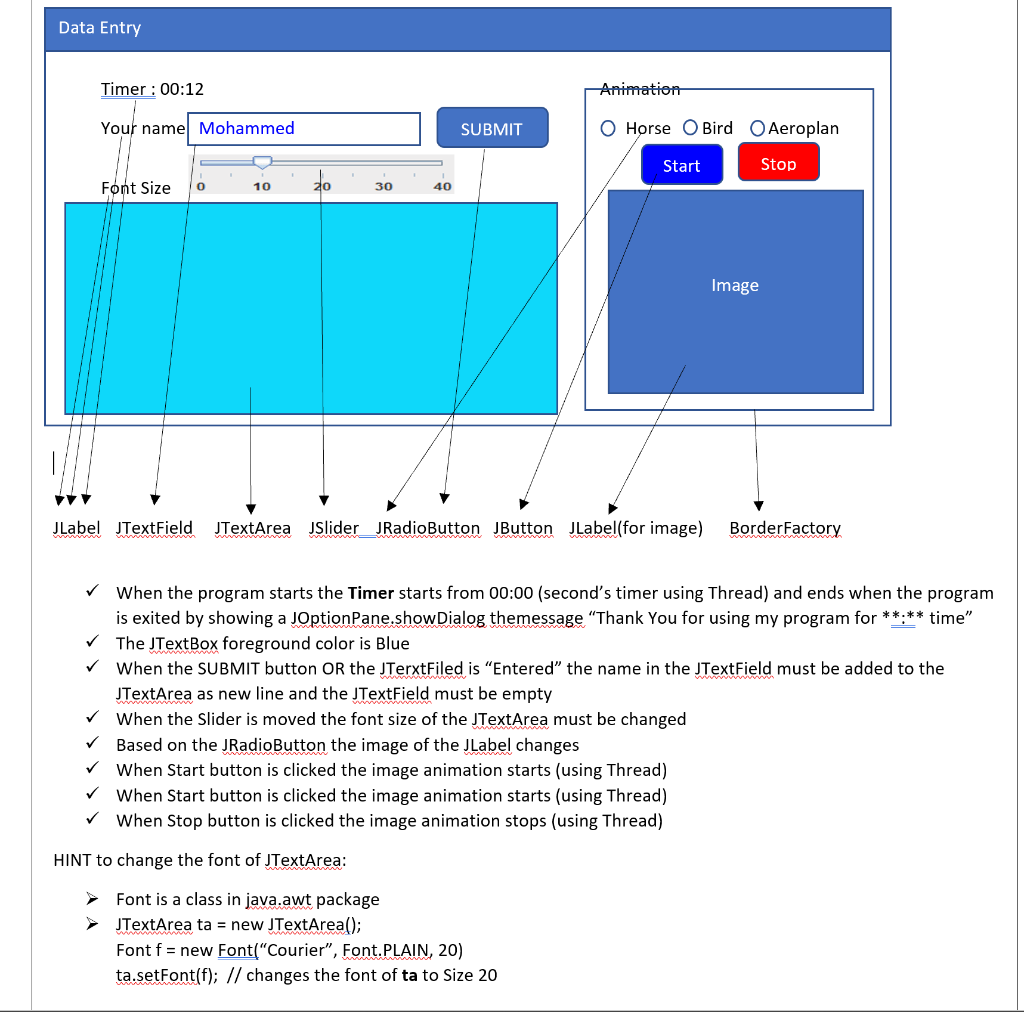
When the program starts the Timer starts from 00:00 (second's timer using Thread) and ends when the program is exited by showing a JOptionPane.showDialog themessage "Thank You for using my program for **:** time" The JTextBox foreground color is Blue When the SUBMIT button OR the JTerxtFiled is "Entered" the name in the JTextField must be added to the JTextArea as new line and the JTextField must be empty When the Slider is moved the font size of the JTextArea must be changed Based on the JRadioButton the image of the JLabel changes When Start button is clicked the image animation starts (using Thread) When Start button is clicked the image animation starts (using Thread) When Stop button is clicked the image animation stops (using Thread) HINT to change the font of JTextArea: Font is a class in java.awt package JTextArea ta = new JTextArea(); Font f= new Font( "Courier", Font.PLAIN, 20) ta.setFont(f); // changes the font of ta to Size 20
Step by Step Solution
There are 3 Steps involved in it

Get step-by-step solutions from verified subject matter experts
 Study Help