







Question: When working the problem out please explain revenue.txt ... I keep getting errors saying No such file or directory. Also, please provide in Python. Thank
When working the problem out please explain "revenue.txt" ... I keep getting errors saying "No such file or directory". Also, please provide in Python. Thank you! 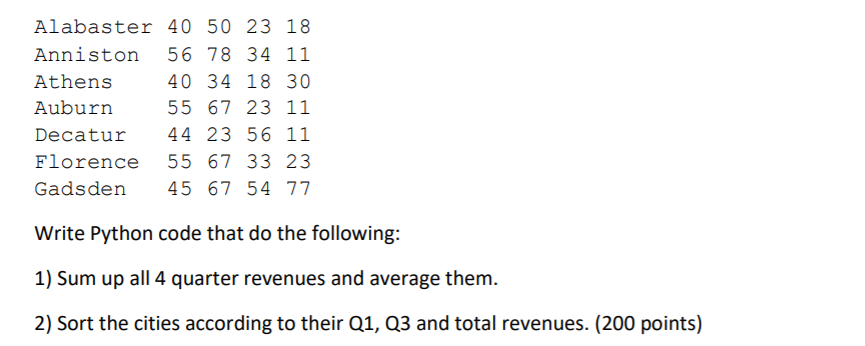
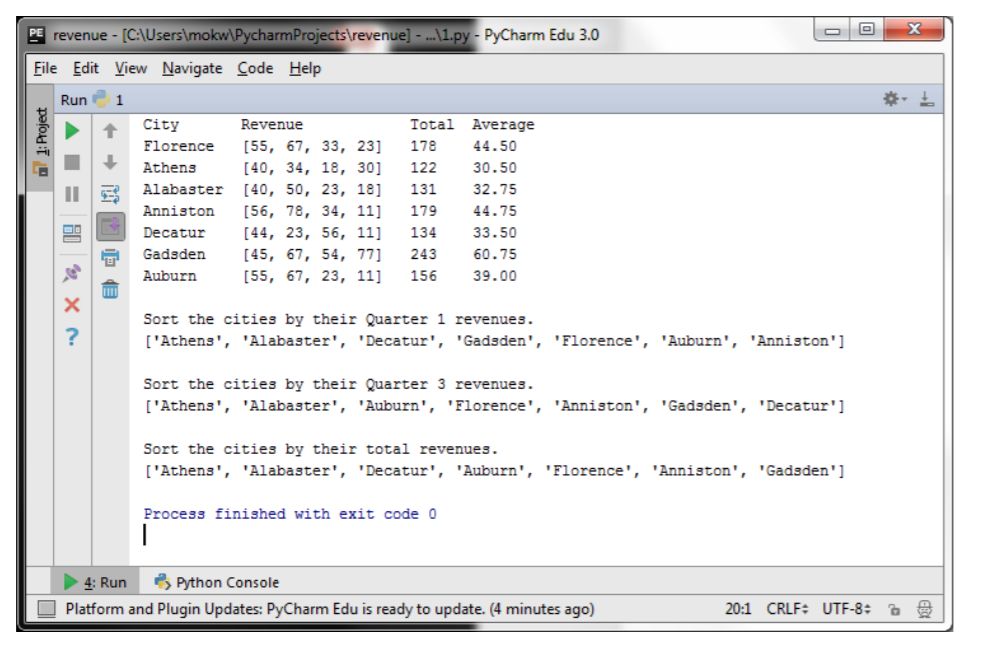
Alabaster 40 50 23 18 Anniston 56 78 34 11 Athens 40 34 18 30 Auburn 55 67 23 11 Decatur 44 23 56 11 Florence 55 67 33 23 Gadsden 45 67 54 77 Write Python code that do the following: 1) Sum up all 4 quarter revenues and average them. 2) Sort the cities according to their Q1, Q3 and total revenues. (200 points) PE revenue - [C:\Users\mokw\Pycharm Projects revenue) - ... 1.py - PyCharm Edu 3.0 File Edit View Navigate Code Help Run 1 1: Project + City Revenue Florence [55, 67, 33, 23] Athens [40, 34, 18, 30] Alabaster [40, 50, 23, 18] Anniston [56, 78, 34, 11] Decatur [44, 23, 56, 11] Gadsden [45, 67, 54, 77] Auburn [55, 67, 23, 11] Total 178 122 131 179 134 243 156 Average 44.50 30.50 32.75 44.75 33.50 60.75 39.00 ET Sort the cities by their Quarter 1 revenues. ['Athens', 'Alabaster', 'Decatur', 'Gadsden', 'Florence', 'Auburn', 'Anniston'] Sort the cities by their Quarter 3 revenues. ['Athens', 'Alabaster', 'Auburn', 'Florence', 'Anniston', 'Gadsden', 'Decatur'] Sort the cities by their total revenues. ['Athens', 'Alabaster', 'Decatur', 'Auburn', 'Florence', 'Anniston', 'Gadsden'] Process finished with exit code 0 4: Run Python Console Platform and Plugin Updates: PyCharm Edu is ready to update. (4 minutes ago) 20:1 CRLF: UTF-8
Step by Step Solution
There are 3 Steps involved in it

Get step-by-step solutions from verified subject matter experts
 Study Help