







Question: When you send HTTP requests to AWS, you need to sign the requests so that AWS can identify who sent them. You sign requests with
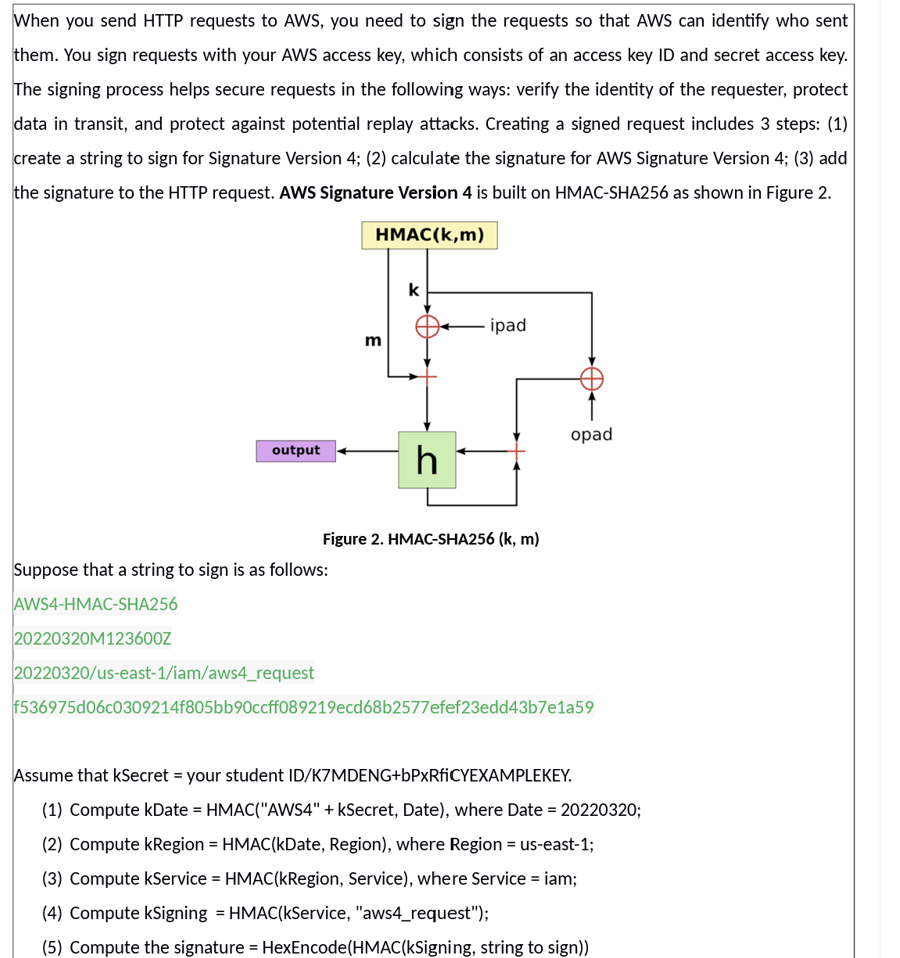
When you send HTTP requests to AWS, you need to sign the requests so that AWS can identify who sent
them. You sign requests with your AWS access key, which consists of an access key ID and secret access key.
The signing process helps secure requests in the following ways: verify the identity of the requester, protect
data in transit, and protect against potential replay attacks. Creating a signed request includes steps:
create a string to sign for Signature Version ; calculate the signature for AWS Signature Version ; add
the signature to the HTTP request. AWS Signature Version is built on HMACSHA as shown in Figure
Suppose that a string to sign is as follows:
AWSHMACSHA
MZ
useastiamawsrequest
fdcfbbccffecdbefefeddbea
Assume that kSecret your student IDKMDENGbPxRfiCYEXAMPLEKEY.
Compute kDate HMACAWS kSecret, Date where Date ;
Compute kRegion HMACkDate Region where Region useast;
Compute kService HMACkRegion Service where Service iam;
Compute kSigning HMACkService "awsrequest";
Compute the signature HexEncodeHMACkSigning string to sign Student id:S
Step by Step Solution
There are 3 Steps involved in it
1 Expert Approved Answer
Step: 1 Unlock

Question Has Been Solved by an Expert!
Get step-by-step solutions from verified subject matter experts
Step: 2 Unlock
Step: 3 Unlock
 Study Help