





Question: Where do I put in my switch statements? . , eApplication2ConsoleApplicationacon soleApplication2.cpp : This file contains the 'main' function. Program 1 17 ConsoleApplication2.cpp 2 //Nathanael
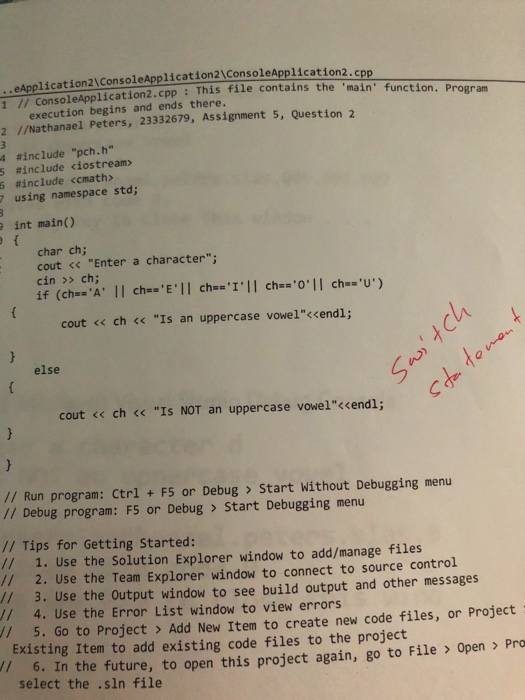
Where do I put in my switch statements?  Where do I put in my switch statements? . , eApplication2\ConsoleApplicationacon

. , eApplication2\ConsoleApplicationacon soleApplication2.cpp : This file contains the 'main' function. Program 1 17 ConsoleApplication2.cpp 2 //Nathanael Peters, 23332679, Assignment 5, Question 2 4 #include-pch.h" execution begins and ends there. #include 5 #include 7 using namespace std; int main() char ch; cout ch; t If (ches cout Start Without Debugging menu // Debug program: F5 or Debug > Start Debugging menu // Tips for Getting Started: // 1. Use the Solution Explorer window to add/manage files // 2. Use the Team Explorer window to connect to source control // 3. Use the Output window to see build output and other messages // 4. Use the Error List window to view errors // 5. Go to Project > Add New Item to create new code files, or Project Existing Item to add existing code files to the project 6. In the future, to open this project again, go to File > Open > Pro select the .sin file

Step by Step Solution

There are 3 Steps involved in it

1 Expert Approved Answer
Step: 1 Unlock blur-text-image
Question Has Been Solved by an Expert!

Get step-by-step solutions from verified subject matter experts

Step: 2 Unlock
Step: 3 Unlock

Students Have Also Explored These Related Databases Questions!