







Question: Which command on the Protect Document drop - down menu allows you to restrict editing to specific sections of your document? ( 4 ) New
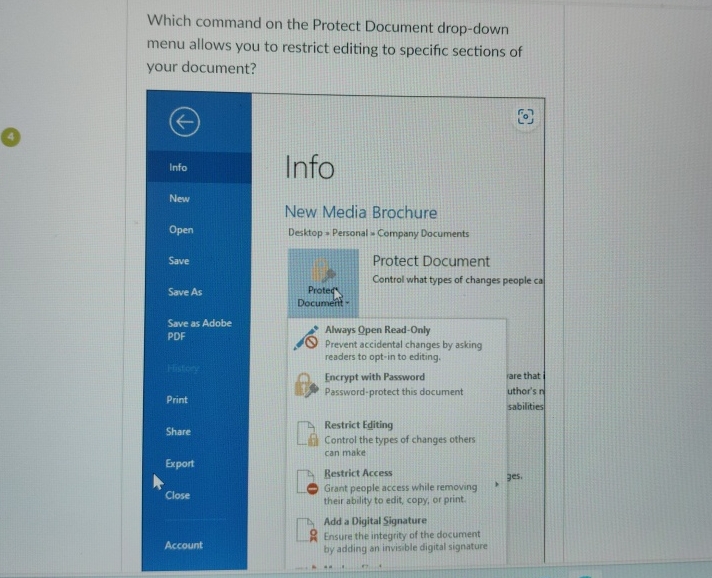
Which command on the Protect Document dropdown menu allows you to restrict editing to specific sections of your document?
New Media Brochure
Desktop Personal Company Documents
Protect Document
Control what types of changes people ca Document
Always Open ReadOnly
Prevent accidental changes by asking readers to optin to editing.
Encrypt with Password fare that
Passwordprotect this document uthor's n
Restrict Editing
Control the types of changes others can make
Bestrict Access
Grant people access while removing their ability to edit, copy, or print.
Add a Digital Signature
Ensure the integrity of the document
Account by adding on invisible digital signature
Step by Step Solution
There are 3 Steps involved in it
1 Expert Approved Answer
Step: 1 Unlock

Question Has Been Solved by an Expert!
Get step-by-step solutions from verified subject matter experts
Step: 2 Unlock
Step: 3 Unlock
 Study Help