



Question: While the cumulative number of days between two dates can be very useful, sometimes we would like to convert the number of days into a
While the cumulative number of days between two dates can be very useful, sometimes we would like to convert the number of days into a fraction of a year. The function to do that is YEARFRAC. It asks for a start date, end date, and a basis. For this problem use a basis of 1. More help with YEARFRAC can be found at this link.
For example, you would expect the fraction of a year between January 1st and February 1st to be approximately 1/12st of a year (one month), or about 0.8333 (8.33%) of the entire year. In fact, it is 8.49%; =YEARFRAC(1/1/2019, 2/1/2019, 1). Note: To have the result show as a percentage, you may need to format the cell as a percent.
PROBLEM 1) In cell I4, find the faction of the year represented between the date in E6 and the beginning of the year (to 1 decimal). Enter the percentage below without the % sign.
PROBLEM 2) In cell I5, find the fraction of the year represented between the date in E6 and the beginning of the month (to 1 decimal). Enter the percentage below without the % sign.
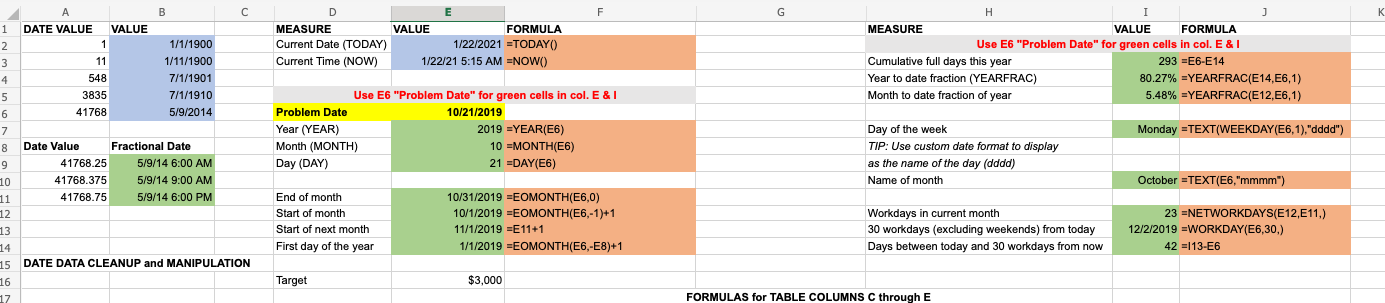
F G K D E MEASURE VALUE FORMULA Current Date (TODAY) 1/22/2021 =TODAYO Current Time (NOW) ) 1/22/21 5:15 AM =NOWO . j MEASURE VALUE FORMULA Use E6 "Problem Date" for green cells in col. E& Cumulative full days this year 293 =E6-E14 Year to date fraction (YEARFRAC) 80.27% =YEARFRAC(E14, E6,1) Month to date fraction of year 5.48% =YEARFRAC(E12, E6,1) B 1 DATE VALUE VALUE 2 1 1/1/1900 3 11 1/11/1900 4 548 7/1/1901 5 5 3835 7/1/1910 6 41768 5/9/2014 7 8 Date Value Fractional Date 9 41768.25 5/9/14 6:00 AM 10 41768.375 5/9/14 9:00 AM 11 41768.75 5/9/14 6:00 PM 12 13 14 15 DATE DATA CLEANUP and MANIPULATION 16 17 Use E6 "Problem Date" for green cells in col. E & I Problem Date 10/21/2019 Year (YEAR) 2019 =YEAR(E6) Month (MONTH) 10 =MONTH(E6) Day (DAY) 21 =DAY(E6) Monday =TEXT(WEEKDAY (E6,1), "dddd") Day of the week TIP: Use custom date format to display as the name of the day (dddd) Name of month October =TEXT(E6,"mmmm") End of month Start of month Start of next month First day of the year 10/31/2019 =EOMONTH(E6,0) 10/1/2019 =EOMONTH(E6,-1)+1 11/1/2019 =E11+1 1/1/2019 =EOMONTH(E6,-E8)+1 Workdays in current month 30 workdays (excluding weekends) from today Days between today and 30 workdays from now 23 =NETWORKDAYS(E12, E11) 12/2/2019 =WORKDAY(E6,30.) 42 = 13-16 Target $3,000 FORMULAS for TABLE COLUMNS C through E
Step by Step Solution
There are 3 Steps involved in it

Get step-by-step solutions from verified subject matter experts