







Question: why does the inside loop change size? if we had it run from 1 up to the length of the array, we would get the
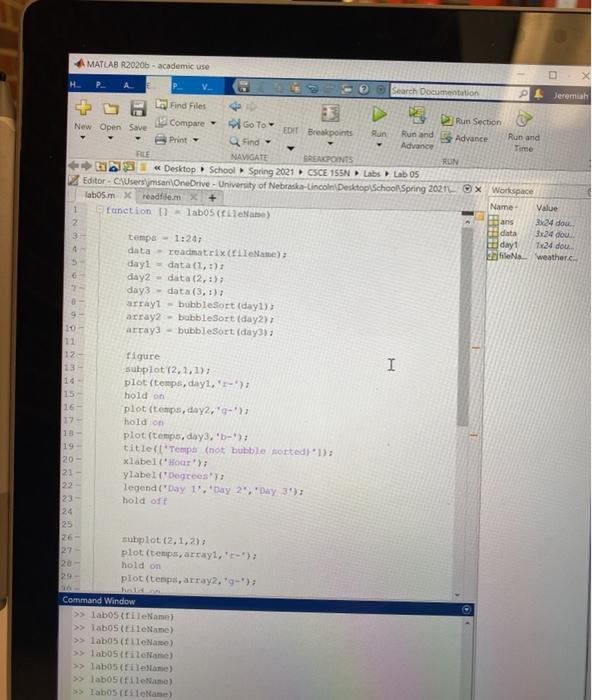
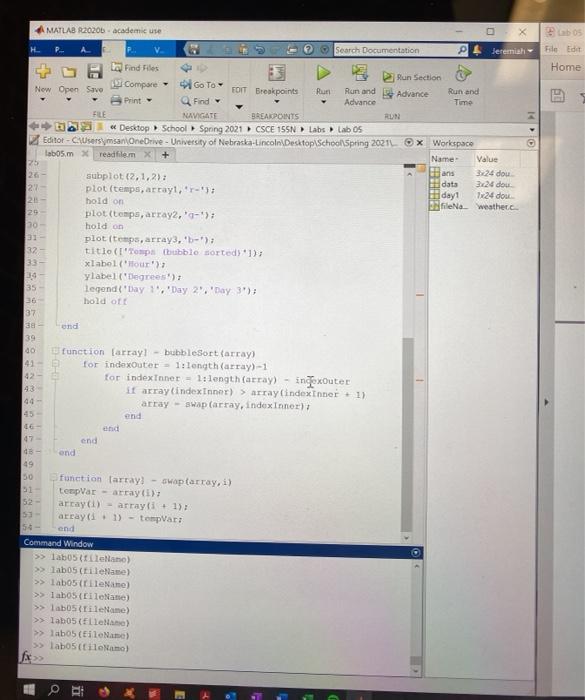
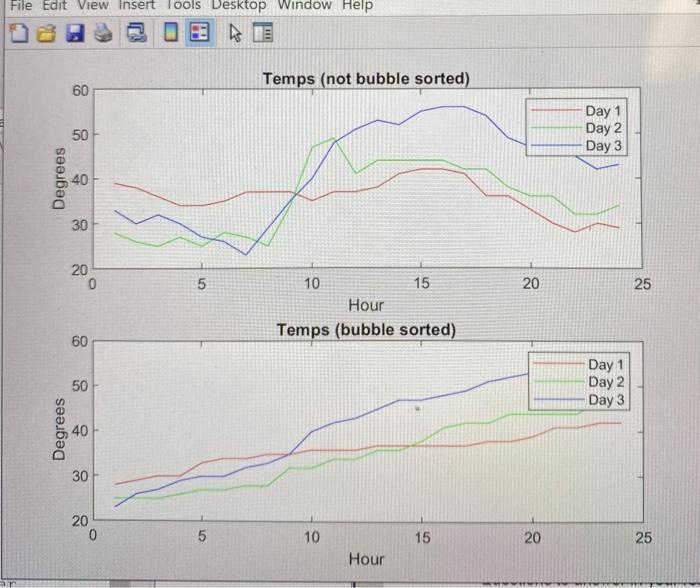
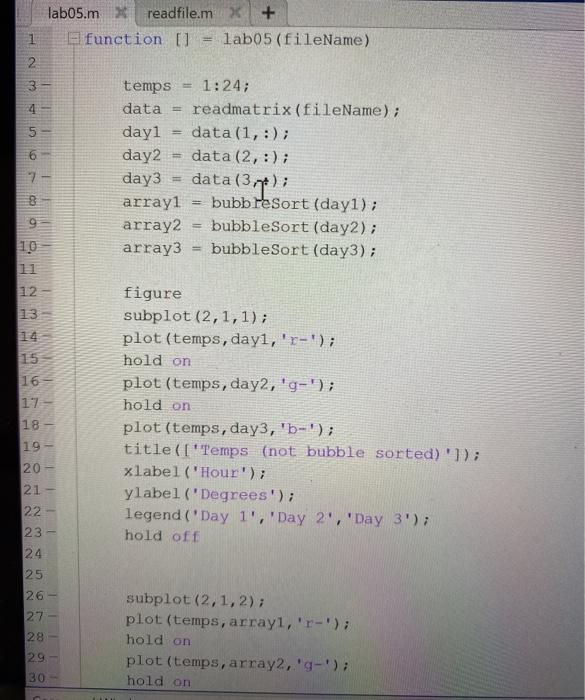
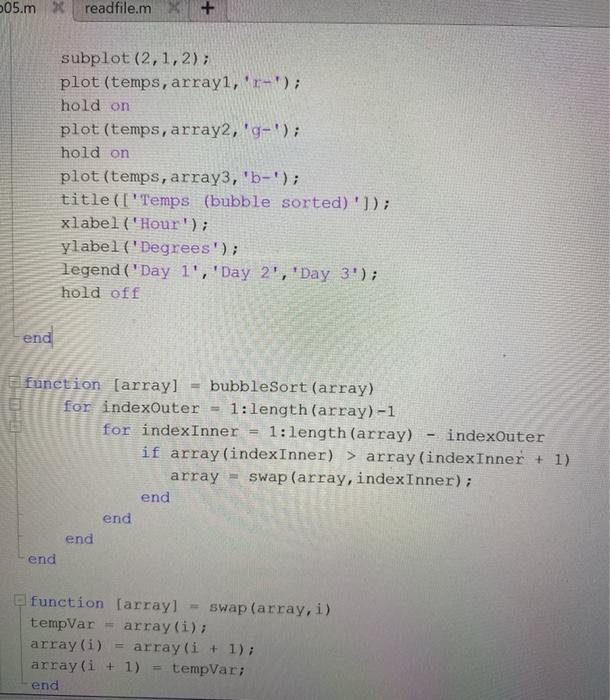
MATLAB R2020b-academic use V Search Documentation P Jeremiah Find Files D Run Section Compare - New Open Save GO TO EDIT Breakpoints Run Run and Advance Run and Print Find - Advance Time FILE NAVIGATE SREACPOINTS RUN Desktop School Spring 2021 CSCE 15SN Labs Lab 05 Editor - Userman OneDrive - University of Nebraska-Lincoln Desktop School Spring 20210X Workspace labos.mxreadfilem Name Value 1 function - lab05 Nam) 3 ans 2x24 dou 2 data 3-24 dou 3 tempe- 1:24 day 1 T24 dou data - readmatrix ElleName); Efto weather.c. dayi - data (1,3) day2 - data (2,3); day3 - data (3, 1); arrayl - bubbleSort (day) 9 array2 - bubbleSort (day2) array3 - bubbleSort (day); 12- 13 I 15 17 - 18 - 19 20 23 22 23- 24 25 26 27 20 29 figure subplot (2,1,1) plot (temps, dayl.' hold on plot (temps, day,'-'); hold on plot (temps, day3, 'b'); title('Tempo (not bubble sorted) 1); xlabel"Hour'); ylabel (Degrees): legend 'Day 1".' Day 2', 'Day 3'); hold oft subplot (2,1,2) plot (temps, array, '-'); hold on plot (temps, array2.'-'); Command Window >> labostileName) >> labos (Name) >> labos (fileName) >> labostileName) >> labos (Name) >> labos fileName) >>> labos (Nano) MATLAB R2020. academic use X b05 File Edit Search Documentation Jeremiah Home 1 20- 32 Find Files Run Section Compare - Go To Now Open Savo FOIT Breakpoints Run and Advance Run and Print Find - Advance Time FLE NAVIGATE BREAKPOINTS RUN e Desktop School Spring 2021 CSCE 155N Labs Lab Os Editor-CUsers msan OneDrive - University of Nebraska-Lincoln Desktop School Spring 2021 x Workspace labos.mxreadfilem x + Name Value 25 ans 3x24 dou 26- subplot (2,1,2) data 3.424 dow 27 plot (temps, array, '-'); day! 1x24 dou hold on fileNa weathere 25 plot(tempo, array, '-'); 30 hold on plot (temps, array, 'b') titlo (pubble sorted> 1) 33 - xlabol(our) ylabel (Degrees) 35 legond('Day 1.' Day 2, 'Day 3'); 26 hold of 37 und 39 40 function (array! - bubbleSort (array) 41 for indexOuter - 1.length(array) - 1 42 for indexinner = 1.length(array) - ingexouter it array Lindexinner) > Array (indexinner + 1) 44 - array - swap(array, index Inner) end 16 47 end DB ond 49 50 function Cartay! - swap(array, i) 21 templar - array(1) 52 array(1) - array(+1) array(s. 1) - templars 54 end Command Window >> labos (lellano) >> labos cileName) >> labos (CileName) >> labostileName) >> labo tileName) >> labos (file) >> Tab05 (EileName) >> labostilolamo) File Edit View Insert Tools Desktop Window Help Temps (not bubble sorted) 60 50 Day 1 Day 2 Day 3 Degrees 40 30 20 0 5 20 25 10 15 Hour Temps (bubble sorted) 60 Day 1 50 Day 2 Day 3 Degrees 30 20 0 5 10 15 20 25 Hour labo5.mXreadfile.m + El function [] lab05 (fileName) 1 2 3 4 5 CON temps 1:24; data = readmatrix (fileName); dayi data (1,:); day2 data (2,:); day3 data(374); arrayi bubbleSort (day1); array2 bubbleSort (day2); array3 bubbleSort (day3); g 10 11 12 13 1 1 4 15 figure subplot (2,1,1); plot (temps, day,'r-'); hold on plot (temps, day2, 'g-'); hold on plot (temps, day3, 'b-'); title(['Temps (not bubble sorted)']); xlabel('Hour'); ylabel('Degrees'); legend (Day 1', 'Day 2', 'Day 3'); hold off 16 17 18- 19- 20 21- 22 - 23 24 25 26- 27 28 - W N N subplot(2,1,2); plot (temps, array, 'r-'); hold on plot (temps, array2, 'g-'); hold on 30 05.mx readfile.m subplot (2,1,2); plot (temps, array, 'r-'); hold on plot (temps, array2,'g-'); hold on plot (temps, array3, 'b-'); title(['Temps (bubble sorted)']); xlabel('Hour'); ylabel (Degrees'); legend ('Day 1', 'Day 2', 'Day 3'); hold off end function (array] bubbleSort (array) for indexOuter 1:length(array)-1 for indexInner 1:length(array) indexOuter if array (indexInner) > array(indexInner + 1) array = swap (array, indexInner); end end end end function (array! swap (array, i) tempVar array(i); array(i) array(i + 1); array(i + 1) tempVar; end MATLAB R2020b-academic use V Search Documentation P Jeremiah Find Files D Run Section Compare - New Open Save GO TO EDIT Breakpoints Run Run and Advance Run and Print Find - Advance Time FILE NAVIGATE SREACPOINTS RUN Desktop School Spring 2021 CSCE 15SN Labs Lab 05 Editor - Userman OneDrive - University of Nebraska-Lincoln Desktop School Spring 20210X Workspace labos.mxreadfilem Name Value 1 function - lab05 Nam) 3 ans 2x24 dou 2 data 3-24 dou 3 tempe- 1:24 day 1 T24 dou data - readmatrix ElleName); Efto weather.c. dayi - data (1,3) day2 - data (2,3); day3 - data (3, 1); arrayl - bubbleSort (day) 9 array2 - bubbleSort (day2) array3 - bubbleSort (day); 12- 13 I 15 17 - 18 - 19 20 23 22 23- 24 25 26 27 20 29 figure subplot (2,1,1) plot (temps, dayl.' hold on plot (temps, day,'-'); hold on plot (temps, day3, 'b'); title('Tempo (not bubble sorted) 1); xlabel"Hour'); ylabel (Degrees): legend 'Day 1".' Day 2', 'Day 3'); hold oft subplot (2,1,2) plot (temps, array, '-'); hold on plot (temps, array2.'-'); Command Window >> labostileName) >> labos (Name) >> labos (fileName) >> labostileName) >> labos (Name) >> labos fileName) >>> labos (Nano) MATLAB R2020. academic use X b05 File Edit Search Documentation Jeremiah Home 1 20- 32 Find Files Run Section Compare - Go To Now Open Savo FOIT Breakpoints Run and Advance Run and Print Find - Advance Time FLE NAVIGATE BREAKPOINTS RUN e Desktop School Spring 2021 CSCE 155N Labs Lab Os Editor-CUsers msan OneDrive - University of Nebraska-Lincoln Desktop School Spring 2021 x Workspace labos.mxreadfilem x + Name Value 25 ans 3x24 dou 26- subplot (2,1,2) data 3.424 dow 27 plot (temps, array, '-'); day! 1x24 dou hold on fileNa weathere 25 plot(tempo, array, '-'); 30 hold on plot (temps, array, 'b') titlo (pubble sorted> 1) 33 - xlabol(our) ylabel (Degrees) 35 legond('Day 1.' Day 2, 'Day 3'); 26 hold of 37 und 39 40 function (array! - bubbleSort (array) 41 for indexOuter - 1.length(array) - 1 42 for indexinner = 1.length(array) - ingexouter it array Lindexinner) > Array (indexinner + 1) 44 - array - swap(array, index Inner) end 16 47 end DB ond 49 50 function Cartay! - swap(array, i) 21 templar - array(1) 52 array(1) - array(+1) array(s. 1) - templars 54 end Command Window >> labos (lellano) >> labos cileName) >> labos (CileName) >> labostileName) >> labo tileName) >> labos (file) >> Tab05 (EileName) >> labostilolamo) File Edit View Insert Tools Desktop Window Help Temps (not bubble sorted) 60 50 Day 1 Day 2 Day 3 Degrees 40 30 20 0 5 20 25 10 15 Hour Temps (bubble sorted) 60 Day 1 50 Day 2 Day 3 Degrees 30 20 0 5 10 15 20 25 Hour labo5.mXreadfile.m + El function [] lab05 (fileName) 1 2 3 4 5 CON temps 1:24; data = readmatrix (fileName); dayi data (1,:); day2 data (2,:); day3 data(374); arrayi bubbleSort (day1); array2 bubbleSort (day2); array3 bubbleSort (day3); g 10 11 12 13 1 1 4 15 figure subplot (2,1,1); plot (temps, day,'r-'); hold on plot (temps, day2, 'g-'); hold on plot (temps, day3, 'b-'); title(['Temps (not bubble sorted)']); xlabel('Hour'); ylabel('Degrees'); legend (Day 1', 'Day 2', 'Day 3'); hold off 16 17 18- 19- 20 21- 22 - 23 24 25 26- 27 28 - W N N subplot(2,1,2); plot (temps, array, 'r-'); hold on plot (temps, array2, 'g-'); hold on 30 05.mx readfile.m subplot (2,1,2); plot (temps, array, 'r-'); hold on plot (temps, array2,'g-'); hold on plot (temps, array3, 'b-'); title(['Temps (bubble sorted)']); xlabel('Hour'); ylabel (Degrees'); legend ('Day 1', 'Day 2', 'Day 3'); hold off end function (array] bubbleSort (array) for indexOuter 1:length(array)-1 for indexInner 1:length(array) indexOuter if array (indexInner) > array(indexInner + 1) array = swap (array, indexInner); end end end end function (array! swap (array, i) tempVar array(i); array(i) array(i + 1); array(i + 1) tempVar; end
Step by Step Solution
There are 3 Steps involved in it

Get step-by-step solutions from verified subject matter experts
 Study Help