







Question: ?? why Given 4 floating-point numbers Use a string formatting expression with conversion specifers to output their product and their average as integers (rounded), then
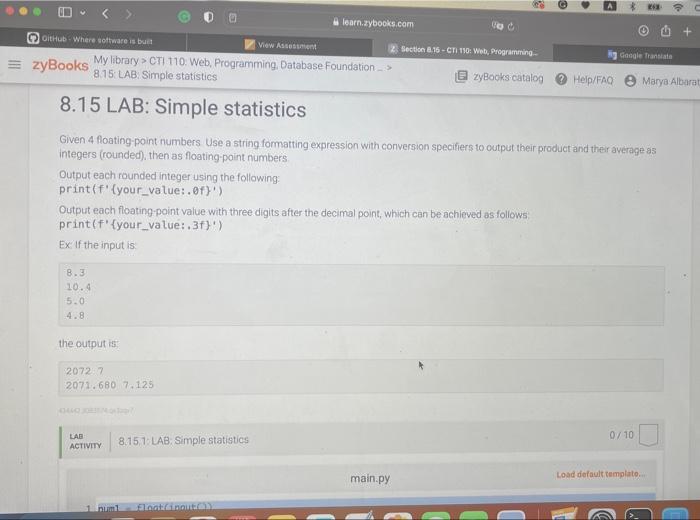
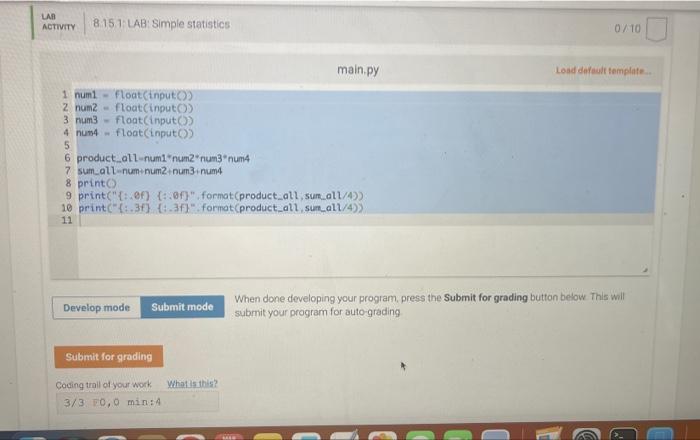
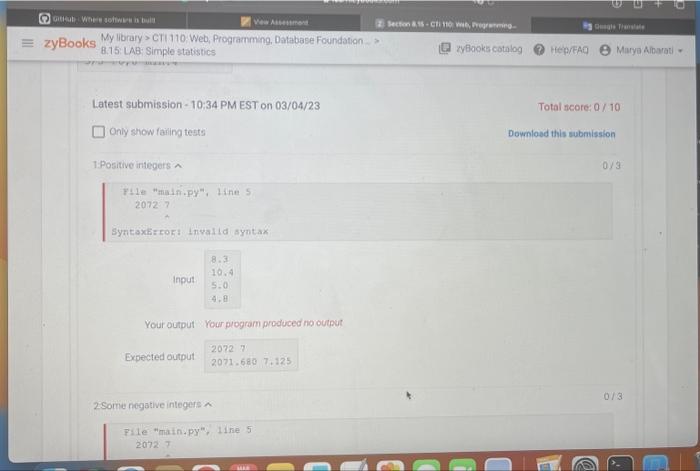
Given 4 floating-point numbers Use a string formatting expression with conversion specifers to output their product and their average as integers (rounded), then as floating-point numbers Output each rounded integer using the following: print (f'\{your_value:.off') Output each floating-point value with three digits after the decimal point, which can be achieved as follows: print ( \( f^{\prime}\{y o u r \text { _value: }, 3 f\}^{\prime} \) ) Ex If the input is: 8.310.45.04.8 the output is: 2072.72072.6807.125 0/10 main.py When done developing your program, press the Submit for grading button below This will submit your program for auto-grading Latest submission - 10:34 PM EST on 03/04/23 Total score: 0/10 Only show failing tests Downlosed this submission 1.Positive integers a 0/3 File "maini.py", line 5 20727 Syntaxbzco5: Invalla syntax Your output Your program produced no output 2 Some negative integers a File "main.py", tine 5 20727 Given 4 floating-point numbers Use a string formatting expression with conversion specifers to output their product and their average as integers (rounded), then as floating-point numbers Output each rounded integer using the following: print (f'\{your_value:.off') Output each floating-point value with three digits after the decimal point, which can be achieved as follows: print ( \( f^{\prime}\{y o u r \text { _value: }, 3 f\}^{\prime} \) ) Ex If the input is: 8.310.45.04.8 the output is: 2072.72072.6807.125 0/10 main.py When done developing your program, press the Submit for grading button below This will submit your program for auto-grading Latest submission - 10:34 PM EST on 03/04/23 Total score: 0/10 Only show failing tests Downlosed this submission 1.Positive integers a 0/3 File "maini.py", line 5 20727 Syntaxbzco5: Invalla syntax Your output Your program produced no output 2 Some negative integers a File "main.py", tine 5 20727
Step by Step Solution
There are 3 Steps involved in it

Get step-by-step solutions from verified subject matter experts
 Study Help