







Question: Windchill Calculator GUI using tkinter in PYTHON thanks! This assignment is the same as Programming Assignment 11 Windchill Calculator except that this program will have
Windchill Calculator GUI using tkinter in PYTHON
thanks!
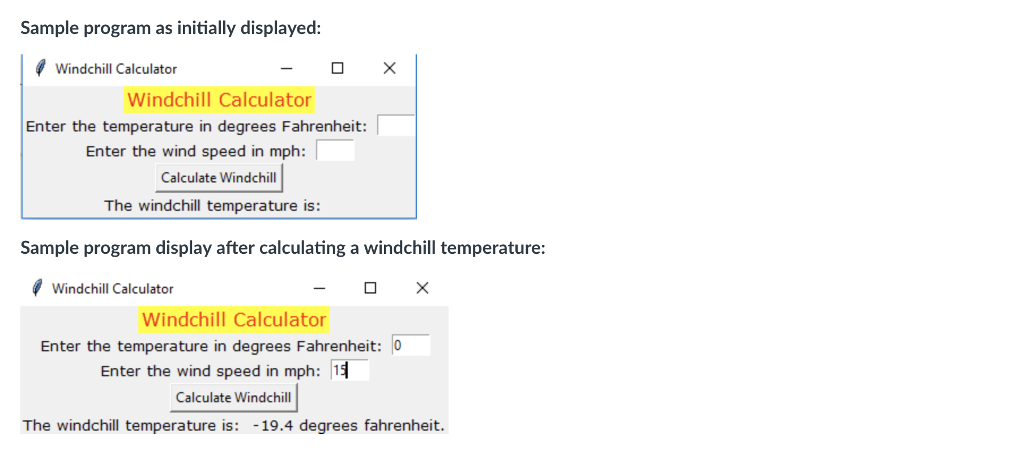
This assignment is the same as Programming Assignment 11 Windchill Calculator except that this program will have a GUI interface to the user instead of a console interface. This program will demonstrate the difference in programming using event driven programming. The GUI will have the appearance of the example demonstrated below. You will use the calculateWindchill function that you wrote for Programming Assignment 11 to calculate the windchill in this program. You can assume that the wind speed and Fahrenheit temperature entered by the user is valid. You may do validation checking, if you desire. The GUI will contain two entry widgets for entering the temperature and wind speed and a label for displaying the windchill as shown in the example below. Just a reminder: there should be no loop in your program to keep the GUI running. A good start for this assignment would be to base it on the kilo_converter2 program in the 'tkinter python programs' folder.
Step by Step Solution
There are 3 Steps involved in it

Get step-by-step solutions from verified subject matter experts
 Study Help