



Question: Wireshark Lab: UDP v8.1 Supplement to Computer Networking: A Top-Down Approach, 806 ed., J.F. Kurose and K. W. Ross Tell me and I fonget. Show
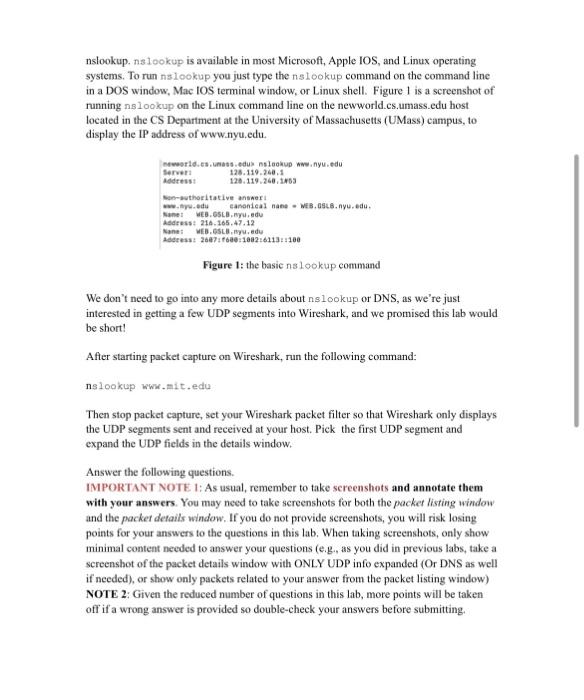
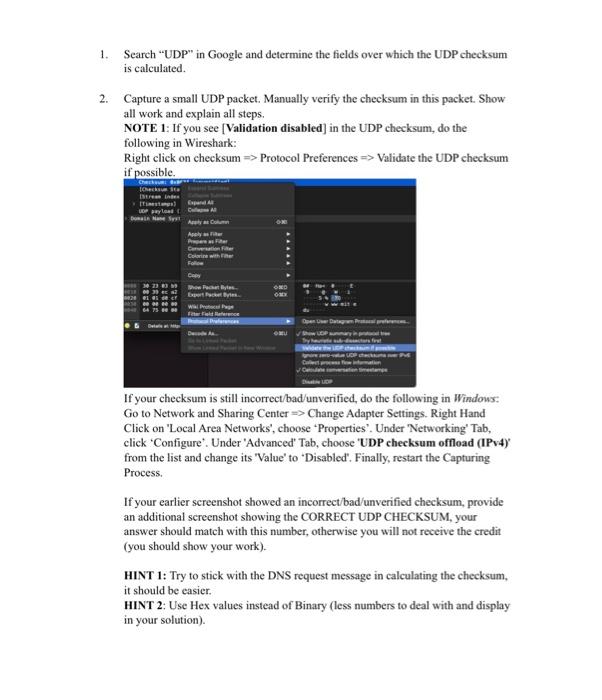
Wireshark Lab: UDP v8.1 Supplement to Computer Networking: A Top-Down Approach, 806 ed., J.F. Kurose and K. W. Ross "Tell me and I fonget. Show me and I remember tholve me' and / undersierd. "Chirese proverb C 2005-2021, J.F Kurose and K. W. Ross, All Rights Reserved In this lab, we'll take a quick look at the UDP transport protocol. As we saw in Chapter 3 of the text 1, UDP is a streamlined, no-frills protocol. You may want to re-read section 3.3 in the text before doing this lab. Because UDP is simple and sweet, we'll be able to cover it pretty quickly in this lab. So if you've another appointment to run off to in 30 minutes, no need to worry, as you should be able to finish this lab with ample time to spare. At this stage, you shouk be a Wireshark expert. Thus, we are not going to spell out the steps as explicitly as in earlier labs. In particular, we are not going to provide example screenshots for all the steps. The Assignment Start capturing packets in Wireshark and then do something that will cause your host to send and receive several UDP packets. It's also likely that just by doing nothing (except capturing packets via Wireshark) that some UDP packets sent by others will appear in your trace, In particular, the Domain Name System (DNS) protocol (see section 2.4 in the text; and the DNS Wireshark Lab) typically sends DNS query and response messages inside of UDP, so it's likely that you'll find some DNS messages (and therefore UDP packets) in your trace. Note: You might need to delete DNS cache before starting/restarting Wireshark capture Specifically you can try out the nslookup command, which invokes the underiying DNS protocol, which in turn will send UDP segments from/to the host issuing the I References to figures and sections are for the 8t edition of our text, Computer. Nenworks, A Top-dous hetg. galiass umass. daduketose toss You'll find lots of interesting open material there. nslookup. nslookup is available in most Microsoft, Apple IOS, and Linux operating systems. To run nslookup you just type the nslookup command on the command line in a DOS window, Mac IOS terminal window, or Linux shell. Figure 1 is a screenshot of running nslookup on the Linux command line on the newworld.cs.umass.edu host located in the CS Department at the University of Massachusetts (UMass) campus, to display the IP address of www.nyu.edu. Figure 1: the basic nslookup command We don't need to go into any more details about nslookup or DNS, as we're just interested in getting a few UDP segments into Wireshark, and we promised this lab would be short! After starting packet capture on Wireshark, run the following command: nslookup wwe.mit.edu Then stop packet capture, set your Wireshark packet filter so that Wireshark only displays the UDP segments sent and received at your host. Pick the first UDP segment and expand the UDP fields in the details window. Answer the following questions. IMPORTANT NOTE 1: As usual, remember to take sereenshots and annotate them with your answers. You may need to take screenshots for both the packet listing window and the packet details window. If you do not provide sereenshots, you will risk losing points for your answers to the questions in this lab. When taking sereenshots, only show minimal content needed to answer your questions (e.g., as you did in previous labs, take a screenshot of the packet details window with ONLY UDP info expanded (Or DNS as well if needed), or show only packets related to your answer from the packet listing window) NOTE 2: Given the reduced number of questions in this lab, more points will be taken off if a wrong answer is provided so double-check your answers before submitting. 1. Select the first UDP segment in your trace. HINT: select the first DNS query (request) that corresponds to the above lookup (as we did in the DNS lab). This DNS query is encapsulated into the UDP segment. Again, make sure your screenshot shows ONLY the UDP info in the packet content window (expand everything under UDP) as well as the packet details window (entire raw data). What is the packet number? of this segment in the trace file? What type of application-layer payload or protocol message is being carried in this UDP segment? Look at the details of this packet in Wireshark. How many fields there are in the UDP header? (You shouldn't look in the textbook! Answer these questions directly from what you observe in the packet trace.) What are the names of these fields? 2. By consulting the displayed information in Wireshark's packet content field for this packet (or by consulting the textbook), what is the length (in bytes) of each of the UDP header fields? 3. The value in the Length field is the length of what? (You can consult the text for this answer). Verify your claim with your captured UDP packet. 4. What is the maximum number of bytes that can be included in a UDP payload? (Hint: the answer to this question can be determined by your answer to 2. above) 5. What is the largest possible source port number? (Hint: see the hint in 4.) 6. What is the protocol number for UDP? Give your answer in decimal notation. To answer this question, you'Il need to look into the Protocol field of the IP datagram containing this UDP segment (see Figure 4.13 in the text, and the discussion of IP header fields). 7. Examine the pair of UDP packets in which your host sends the first UDP packet and the second UDP packet is a reply to this first UDP packet. (Hint: for a second packet to be sent in response to a first packet, the sender of the first packet should be the destination of the second packet). What is the packet number of the first of these two UDP segments in the trace file? What is the packet number of the second of these two UDP segments in the trace file? Describe the relationship between the port numbers in the two packets. That's it! As a streamlined, no-frills protocol , UDP deserves a streamlined, no-frills Wireshark Lab @@. Extra Credit Note: 20% extra points. The extra points will count towards your total grade in the course Alabs even if you complete questions Q1 - Q7 above and receive a perfect score in this lab. 2 Remember that this "packet number" is assigned by Wireshark for listing purposes only; it is NOT a packet number contained in any real packet header. 1. Search "UDP" in Google and determine the fields over which the UDP checksum is calculated. 2. Capture a small UDP packet. Manually verify the checksum in this packet. Show all work and explain all steps. NOTE 1: If you see [Validation disabled] in the UDP checksum, do the following in Wireshark: Right click on checksum Protocol Preferences Validate the UDP checksum if possible. If your checksum is still incorrect/bad/unverified, do the following in Windows: Go to Network and Sharing Center Change Adapter Settings. Right Hand Click on 'Local Area Networks', choose 'Properties'. Under 'Networking' Tab, click 'Configure'. Under 'Advanced' Tab, choose 'UDP checksum offload (IPv4)' from the list and change its 'Value' to 'Disabled'. Finally, restart the Capturing Process. If your earlier screenshot showed an incorrect/bad/unverified checksum, provide an additional screenshot showing the CORRECT UDP CHECKSUM, your answer should match with this number, otherwise you will not receive the credit (you should show your work). HINT 1: Try to stick with the DNS request message in calculating the checksum, it should be easier. HINT 2: Use Hex values instead of Binary (less numbers to deal with and display in your solution)
Step by Step Solution
There are 3 Steps involved in it

Get step-by-step solutions from verified subject matter experts