







Question: With a program that was based on Swing and AWT components. We are going to recreate that project using the Model-View-Controller design pattern, JavaFX, and
With a program that was based on Swing and AWT components. We are going to recreate that project using the Model-View-Controller design pattern, JavaFX, and Scene Builder, but we are going to make it better. program that was based on Swing and AWT components. We are going to recreate that project using the Model-View-Controller design pattern, JavaFX, and Scene Builder, but we are going to make it better.
- The value from the slider is the value that will be used as the Fahrenheit temperature. You will need to convert this value to Celsius. Using C for the Celsius temperature and F for the Fahrenheit temperature, the conversion formula is C = (F - 32) * 5 / 9.
- Both the Fahrenheit and Celsius temperatures should be displayed as integers. Since the Fahrenheit temperature comes straight from the Slider this value is already in integer form. For the Celsius temperature you will need to round the value that you get from the conversion formula. Note that you are placing a numeric value into a TextField. TextFields work with strings, so you will need to convert the integers into strings.
When you run your program note that the app window is much larger than needed. Experiment with different sizes, then set to 225x150 in the final version of your program. Note that the size is set in Main.java
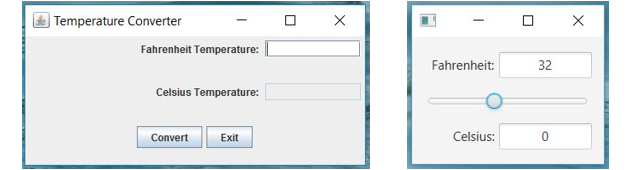
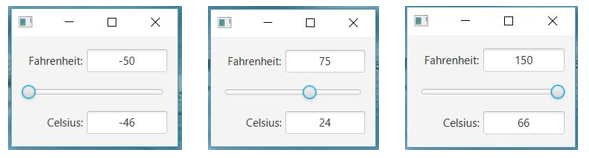
Temperature Converter 14 Fahrenheit Temperature: | Fahrenheit: 32 Celsius Temperature: Celsius: Convert Exit - Fahrenheit 50 Fahrenheit 75 Fahreneit: 150 Celsius: -46 Celsius: 24 Celsius
Step by Step Solution
There are 3 Steps involved in it

Get step-by-step solutions from verified subject matter experts
 Study Help