







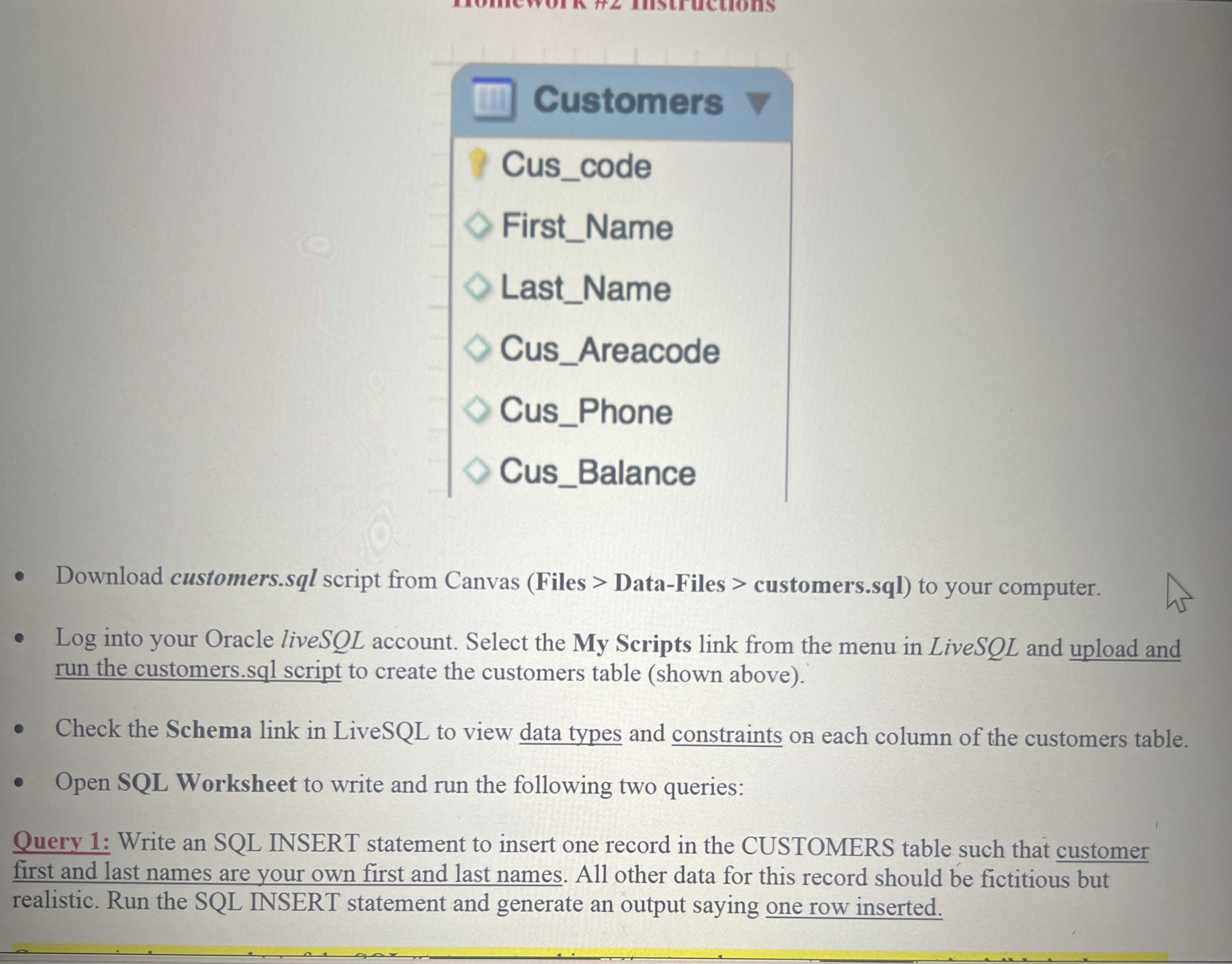
Question: With the constraints shown Customers Cus _ code First _ Name Last _ Name Cus _ Areacode Cus _ Phone Cus _ Balance Download customers.sql
With the constraints shown
Customers
Cuscode
FirstName
LastName
CusAreacode
CusPhone
CusBalance
Download customers.sql script from Canvas Files DataFiles customers.sql to your computer.
Log into your Oracle liveSQL account. Select the My Scripts link from the menu in LiveSQL and upload and
run the customers.sql script to create the customers table shown above
Check the Schema link in LiveSQL to view data types and constraints on each column of the customers table.
Open SQL Worksheet to write and run the following two queries:
Query : Write an SQL INSERT statement to insert one record in the CUSTOMERS table such that customer
first and last names are your own first and last names. All other data for this record should be fictitious but
realistic. Run the SQL INSERT statement and generate an output saying one row inserted.
Step by Step Solution
There are 3 Steps involved in it
1 Expert Approved Answer
Step: 1 Unlock

Question Has Been Solved by an Expert!
Get step-by-step solutions from verified subject matter experts
Step: 2 Unlock
Step: 3 Unlock
 Study Help