





Question: With this code on C++: #include #include using namespace std; struct point { int x, y; }; int main() { point p; cout > p.x
 With this code on C++: #include #include using namespace std; struct

With this code on C++:

#include #include using namespace std; struct point { int x, y; }; int main() { point p; cout > p.x >> p.y; int size = 10; point *arr = new point[size]; for(int i = 0; i > arr[i].x >> arr[i].y; } double *d = new double[size]; for(int i = 0; i d[j+1]) { ptemp.x = arr[j].x; ptemp.y = arr[j].y; arr[j].x = arr[j+1].x; arr[j+1].x = ptemp.x; arr[j].y = arr[j+1].y; arr[j+1].y = ptemp.y; dtemp = d[j]; d[j] = d[j+1]; d[j+1] = dtemp; } } } // print here cout

Add-on or modify it so that when it outputs it tells the user which way to go. (For instance if the point selected is (1,2) and the nearest point is (3,4) the program will tell you to go to the RIGHT 2 and UP 2). Make sure to do this with all the points.

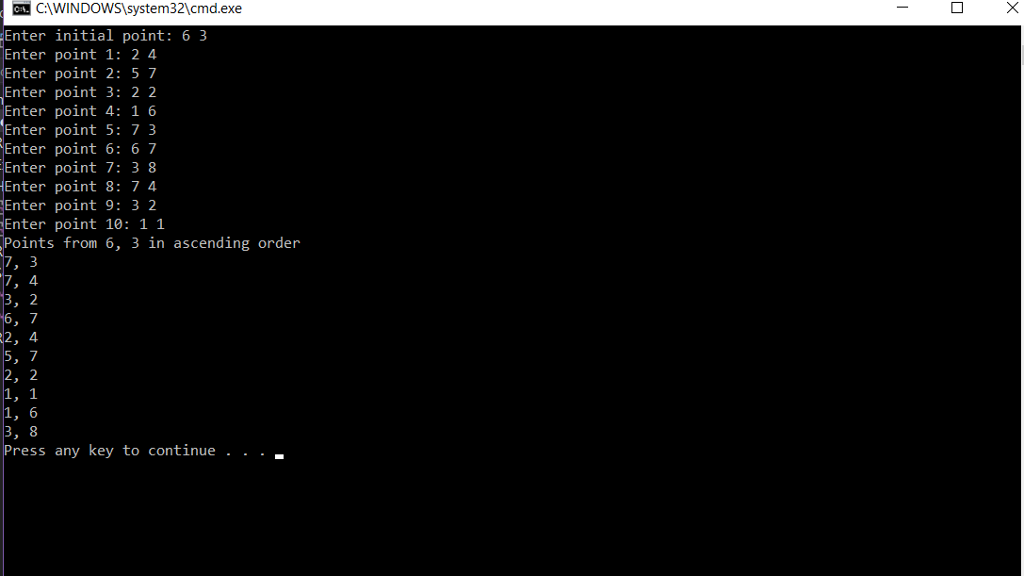
C:WINDOWS system32\cmd.exe Enter initial point: 6 3 Enter point 1: 2 4 Enter point 2: 5 7 Enter point 3: 2 2 Enter point 4: 1 6 Enter point 5: 7 3 Enter point 6: 6 7 Enter point 7: 3 8 Enter point 8:7 4 Enter point 9: 3 2 Enter point 10: 1 1 Points from 6, 3 in ascending order 7 2 1, 6 ress any key to continue

Step by Step Solution

There are 3 Steps involved in it

1 Expert Approved Answer
Step: 1 Unlock blur-text-image
Question Has Been Solved by an Expert!

Get step-by-step solutions from verified subject matter experts

Step: 2 Unlock
Step: 3 Unlock

Students Have Also Explored These Related Databases Questions!