







Question: Word Assignment 1 (Block Letter) Instructions Word Assignment 1 (10%) Block Letter Style The purpose of this assignment is to provide students with an
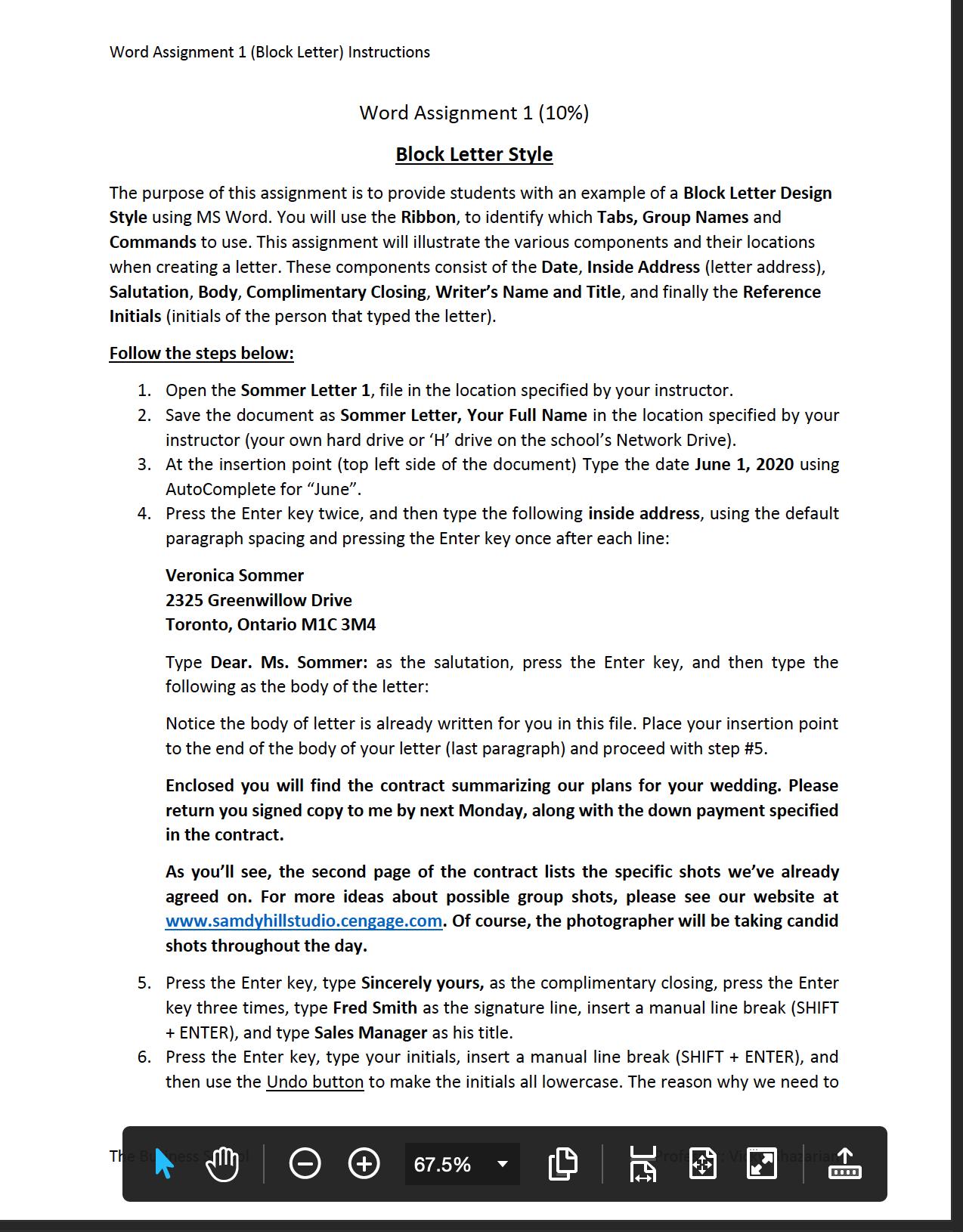
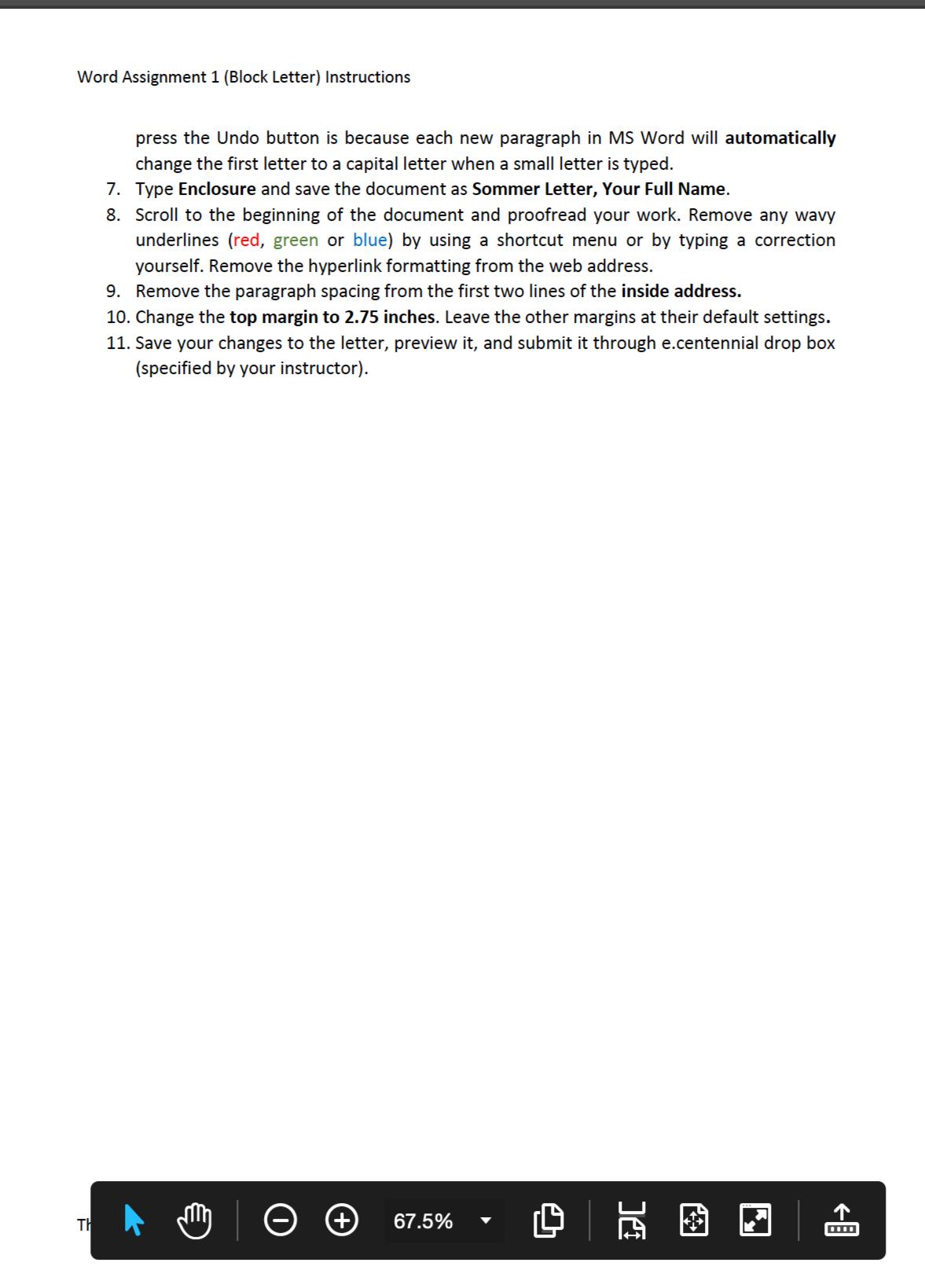
Word Assignment 1 (Block Letter) Instructions Word Assignment 1 (10%) Block Letter Style The purpose of this assignment is to provide students with an example of a Block Letter Design Style using MS Word. You will use the Ribbon, to identify which Tabs, Group Names and Commands to use. This assignment will illustrate the various components and their locations when creating a letter. These components consist of the Date, Inside Address (letter address), Salutation, Body, Complimentary Closing, Writer's Name and Title, and finally the Reference Initials (initials of the person that typed the letter). Follow the steps below: 1. Open the Sommer Letter 1, file in the location specified by your instructor. 2. Save the document as Sommer Letter, Your Full Name in the location specified by your instructor (your own hard drive or 'H' drive on the school's Network Drive). 3. At the insertion point (top left side of the document) Type the date June 1, 2020 using AutoComplete for "June". 4. Press the Enter key twice, and then type the following inside address, using the default paragraph spacing and pressing the Enter key once after each line: Veronica Sommer 2325 Greenwillow Drive Toronto, Ontario M1C 3M4 Type Dear. Ms. Sommer: as the salutation, press the Enter key, and then type the following as the body of the letter: Notice the body of letter is already written for you in this file. Place your insertion point to the end of the body of your letter (last paragraph) and proceed with step #5. Enclosed you will find the contract summarizing our plans for your wedding. Please return you signed copy to me by next Monday, along with the down payment specified in the contract. As you'll see, the second page of the contract lists the specific shots we've already agreed on. For more ideas about possible group shots, please see our website at www.samdyhillstudio.cengage.com. Of course, the photographer will be taking candid shots throughout the day. 5. Press the Enter key, type Sincerely yours, as the complimentary closing, press the Enter key three times, type Fred Smith as the signature line, insert a manual line break (SHIFT + ENTER), and type Sales Manager as his title. 6. Press the Enter key, type your initials, insert a manual line break (SHIFT + ENTER), and then use the Undo button to make the initials all lowercase. The reason why we need to TH M 67.5% Word Assignment 1 (Block Letter) Instructions press the Undo button is because each new paragraph in MS Word will automatically change the first letter to a capital letter when a small letter is typed. 7. Type Enclosure and save the document as Sommer Letter, Your Full Name. 8. Scroll to the beginning of the document and proofread your work. Remove any wavy underlines (red, green or blue) by using a shortcut menu or by typing a correction yourself. Remove the hyperlink formatting from the web address. 9. Remove the paragraph spacing from the first two lines of the inside address. 10. Change the top margin to 2.75 inches. Leave the other margins at their default settings. 11. Save your changes to the letter, preview it, and submit it through e.centennial drop box (specified by your instructor). TH 67.5% DC
Step by Step Solution
There are 3 Steps involved in it

Get step-by-step solutions from verified subject matter experts
 Study Help