







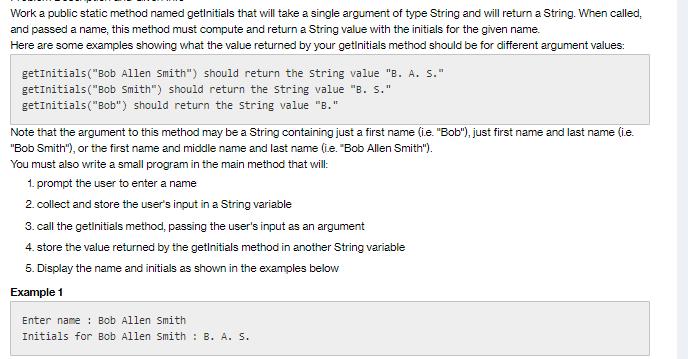
Question: Work a public static method named getInitials that will take a single argument of type String and will return a String. When called, and
![// Below this comment: import the Scanner public class Initials { public static void main(String[] args) { //](https://dsd5zvtm8ll6.cloudfront.net/si.experts.images/questions/2023/08/64ed9179b4a7d_1693290872570.jpg)
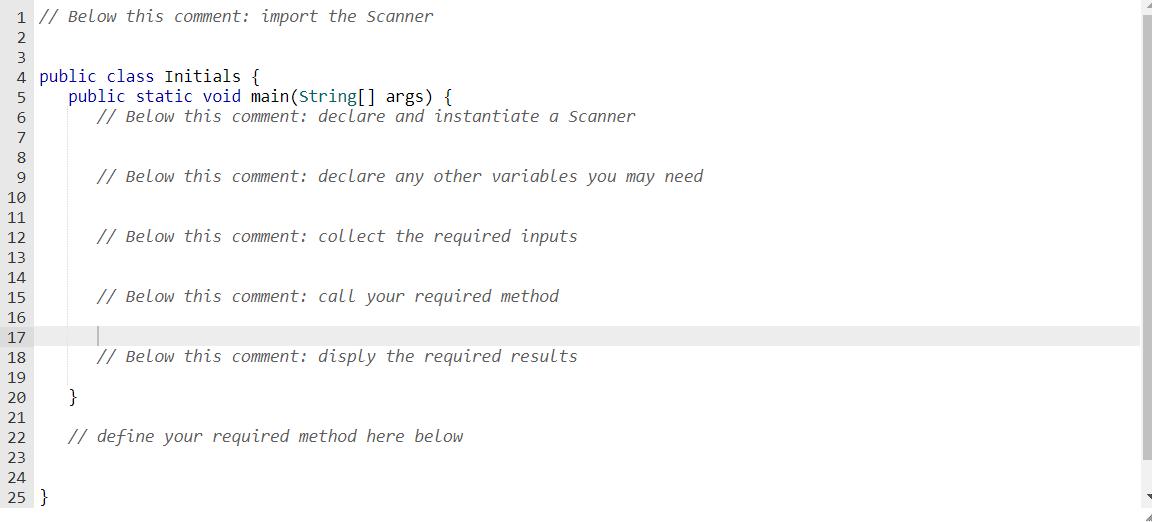
Work a public static method named getInitials that will take a single argument of type String and will return a String. When called, and passed a name, this method must compute and return a String value with the initials for the given name. Here are some examples showing what the value returned by your getinitials method should be for different argument values: getInitials("Bob Allen Smith") should return the string value "B. A. S." getInitials("Bob Smith") should return the string value "B. S." getInitials("Bob") should return the string value "8." Note that the argument to this method may be a String containing just a first name (i.e. "Bob"), just first name and last name (i.e. "Bob Smith"), or the first name and middle name and last name (ie. "Bob Allen Smith"). You must also write a small program in the main method that will: 1. prompt the user to enter a name 2. collect and store the user's input in a String variable 3. call the getinitials method, passing the user's input as an argument 4. store the value returned by the getInitials method in another String variable 5. Display the name and initials as shown in the examples below Example 1 Enter name: Bob Allen Smith Initials for Bob Allen Smith: B. A. S. 1 // Below this comment: import the Scanner 2 3 4 public class Initials { 5 6 7 8 9 10 11 12 13 14 15 16 17 18 19 20 21 22 23 24 25 } public static void main(String[] args) { // Below this comment: declare and instantiate a Scanner // Below this comment: declare any other variables you may need // Below this comment: collect the required inputs // Below this comment: call your required method // Below this comment: disply the required results } // define your required method here below // Below this comment: import the Scanner public class Initials { public static void main(String[] args) { // Below this comment: declare and instantiate a Scanner } // Below this comment: declare any other variables you may need } // Below this comment: collect the required inputs // Below this comment: call your required method // Below this comment: disply the required results // define your required method here below
Step by Step Solution
3.36 Rating (146 Votes )
There are 3 Steps involved in it
Initialsjava import javautilScanner public class Initials public static void mainString args create ... View full answer

Get step-by-step solutions from verified subject matter experts
 Study Help