







Question: WORKING ON TASK 6 how to add 3 test on the song class. main class: package mru.lab3.application; import mru.lab3.controller.CompactDisk; public class CompactDiskDemo { public static
WORKING ON TASK 6 how to add 3 test on the song class.
main class:
package mru.lab3.application;
import mru.lab3.controller.CompactDisk;
public class CompactDiskDemo {
public static void main(String[] args) throws Exception { //Task #5 - Create an object from CompactDisk class CompactDisk obj = new CompactDisk(); } }
//compactdisk
package mru.lab3.controller;
import java.io.BufferedReader; import java.io.FileNotFoundException; import java.io.FileReader; import java.io.IOException; import java.util.ArrayList;
import mru.lab3.model.Song; import mru.lab3.view.AppMenu;
/** * This program creates a list of songs for a CD by reading from a file. */
public class CompactDisk { AppMenu appMen = new AppMenu(); // Declaring an arrayList of Song objects, called cd, ArrayList cd;
public CompactDisk() throws Exception { // Task #3 instantiate (new ...) the arrayList here cd = new ArrayList(); loadSongs(); }
private void loadSongs() throws IOException {
FileReader file = new FileReader("res/Classics.txt"); BufferedReader input = new BufferedReader(file);
String line; String[] currentSong;
// BufferReader is another package that you use to read a file it is faster than previous method! while ((line = input.readLine())!= null) { currentSong = line.trim().split(",");
// ADD LINES FOR TASK #3 HERE // Fill the arraylist by creating a new song object with // the title and artist Song song = new Song(currentSong[0], currentSong[1]); cd.add(song); } // Calling printContents methods from AppMenu to print out the song on the console appMen.printContents(cd);
}
//song class
package mru.lab3.model;
/* This class stores data about a song. */
public class Song { private String title; // The song's title private String artist; // The song's artist
/** * Constructor * * @param title A reference to a String object containing the song's title. * @param artist A reference to a String object containing the song's artist. */
public Song(String title, String artist) { this.title = title; this.artist = artist; } // Task #2 - add setter and getters for title and artist here public String getArtist() { return artist; } public String getTitle() { return title; } public void setArtist(String a) { artist = a; } public void setTitle(String t) { this.title = t; } /** * The toString method * * @return A String object containing the name of the song and the artist. */
public String toString() { return title + " by " + artist + " "; } }
app menu
package mru.lab3.view;
import java.util.ArrayList;
import mru.lab3.model.Song;
public class AppMenu { public void printContents(ArrayList cd) { System.out.println("Contents of Classics:"); // Task #4 Write an enhanced for loop to print the content of the arraylist to the console for(int i =0; i
} }
}
//test class
package mru.lab3.test; import static org.junit.Assert.assertEquals; import static org.junit.jupiter.api.Assertions.*;
import org.junit.jupiter.api.Test;
import mru.lab3.model.Song;
class TestSong { // Task #5 Write 3 tests here!
Song test = new Song(null, null); @Test void test() { }
}
}
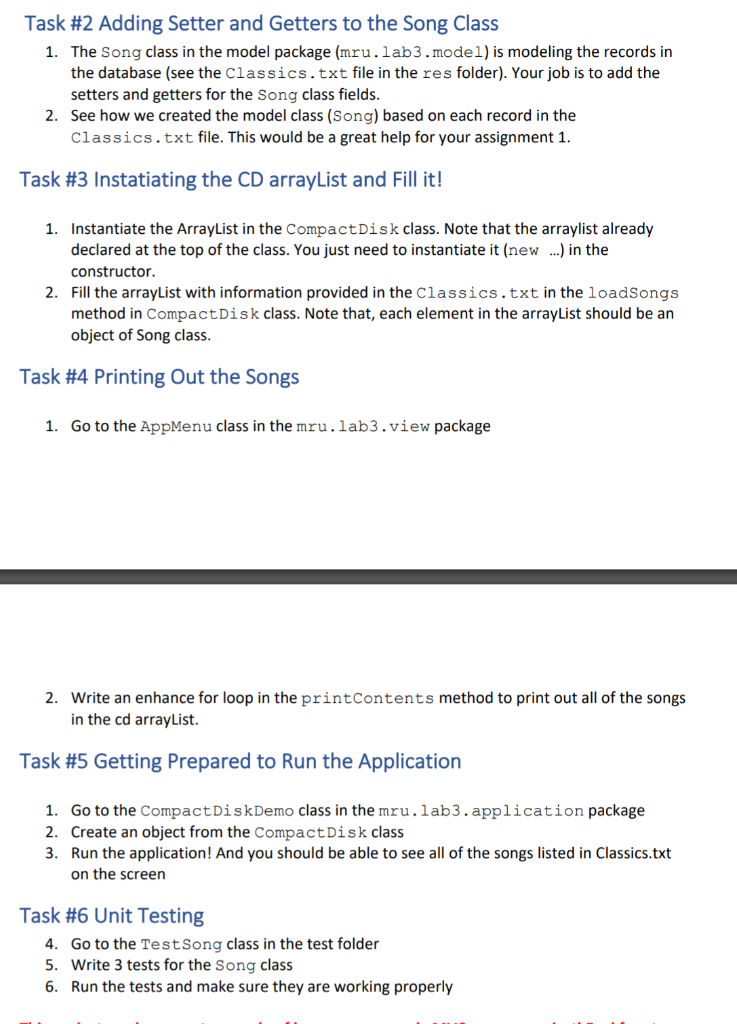
Task #2 Adding Setter and Getters to the Song Class 1. The Song class in the model package (mru.lab3.model) is modeling the records in the database (see the Classics.txt file in the res folder). Your job is to add the setters and getters for the song class fields. 2. See how we created the model class (Song) based on each record in the Classics.txt file. This would be a great help for your assignment 1. Task #3 Instatiating the CD arrayList and Fill it! 1. Instantiate the ArrayList in the CompactDisk class. Note that the arraylist already declared at the top of the class. You just need to instantiate it (new ...) in the constructor. 2. Fill the arrayList with information provided in the Classics.txt in the loadSongs method in CompactDisk class. Note that, each element in the arrayList should be an object of Song class. Task #4 Printing Out the Songs 1. Go to the AppMenu class in the mru.lab3.view package 2. Write an enhance for loop in the printContents method to print out all of the songs in the cd arrayList. Task #5 Getting Prepared to Run the Application 1. Go to the Compact DiskDemo class in the mru.lab3. application package 2. Create an object from the Compact Disk class 3. Run the application! And you should be able to see all of the songs listed in Classics.txt the screen Task #6 Unit Testing 4. Go to the Test Song class in the test folder 5. Write 3 tests for the Song class 6. Run the tests and make sure they are working properly
Step by Step Solution
There are 3 Steps involved in it

Get step-by-step solutions from verified subject matter experts
 Study Help