







Question: Working on the following Java code: import java.awt.Container; import java.awt.FlowLayout; import java.awt.event.ActionEvent; import java.awt.event.ActionListener; import javax.swing.JButton; import javax.swing.JFrame; import javax.swing.JLabel; import javax.swing.JOptionPane; import javax.swing.JTextField; class
Working on the following Java code:
import java.awt.Container; import java.awt.FlowLayout; import java.awt.event.ActionEvent; import java.awt.event.ActionListener;
import javax.swing.JButton; import javax.swing.JFrame; import javax.swing.JLabel; import javax.swing.JOptionPane; import javax.swing.JTextField; class a extends JFrame implements ActionListener { //class definition, which inherits from class JFrame //define interface components JLabel numberLabel; JTextField numberTextField; JButton displayButton; public GUIExample1() { //class constructor will "construct" the user interface //components to a content pane are placed in the order //that they are added Container pane = getContentPane(); pane.setLayout(new FlowLayout()); //The getContentPane() method sets up the content pane. //The FlowLayout manager lays out the components in a //free flowing, left to right order. numberLabel = new JLabel("Enter a number:"); numberTextField = new JTextField(4); displayButton = new JButton("Enter"); pane.add(numberLabel); pane.add(numberTextField); pane.add(displayButton); displayButton.addActionListener(this); //The add() method adds components into the content pane setDefaultCloseOperation(JFrame.EXIT_ON_CLOSE); setTitle("GUI Example"); pack(); setVisible(true); } public void actionPerformed(ActionEvent event) { Object source = event.getSource(); if (source == displayButton) { double result = Integer.parseInt(numberTextField.getText()); JOptionPane.showMessageDialog(null, "you entered " + (int)(result), "Hello", JOptionPane.PLAIN_MESSAGE); System.exit(0); } } public static void main(String[] args) { new GUIExample1(); } }
Output:
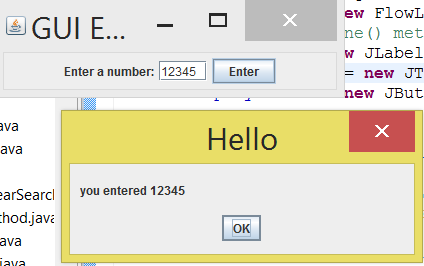
I have to modify the code so when the user enters a non-numeric character, the output displays the following:
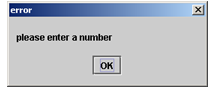
Clicking ok, the user will return to the application with the chance of entering a number. Run the program to see if it runs correctly.
GUIE... Enter a number: 12345 Enter ava Hello you entered 12345 hod java OK ava ew Flow ne met w JLabel new JT new JBut
Step by Step Solution
There are 3 Steps involved in it

Get step-by-step solutions from verified subject matter experts
 Study Help