







Question: Working with Windows Forms and C#, I'm a beginner and am looking for how to code this. Please leave good comments to help me understand
Working with Windows Forms and C#, I'm a beginner and am looking for how to code this. Please leave good comments to help me understand the process. Also we haven't gone over Arrays yet so please don't use those. Thank you, Here is the GUI:
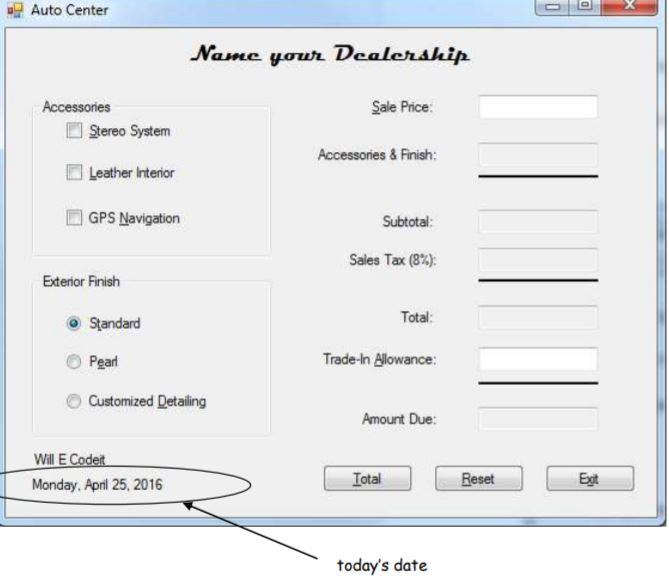
The following are the names I have created for the check boxes, radio buttons, buttons, and text boxes:
Text Box names: txtSalesPrice, txtAccessoriesAndFinish, txtSubtotal, txtSalesTax, txtTotal, txtTradeInAllowance, txtAmountDue.
CheckBox names: chkStereoSystem, chkLeatherInterior, chkGpsNavigation.
Radio Button names: radStandard, radPearl, radCustomizedDetailing.
Button names: btnTotal, btnReset, btnExit.
Numbers for calculations:
Accessory prices: Stereo is 425.76 / Leather Interior is 987.41 / GPS is 1,741.23.
Exterior Finish prices: Standard is no charge / Pearl is 345.72 / Customized detailing is 599.99
Tax rate is: 8%
How would I code the following for the Total Button:
Sales price must be between $500 and $30,000. Message box should pop up with error message if its not valid data.
After valid data is entered, the trade-in allowance should be validated, should be less than slaes price. If trade-in is not valid data then a message box should pop up with an error message, and the focus should be sent back to the textbox and highlight the entry.
To calculate the amount due:
add price of selected accessories and finish, display result in the txtAccessoriesAndFinish read-only box. Finish as a numeric value with 2 decimals.
Then add accessories and finish total to sales price, display result in txtSubtotal read-only box as numeric value with 2 decimals.
Calculate sales tax using subtotal and display result in txtSalesTax read-only box as numeric value with 2 decimals.
Add subtotal to sales tax and display result in txtTotal read-only box as currency.
If trade-in value is greater than zero then subtract trade-in amount from the total.
Display result for txtAmountDue read-only box as currency.
Accumulate total number of transactions as well as total amount sold(amount due). Focus should return to txtSalesPrice box and any entry should be highlighted, unselect and accessories and default the Exterior finish to Standard.
Thank you for your help.
Auto Center Name your Dealership Sale Price: Sereo System Leather Interior GPS Navigation Accessories& Finish: Subtotal: Sales Tax (8%): Exterior Finish Total: Standard Pear Customized Detailing Trade-in Allowance: Amount Due Will E Codeit Monday, Apnl 25, 2016 Total Reset Exit today's date
Step by Step Solution
There are 3 Steps involved in it

Get step-by-step solutions from verified subject matter experts
 Study Help