







Question: Worksheet 1, Task 1: 2 questions (2 marks per question) Question Cells Task/problem Example Excel Functions/features to you should use 18:1130 Calculate consultant bonus: Bob
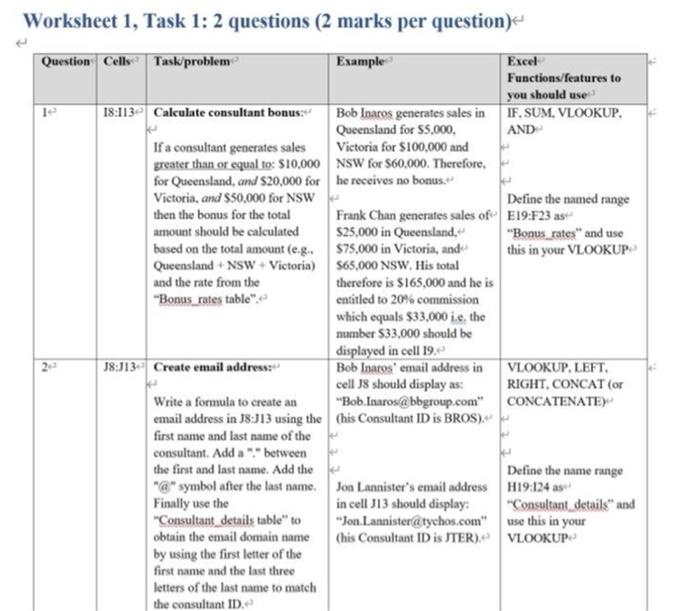
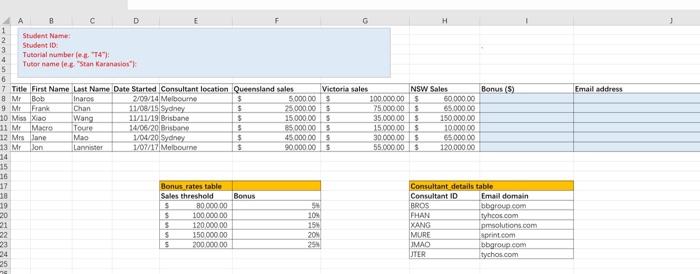
Worksheet 1, Task 1: 2 questions (2 marks per question) Question Cells Task/problem Example Excel Functions/features to you should use 18:1130 Calculate consultant bonus: Bob Inaros generates sales in IF.SUM, VLOOKUP. Queensland for $5.000, AND If a consultant generates sales Victoria for $100.000 and greater than or equal to $10,000 NSW for $60,000. Therefore, for Queensland, and $20,000 for he receives no bonus. Victoria, and $50,000 for NSW Define the named range then the bonus for the total Frank Chan generates sales of E19:F23 as amount should be calculated $25,000 in Queensland, "Bonus_rates" and use based on the total amount (e.g.. $75,000 in Victoria, and this in your VLOOKUP Queensland - NSW - Victoria) 565,000 NSW. His total and the rate from the therefore is $165.000 and he is "Bonus_rates table" entitled to 20% commission which equals $33,000 ie, the number S33.000 should be displayed in cell 19.0 J8:J13- Create email address: Bob Iparos' email address in VLOOKUP, LEFT, cell 8 should display as: RIGHT, CONCAT (or Write a formula to create an "Bob.Inaros@bbgroup.com" CONCATENATE email address in 18:J13 using the Chis Consultant ID is BROS)." first name and last name of the consultant. Add a "" between the first and last name. Add the Define the name range "@" symbol after the last name. Jon Lannister's email address H19:124 as Finally use the in cell J13 should display: "Consultant details and "Consultant details table" to "Jon Lannister@tychos.com" use this in your obtain the email domain name (his Consultant ID is JTER), VLOOKUP by using the first letter of the first name and the last three letters of the last name to match the consultant ID Email address Student Name: 9 Student ID 4 Tutorial number let. 4): 5 Tutor name le "Stan Karanasia" 6 7 Title First Name Last Name Date Started Consultant location Queensland sales Victoria sales NSW Sales Bonus (5) 8 Mr Bob Inaros 2/09/14 Melbourne $ 5.000.00 $ 10000000 5000000 9 Mr Frank Chan 11/08/15 Sydney s 25000.00 $ 75000.00 65.000.00 10 Miss Xiao Wang 11/11/19 Brisbane $ 15.000.00 5 35 000 000 150,000.00 11 ME Macro Tour 14/06/20 Brisbane $ 25 000 00 $ 15.000.00 $ 10.000.00 12 Mrs Lane Mao 1/04/20 Sydney $ 45000.00 5 30 000.00 $ 65.000.00 13 Mr Jon Lannister 1/07/17 Melbourne $ 9000000 $ 55.000005 12000000 14 15 16 17 Bonus rates table Consultant details table 36 Sales threshold Bonus Consultant ID Email domain 19 $ 80 000.00 BROS bbgroup.com 20 S 100 000.00 104 FHAN tyhos.com 21 120 000.00 15 IXANG pmsolutions.com 22 $ 15000000 20N MURE sprint.com S 200 000 00 IMAO bbgroup.com JTER tychos.com 25
Step by Step Solution
There are 3 Steps involved in it

Get step-by-step solutions from verified subject matter experts
 Study Help