







Question: Would like to know how to perform this task. List of Items Number of items Items Cost (5) Units Properties Property 1.price [ Property 2
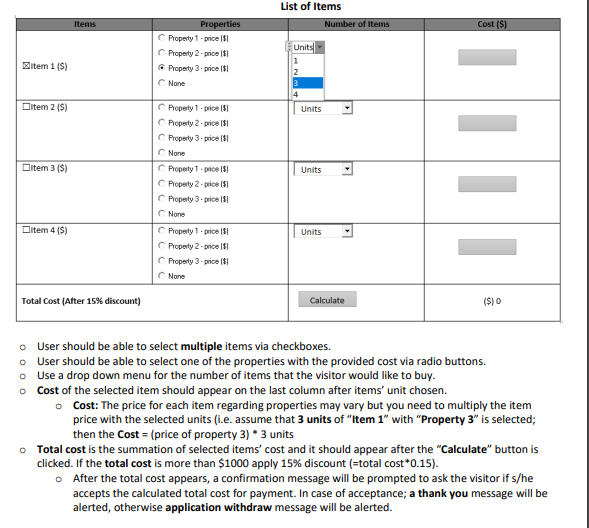
Would like to know how to perform this task.
List of Items Number of items Items Cost (5) Units Properties Property 1.price [ Property 2 -price 11 Property 3.price 151 None Item 1 ($) 2 Ditem 2 (S) Units Ditem 3 ($) Units Property 1. price ISI Property 2. price $ Property 3 - price [S1 None Property 1 price is! Property 2. price is! Property 3.price 151 None Property 1. $ Property 2.price II Property 3.price II None Ditem 4 ($) Units Total Cost (After 15% discount) Calculate ($) User should be able to select multiple items via checkboxes. o User should be able to select one of the properties with the provided cost via radio buttons. o Use a drop down menu for the number of items that the visitor would like to buy. Cost of the selected item should appear on the last column after items' unit chosen. o Cost: The price for each item regarding properties may vary but you need to multiply the item price with the selected units (i.e. assume that 3 units of "Item 1" with "Property 3" is selected; then the Cost = (price of property 3) * 3 units Total cost is the summation of selected items' cost and it should appear after the "Calculate" button is clicked. If the total cost is more than $1000 apply 15% discount (=total cost*0.15). o After the total cost appears, a confirmation message will be prompted to ask the visitor if s/he accepts the calculated total cost for payment. In case of acceptance; a thank you message will be alerted, otherwise application withdraw message will be alerted
Step by Step Solution
There are 3 Steps involved in it

Get step-by-step solutions from verified subject matter experts
 Study Help