







Question: Write 350 words on Cloud Computing. Chapter 22. Digital Platforms Standalone digitalized business processes, local business platforms and global business platforms are enabled and supported
Write 350 words on Cloud Computing.
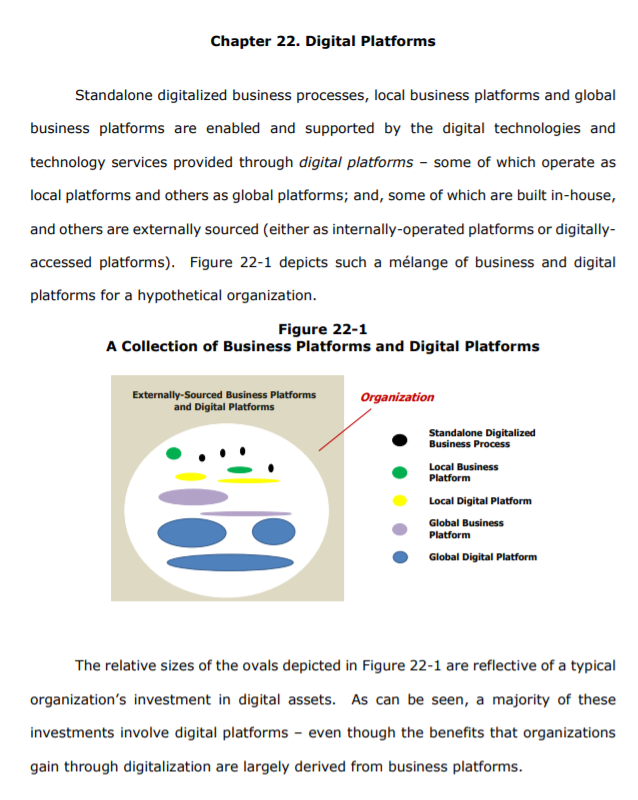
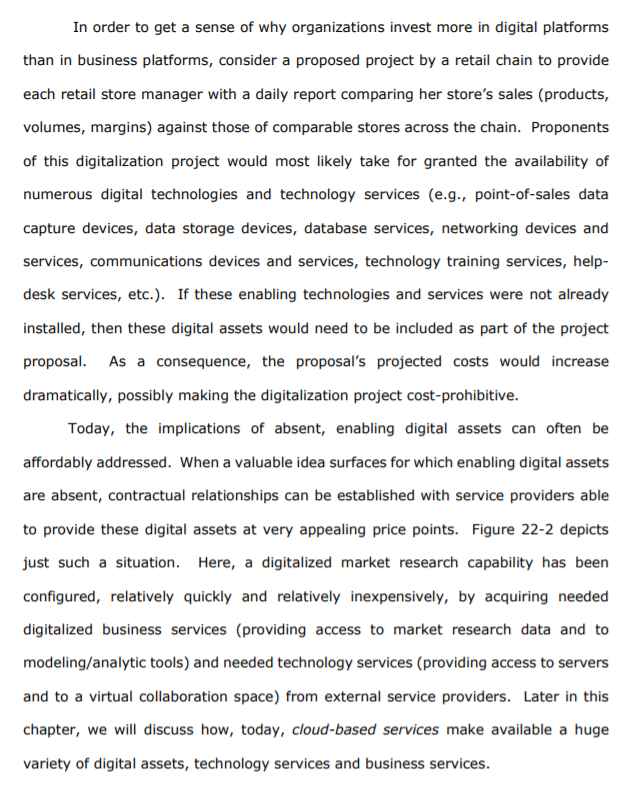
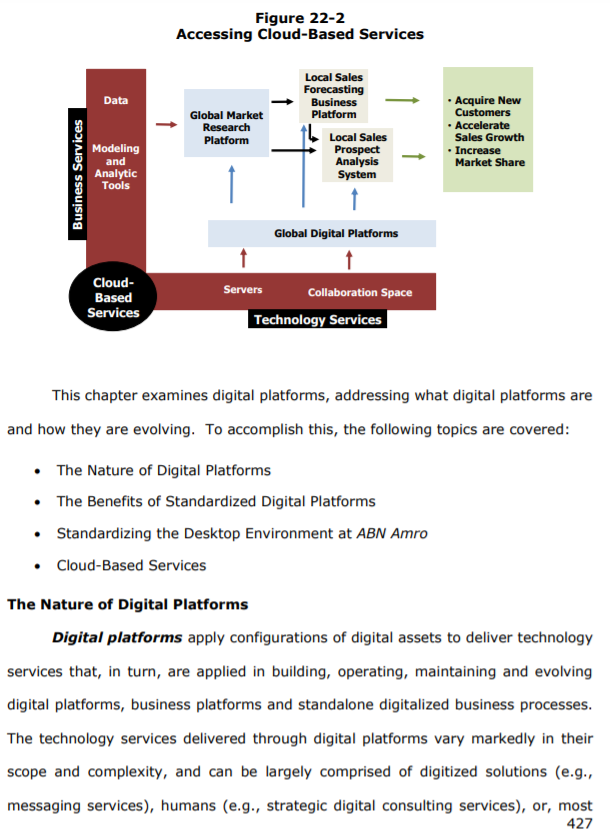
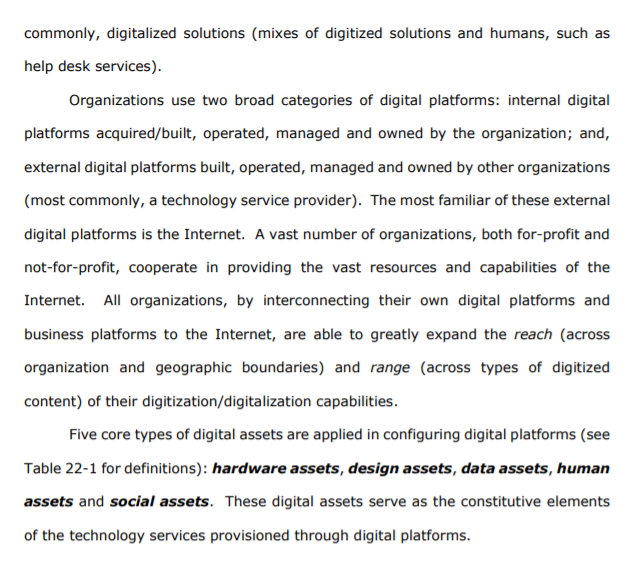
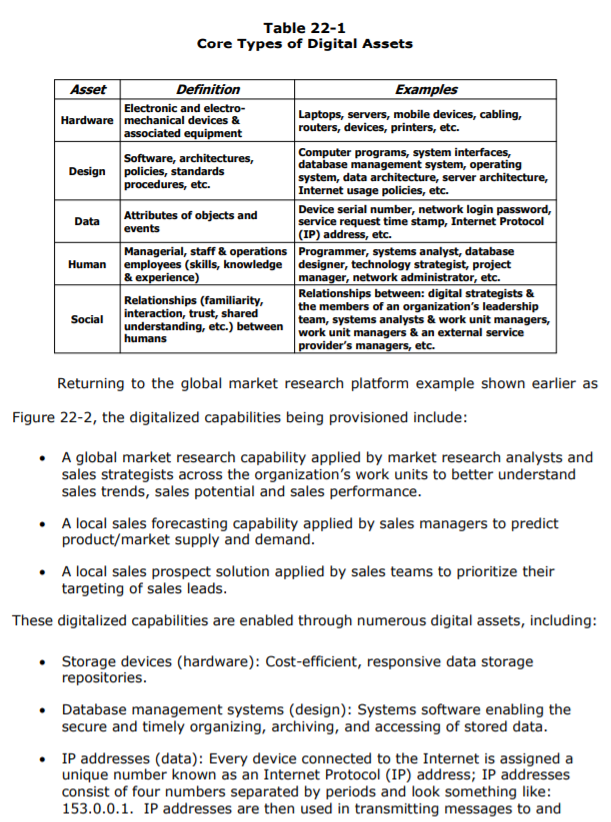
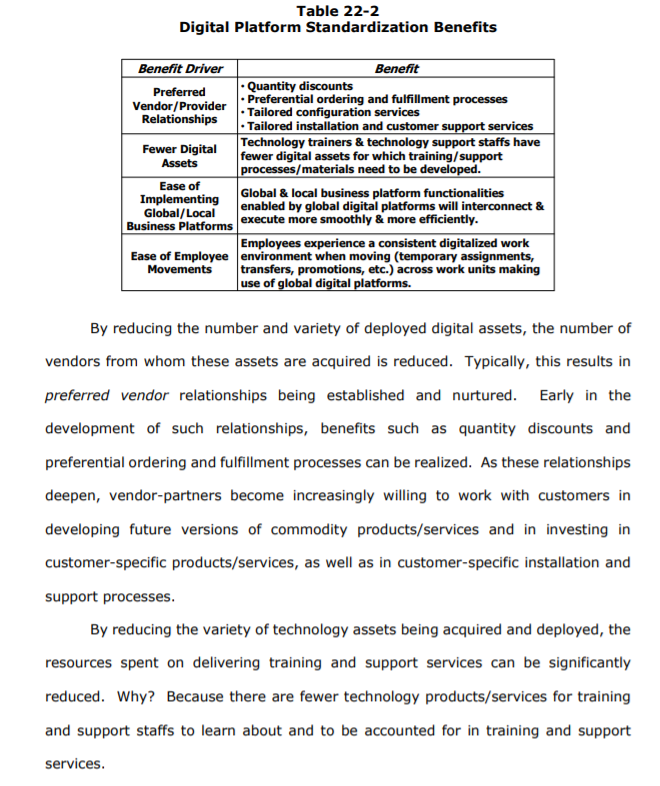
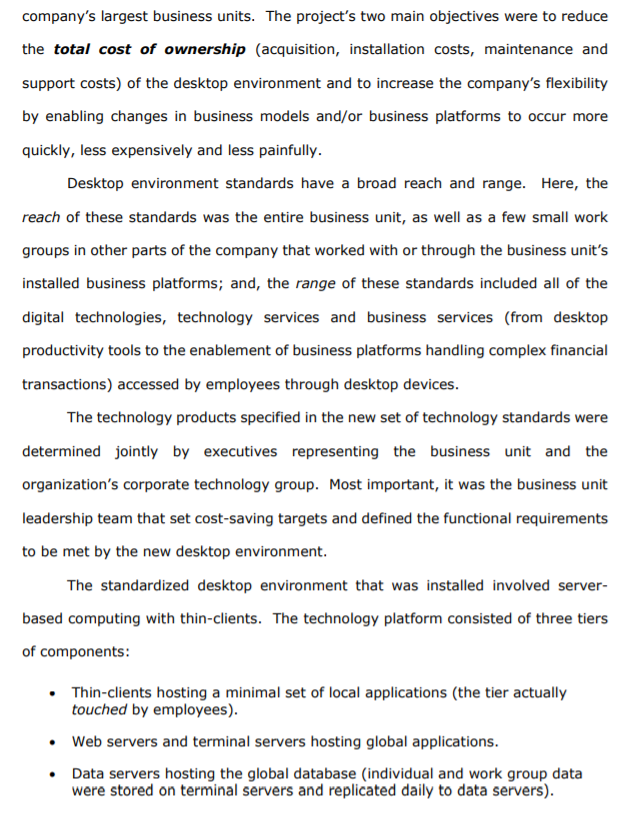
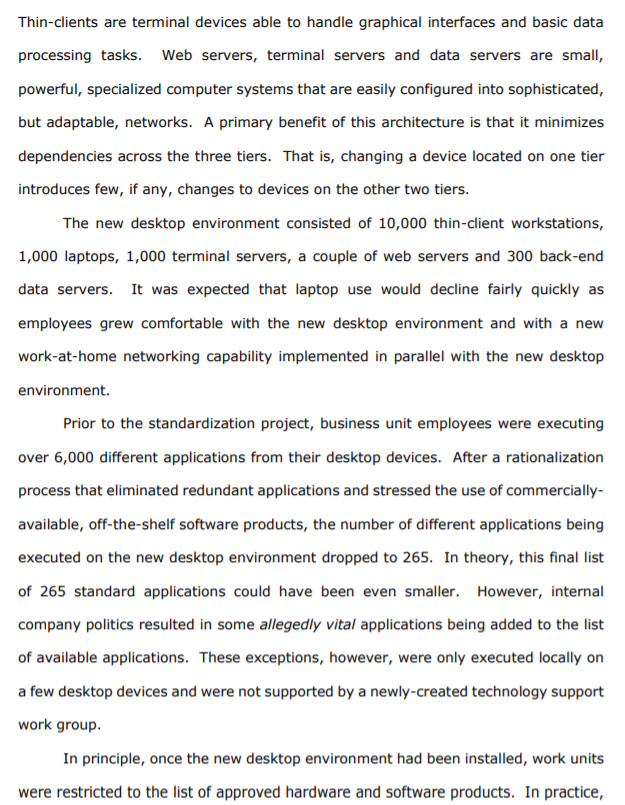
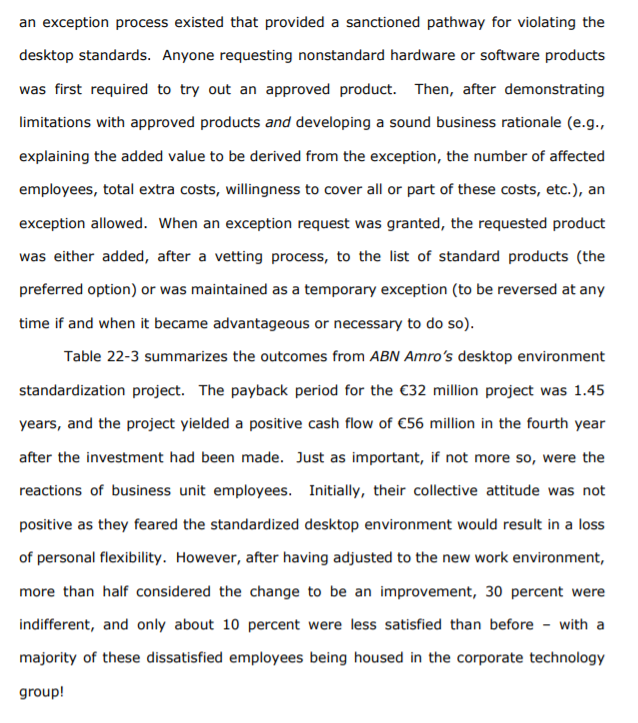
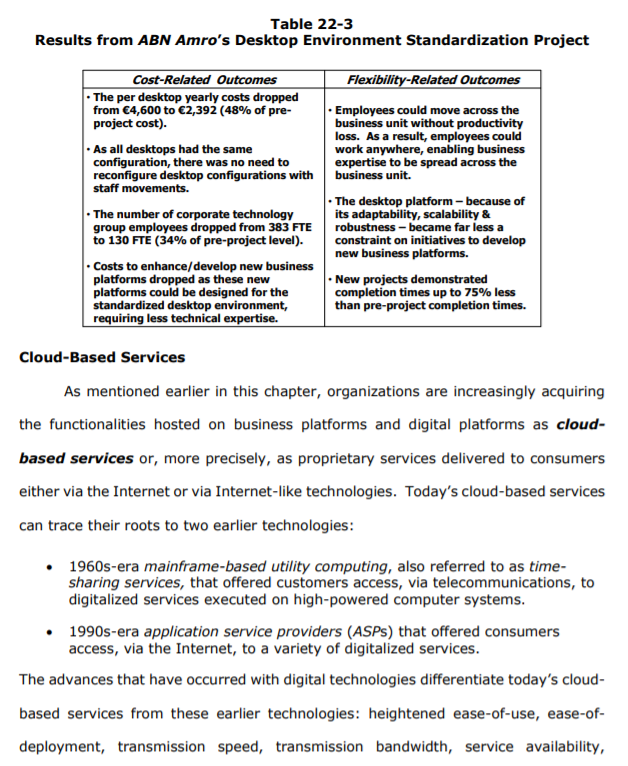
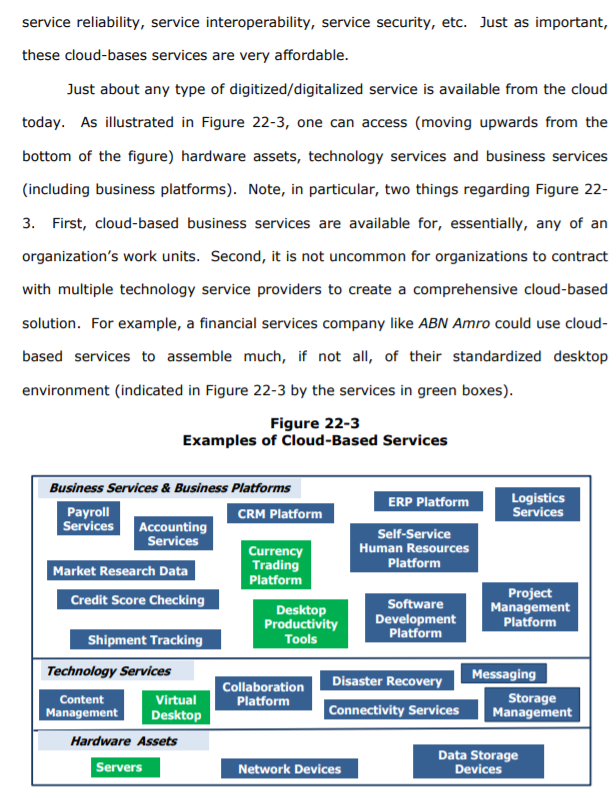
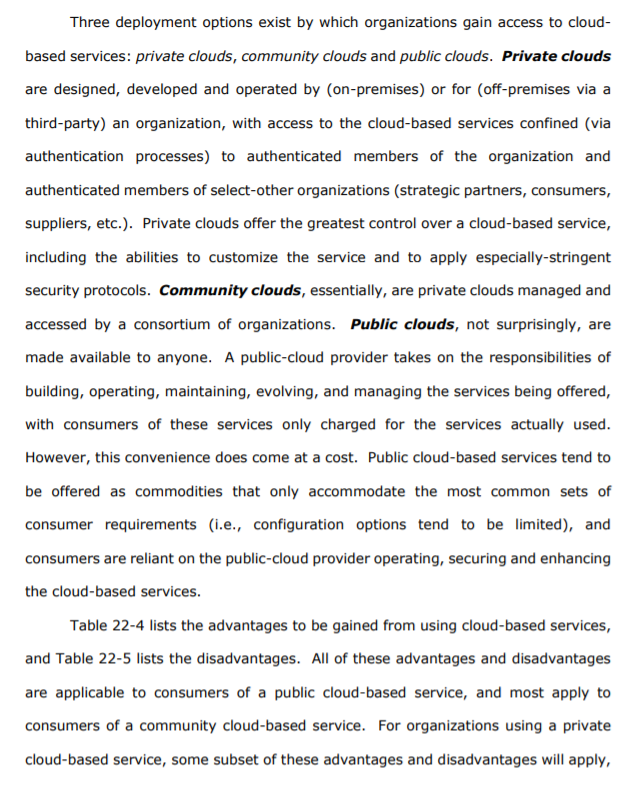
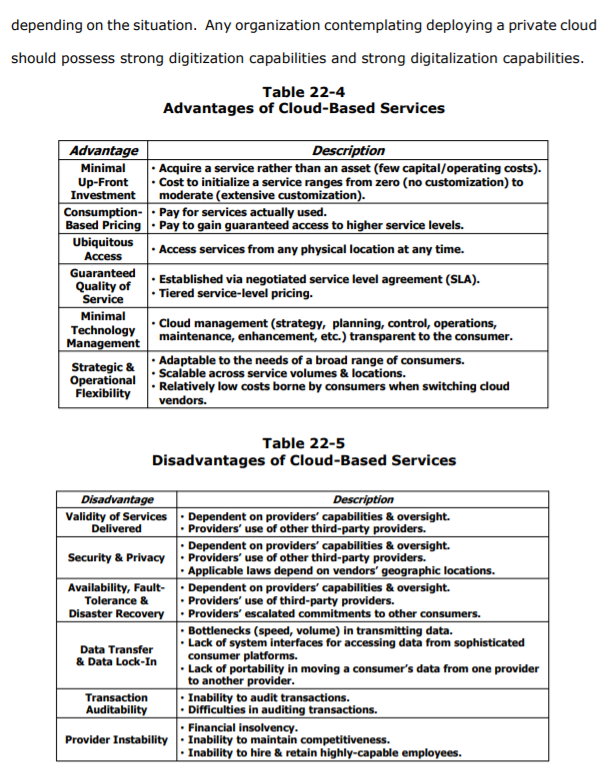
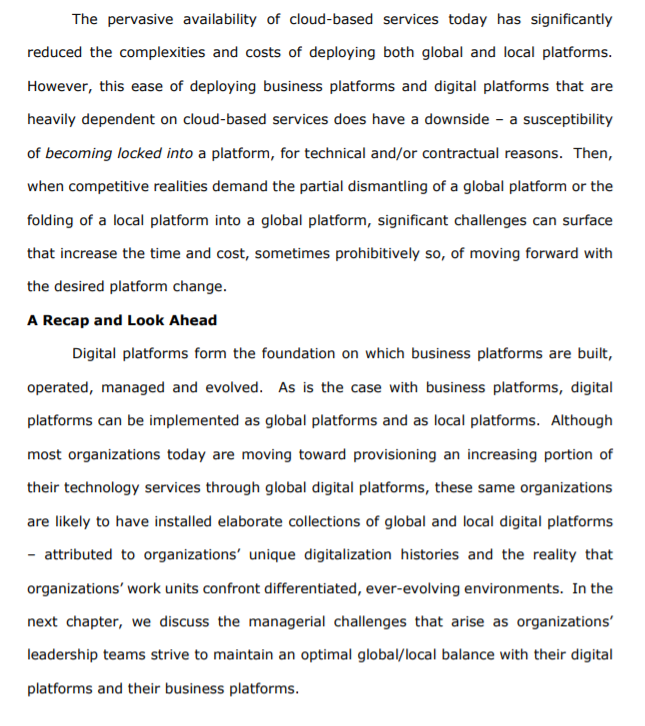
Chapter 22. Digital Platforms Standalone digitalized business processes, local business platforms and global business platforms are enabled and supported by the digital technologies and technology services provided through digital platforms - some of which operate as local platforms and others as global platforms; and, some of which are built in-house, and others are externally sourced (either as internally-operated platforms or digitally- accessed platforms). Figure 22-1 depicts such a mlange of business and digital platforms for a hypothetical organization. Figure 22-1 A Collection of Business Platforms and Digital Platforms Externally-Sourced Business Platforms and Digital Platforms Organization Standalone Digitalized Business Process Local Business Platform Local Digital Platform Global Business Platform Global Digital Platform The relative sizes of the ovals depicted in Figure 22-1 are reflective of a typical organization's investment in digital assets. As can be seen, a majority of these investments involve digital platforms - even though the benefits that organizations gain through digitalization are largely derived from business platforms. In order to get a sense of why organizations invest more in digital platforms than in business platforms, consider a proposed project by a retail chain to provide each retail store manager with a daily report comparing her store's sales (products, volumes, margins) against those of comparable stores across the chain. Proponents of this digitalization project would most likely take for granted the availability of numerous digital technologies and technology services (e.g., point-of-sales data capture devices, data storage devices, database services, networking devices and services, communications devices and services, technology training services, help- desk services, etc.). If these enabling technologies and services were not already installed, then these digital assets would need to be included as part of the project proposal. As a consequence, the proposal's projected costs would increase dramatically, possibly making the digitalization project cost-prohibitive. Today, the implications of absent, enabling digital assets can often be affordably addressed. When a valuable idea surfaces for which enabling digital assets are absent, contractual relationships can be established with service providers able to provide these digital assets at very appealing price points. Figure 22-2 depicts just such a situation. Here, a digitalized market research capability has been configured, relatively quickly and relatively inexpensively, by acquiring needed digitalized business services (providing access to market research data and to modeling/analytic tools) and needed technology services (providing access to servers and to a virtual collaboration space) from external service providers. Later in this chapter, we will discuss how, today, cloud-based services make available a huge variety of digital assets, technology services and business services. Figure 22-2 Accessing Cloud-Based Services Data Global Market Research Platform Local Sales Forecasting Business Platform Local Sales Prospect Analysis System Acquire New Customers Accelerate Sales Growth Increase Market Share Business Services Modeling and Analytic Tools Cloud- Based Services Global Digital Platforms 1 Servers Collaboration Space Technology Services This chapter examines digital platforms, addressing what digital platforms are and how they are evolving. To accomplish this, the following topics are covered: The Nature of Digital Platforms The Benefits of Standardized Digital Platforms Standardizing the Desktop Environment at ABN Amro Cloud-Based Services The Nature of Digital Platforms Digital platforms apply configurations of digital assets to deliver technology services that, in turn, are applied in building, operating, maintaining and evolving digital platforms, business platforms and standalone digitalized business processes. The technology services delivered through digital platforms vary markedly in their scope and complexity, and can be largely comprised of digitized solutions (e.g., messaging services), humans (e.g., strategic digital consulting services), or, most 427 commonly, digitalized solutions (mixes of digitized solutions and humans, such as help desk services). Organizations use two broad categories of digital platforms: internal digital platforms acquired/built, operated, managed and owned by the organization; and, external digital platforms built, operated, managed and owned by other organizations (most commonly, a technology service provider). The most familiar of these external digital platforms is the Internet. A vast number of organizations, both for-profit and not-for-profit, cooperate in providing the vast resources and capabilities of the Internet. All organizations, by interconnecting their own digital platforms and business platforms to the Internet, are able to greatly expand the reach (across organization and geographic boundaries) and range (across types of digitized content) of their digitization/digitalization capabilities. Five core types of digital assets are applied in configuring digital platforms (see Table 22-1 for definitions): hardware assets, design assets, data assets, human assets and social assets. These digital assets serve as the constitutive elements of the technology services provisioned through digital platforms. Table 22-1 Core Types of Digital Assets Asset Definition Examples Electronic and electro- Hardware mechanical devices & Laptops, servers, mobile devices, cabling, associated equipment routers, devices, printers, etc. Software, architectures, Computer programs, system interfaces, Design policies, standards database management system, operating procedures, etc. system, data architecture, server architecture, Internet usage policies, etc. Data Attributes of objects and Device serial number, network login password, events service request time stamp, Internet Protocol (IP) address, etc. Managerial, staff & operations Programmer, systems analyst, database Human employees (skills, knowledge designer, technology strategist, project & experience) manager, network administrator, etc. Relationships (familiarity, Relationships between: digital strategists & Social interaction, trust, shared the members of an organization's leadership team, systems analysts & work unit managers, understanding, etc.) between humans work unit managers & an external service provider's managers, etc. Returning to the global market research platform example shown earlier as Figure 22-2, the digitalized capabilities being provisioned include: A global market research capability applied by market research analysts and sales strategists across the organization's work units to better understand sales trends, sales potential and sales performance. A local sales forecasting capability applied by sales managers to predict product/market supply and demand. A local sales prospect solution applied by sales teams to prioritize their targeting of sales leads. These digitalized capabilities are enabled through numerous digital assets, including: Storage devices (hardware): Cost-efficient, responsive data storage repositories. Database management systems (design): Systems software enabling the secure and timely organizing, archiving, and accessing of stored data. IP addresses (data): Every device connected to the Internet is assigned a unique number known as an Internet Protocol (IP) address; IP addresses consist of four numbers separated by periods and look something like: 153.0.0.1. IP addresses are then used in transmitting messages to and from market researchers by indicating the specific devices to which messages are sent. Database analyst (human): An expert in organizing data within a database such that digitized data can be electronically stored and accessed efficiently and flexibly. Here, a database designer organizes the collection of digitized data to be used in market research analyses. Relationships between the database analyst and market researchers (social): Close working relationships between the database analyst (whom understands the structure of the data being maintained in the market research database) and market researchers (whom will be accessing these data) enables the timely and effective completion of market research projects. The Benefits of Standardized Digital Platforms As indicated in Figure 22-1, digital platforms can be implemented as global platforms and as local platforms. A global digital platform is a standardized digital platform used across many, if not most, of an organization's work units. A local digital platform is a tailored digital platform used by a few work units (often, a single work unit). Because of the benefits to be derived from standardization (see Table 22-2), digital platforms are increasingly being configured as global platforms. The first column of Table 22-2 lists four drivers of these benefits. The first two drivers accrue from the role that standardization plays in reducing the number of and variety of digital assets deployed across an organization's digital platforms. The latter two drivers accrue from assuring high levels of compatibility and consistency across these digital assets. Table 22-2 Digital Platform Standardization Benefits Benefit Driver Benefit Preferred . Quantity discounts Vendor/Provider Preferential ordering and fulfillment processes Tailored configuration services Relationships - Tailored installation and customer support services Fewer Digital Technology trainers & technology support staffs have Assets fewer digital assets for which training/support processes/materials need to be developed. Ease of Implementing Global & local business platform functionalities Global/Local enabled by global digital platforms will interconnect & Business Platforms execute more smoothly & more efficiently. Employees experience a consistent digitalized work Ease of Employee environment when moving (temporary assignments, Movements transfers, promotions, etc.) across work units making use of global digital platforms. By reducing the number and variety of deployed digital assets, the number of vendors from whom these assets are acquired is reduced. Typically, this results in preferred vendor relationships being established and nurtured. Early in the development of such relationships, benefits such as quantity discounts and preferential ordering and fulfillment processes can be realized. As these relationships deepen, vendor-partners become increasingly willing to work with customers in developing future versions of commodity products/services and in investing in customer-specific products/services, as well as in customer-specific installation and support processes. By reducing the variety of technology assets being acquired and deployed, the resources spent on delivering training and support services can be significantly reduced. Why? Because there are fewer technology products/services for training and support staffs to learn about and to be accounted for in training and support services. By assuring component compatibility and consistency across an organization's global digital platforms, the complexities associated with implementing global business platforms are significantly reduced. As a result, the interconnection of and execution of the business processes being hosted on business platforms should occur more smoothly and more efficiently. Finally, establishing compatibility and consistency across a global digital platform results in employees experiencing a consistent digitalized work environment when moving from one work unit to another (e.g., as a result of temporary work assignments, of work unit transfers, of promotions, etc.). As a consequence, transferred employees are likely to experience little, if any, drops in productivity while adjusting to their new work contexts. Standardizing the Desktop Environment at ABN Amro88 ABN Amro serves retail, private and commercial banking customers in its home country of the Netherlands and across the globe) with a comprehensive range of financial products and services. In 2002, the company's desktop environment (a collection of digital platforms) was comprised of a broad variety of digital assets. Managing this complex desktop environment proved costly and difficult, and these complexities added considerable time and expense when the company enhanced installed business platforms or implemented new business platforms. In order to resolve this situation, a two-year desktop environment standardization project was carried out, affecting 10,000 employees at one of the company's largest business units. The project's two main objectives were to reduce the total cost of ownership (acquisition, installation costs, maintenance and support costs) of the desktop environment and to increase the company's flexibility by enabling changes in business models and/or business platforms to occur more quickly, less expensively and less painfully. Desktop environment standards have a broad reach and range. Here, the reach of these standards was the entire business unit, as well as a few small work groups in other parts of the company that worked with or through the business unit's installed business platforms; and, the range of these standards included all of the digital technologies, technology services and business services (from desktop productivity tools to the enablement of business platforms handling complex financial transactions) accessed by employees through desktop devices. The technology products specified in the new set of technology standards were determined jointly by executives representing the business unit and the organization's corporate technology group. Most important, it was the business unit leadership team that set cost-saving targets and defined the functional requirements to be met by the new desktop environment. The standardized desktop environment that was installed involved server- based computing with thin-clients. The technology platform consisted of three tiers of components: Thin-clients hosting a minimal set of local applications (the tier actually touched by employees). Web servers and terminal servers hosting global applications. Data servers hosting the global database (individual and work group data were stored on terminal servers and replicated daily to data servers). Thin-clients are terminal devices able to handle graphical interfaces and basic data processing tasks. Web servers, terminal servers and data servers are small, powerful, specialized computer systems that are easily configured into sophisticated, but adaptable, networks. A primary benefit of this architecture is that it minimizes dependencies across the three tiers. That is, changing a device located on one tier introduces few, if any, changes to devices on the other two tiers. The new desktop environment consisted of 10,000 thin-client workstations, 1,000 laptops, 1,000 terminal servers, a couple of web servers and 300 back-end data servers. It was expected that laptop use would decline fairly quickly as employees grew comfortable with the new desktop environment and with a new work-at-home networking capability implemented in parallel with the new desktop environment. Prior to the standardization project, business unit employees were executing over 6,000 different applications from their desktop devices. After a rationalization process that eliminated redundant applications and stressed the use of commercially- available, off-the-shelf software products, the number of different applications being executed on the new desktop environment dropped to 265. In theory, this final list of 265 standard applications could have been even smaller. However, internal company politics resulted in some allegedly vital applications being added to the list of available applications. These exceptions, however, were only executed locally on a few desktop devices and were not supported by a newly-created technology support work group. In principle, once the new desktop environment had been installed, work units were restricted to the list of approved hardware and software products. In practice, an exception process existed that provided a sanctioned pathway for violating the desktop standards. Anyone requesting nonstandard hardware or software products was first required to try out an approved product. Then, after demonstrating limitations with approved products and developing a sound business rationale (e.g., explaining the added value to be derived from the exception, the number of affected employees, total extra costs, willingness to cover all or part of these costs, etc.), an exception allowed. When an exception request was granted, the requested product was either added, after a vetting process, to the list of standard products (the preferred option) or was maintained as a temporary exception (to be reversed at any time if and when it became advantageous or necessary to do so). Table 22-3 summarizes the outcomes from ABN Amro's desktop environment standardization project. The payback period for the 32 million project was 1.45 years, and the project yielded a positive cash flow of 56 million in the fourth year after the investment had been made. Just as important, if not more so, were the reactions of business unit employees. Initially, their collective attitude was not positive as they feared the standardized desktop environment would result in a loss of personal flexibility. However, after having adjusted to the new work environment, more than half considered the change to be an improvement, 30 percent were indifferent, and only about 10 percent were less satisfied than before - with a majority of these dissatisfied employees being housed in the corporate technology group! Table 22-3 Results from ABN Amro's Desktop Environment Standardization Project Flexibility-Related Outcomes Cost-Related Outcomes The per desktop yearly costs dropped from 4,600 to 2,392 (48% of pre- project cost). . As all desktops had the same configuration, there was no need to reconfigure desktop configurations with staff movements. 1. The number of corporate technology group employees dropped from 383 FTE to 130 FTE (34% of pre-project level). Costs to enhance/develop new business platforms dropped as these new platforms could be designed for the standardized desktop environment, requiring less technical expertise. . Employees could move across the business unit without productivity loss. As a result, employees could work anywhere, enabling business expertise to be spread across the business unit. The desktop platform - because of its adaptability, scalability & robustness - became far less a constraint on initiatives to develop new business platforms. New projects demonstrated completion times up to 75% less than pre-project completion times. Cloud-Based Services As mentioned earlier in this chapter, organizations are increasingly acquiring the functionalities hosted on business platforms and digital platforms as cloud- based services or, more precisely, as proprietary services delivered to consumers either via the Internet or via Internet-like technologies. Today's cloud-based services can trace their roots to two earlier technologies: 1960s-era mainframe-based utility computing, also referred to as time- sharing services, that offered customers access, via telecommunications, to digitalized services executed on high-powered computer systems. 1990s-era application service providers (ASPs) that offered consumers access, via the Internet, to a variety of digitalized services. The advances that have occurred with digital technologies differentiate today's cloud- based services from these earlier technologies: heightened ease-of-use, ease-of- deployment, transmission speed, transmission bandwidth, service availability, service reliability, service interoperability, service security, etc. Just as important, these cloud-bases services are very affordable. Just about any type of digitized/digitalized service is available from the cloud today. As illustrated in Figure 22-3, one can access (moving upwards from the bottom of the figure) hardware assets, technology services and business services (including business platforms). Note, in particular, two things regarding Figure 22- 3. First, cloud-based business services are available for, essentially, any of an organization's work units. Second, it is not uncommon for organizations to contract with multiple technology service providers to create a comprehensive cloud-based solution. For example, a financial services company like ABN Amro could use cloud- based services to assemble much, if not all, of their standardized desktop environment (indicated in Figure 22-3 by the services in green boxes). Figure 22-3 Examples of Cloud-Based Services Business Services & Business Platforms ERP Platform Logistics Payroll CRM Platform Services Services Accounting Self-Service Services Currency Human Resources Market Research Data Trading Platform Platform Project Credit Score Checking Desktop Software Management Productivity Development Platform Shipment Tracking Tools Platform Technology Services Collaboration Messaging Disaster Recovery Content Virtual Platform Storage Management Desktop Connectivity Services Management Hardware Assets Data Storage Servers Network Devices Devices Three deployment options exist by which organizations gain access to cloud- based services: private clouds, community clouds and public clouds. Private clouds are designed, developed and operated by (on-premises) or for (off-premises via a third-party) an organization, with access to the cloud-based services confined (via authentication processes) to authenticated members of the organization and authenticated members of select-other organizations (strategic partners, consumers, suppliers, etc.). Private clouds offer the greatest control over a cloud-based service, including the abilities to customize the service and to apply especially-stringent security protocols. Community clouds, essentially, are private clouds managed and accessed by a consortium of organizations. Public clouds, not surprisingly, are made available to anyone. A public-cloud provider takes on the responsibilities of building, operating, maintaining, evolving, and managing the services being offered, with consumers of these services only charged for the services actually used. However, this convenience does come at a cost. Public cloud-based services tend to be offered as commodities that only accommodate the most common sets of consumer requirements (i.e., configuration options tend to be limited), and consumers are reliant on the public-cloud provider operating, securing and enhancing the cloud-based services. Table 22-4 lists the advantages to be gained from using cloud-based services, and Table 22-5 lists the disadvantages. All of these advantages and disadvantages are applicable to consumers of a public cloud-based service, and most apply to consumers of a community cloud-based service. For organizations using a private cloud-based service, some subset of these advantages and disadvantages will apply, depending on the situation. Any organization contemplating deploying a private cloud should possess strong digitization capabilities and strong digitalization capabilities. Table 22-4 Advantages of Cloud-Based Services Advantage Description Minimal Acquire a service rather than an asset (few capital/operating costs). Up-Front - Cost to initialize a service ranges from zero (no customization) to Investment moderate (extensive customization). Consumption-Pay for services actually used. Based Pricing. Pay to gain guaranteed access to higher service levels. Ubiquitous Access Access services from any physical location at any time. Guaranteed Quality of Established via negotiated service level agreement (SLA). Service Tiered service-level pricing. Minimal Technology Cloud management (strategy, planning, control, operations, Management maintenance, enhancement, etc.) transparent to the consumer. Strategic & Scalable across service volumes & locations. . Adaptable to the needs of a broad range of consumers. Operational Relatively low costs borne by consumers when switching cloud Flexibility vendors. Table 22-5 Disadvantages of Cloud-Based Services Disadvantage Validity of Services Delivered Security & Privacy Availability, Fault- Tolerance & Disaster Recovery Description Dependent on providers' capabilities & oversight. Providers' use of other third-party providers. Dependent on providers' capabilities & oversight. Providers' use of other third-party providers. Applicable laws depend on vendors' geographic locations. . Dependent on providers' capabilities & oversight. Providers' use of third-party providers. Providers' escalated commitments to other consumers. Bottlenecks (speed, volume) in transmitting data. . Lack of system interfaces for accessing data from sophisticated consumer platforms. Lack of portability in moving a consumer's data from one provider to another provider. Inability to audit transactions. Difficulties in auditing transactions. Financial insolvency. Inability to maintain competitiveness. Inability to hire & retain highly-capable employees. Data Transfer & Data Lock-In Transaction Auditability Provider Instability The pervasive availability of cloud-based services today has significantly reduced the complexities and costs of deploying both global and local platforms. However, this ease of deploying business platforms and digital platforms that are heavily dependent on cloud-based services does have a downside - a susceptibility of becoming locked into a platform, for technical and/or contractual reasons. Then, when competitive realities demand the partial dismantling of a global platform or the folding of a local platform into a global platform, significant challenges can surface that increase the time and cost, sometimes prohibitively so, of moving forward with the desired platform change. A Recap and Look Ahead Digital platforms form the foundation on which business platforms are built, operated, managed and evolved. As is the case with business platforms, digital platforms can be implemented as global platforms and as local platforms. Although most organizations today are moving toward provisioning an increasing portion of their technology services through global digital platforms, these same organizations are likely to have installed elaborate collections of global and local digital platforms - attributed to organizations' unique digitalization histories and the reality that organizations' work units confront differentiated, ever-evolving environments. In the next chapter, we discuss the managerial challenges that arise as organizations' leadership teams strive to maintain an optimal global/local balance with their digital platforms and their business platforms
Step by Step Solution
There are 3 Steps involved in it
1 Expert Approved Answer
Step: 1 Unlock

Question Has Been Solved by an Expert!
Get step-by-step solutions from verified subject matter experts
Step: 2 Unlock
Step: 3 Unlock
 Study Help