Question: Write a binary search method for an array of Strings. Return an array list of the indices that were searched. If the target is not
Write a binary search method for an array of Strings. Return an array list of the indices that were searched. If the target is not found, the last number in the array list will be a -1.
Note. The only reason the search method is returning that list of numbers is to check that you implemented the algorithm correctly.
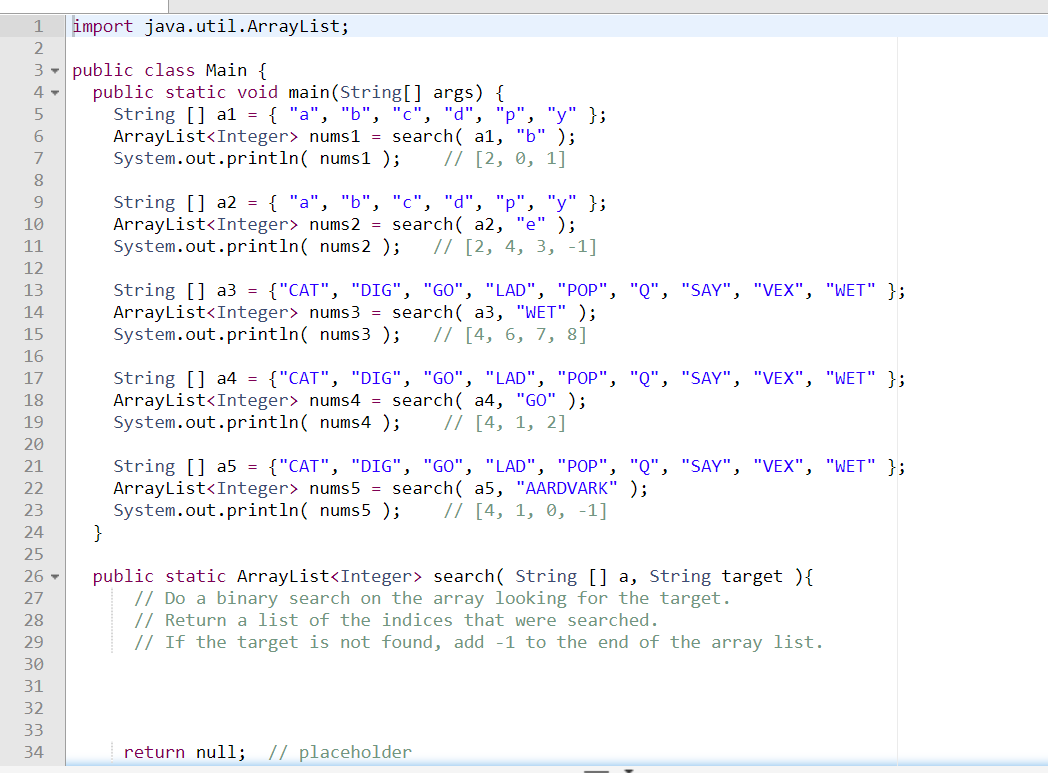
1 import java.util.ArrayList; 2 3 public class Main { 4- public static void main(String[] args) { 5 String [] al = { "a", "b", "c", "d", "p", "y" }; 6 ArrayList nums1 = search( al, "6" ); 7 System.out.println( nums1 ); // [2, 0, 1] 8 9 String [] a2 = { "a", "b", "c", "d", "p", "y" }; 10 ArrayList nums 2 = search( a2, "e" ); 11 System.out.println( nums 2 ); // [2, 4, 3, -1] 12 13 String [] a3 = {"CAT", "DIG", "GO", "LAD", "POP", "Q", "SAY", "VEX", "WET" }; 14 ArrayList nums 3 = search( a3, "WET" ); 15 System.out.println( nums3 ); // [4, 6, 7, 8] 16 17 String [] a4 = {"CAT", "DIG", "GO", "LAD", "POP", "Q", "SAY", "VEX", "WET" }; 18 ArrayList nums4 = search( a4, "GO" ); 19 System.out.println( nums4 ); // [4, 1, 2] 20 21 String [] a5 = {"CAT", "DIG", "GO", "LAD", "POP", "Q", "SAY", "VEX", "WET" }; 22 ArrayList nums 5 = search( a5, "AARDVARK" ); 23 System.out.println( nums5 ); // [4, 1, 0, -1] 24 } 25 26 - public static ArrayList search( String [] a, String target ) { 27 // Do a binary search on the array looking for the target. 28 // Return a list of the indices that were searched. 29 // If the target is not found, add -1 to the end of the array list. 30 31 32 33 34 return null; // placeholder









 Study Help