







Question: Write a C++ menu-driven program that prompts the user to select the type of gate and determine the output for the given inputs. Build the
Write a C++ menu-driven program that prompts the user to select the type of gate and determine the output for the given inputs. Build the truth table for all inputs for the variable(s). For example, for a single variable q, there are two truth values, true/false or 1/0 respectively.
* The program should be a menu-based program that continuously tests any operation until the user decides to exit the program.
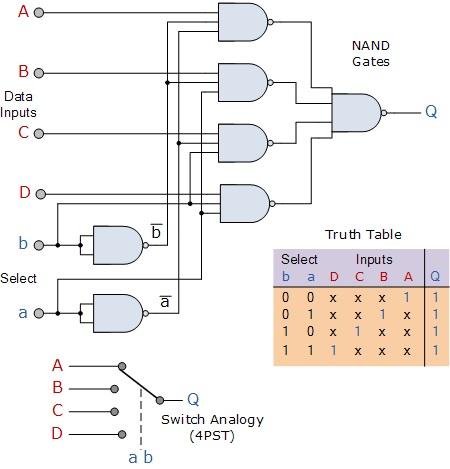
Basic Digital Logic Gates ========================= 1 - NOT gate 2 - AND gate 3 - OR gate 4 - NAND gate 5 - NOR gate 6 - Half-adder (see diagram) 7 - Full-adder (see diagram) 8 - Multiplexer 4 to 1 (2 switch variables as selectors for 4 inputs and 1 output; see diagram) 9 - Exit
Hint: The gates are equivalent to symbols, ,, which we have talked about in class.
Basic Digital Gates:
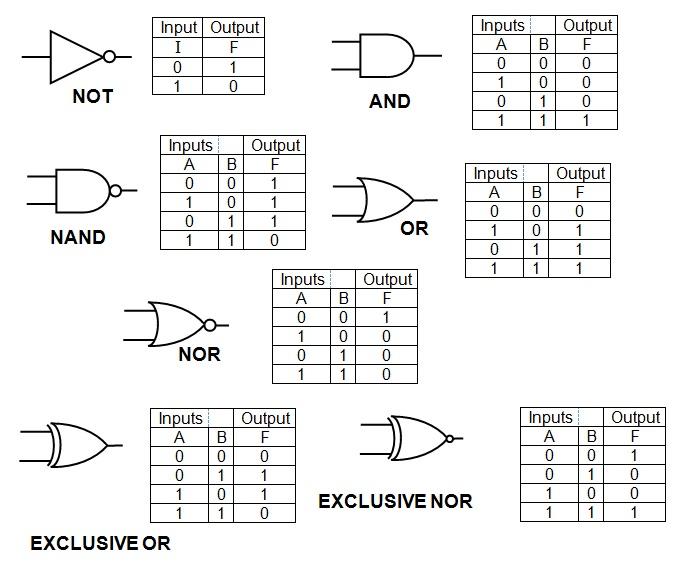
Diagram for Half-adder:
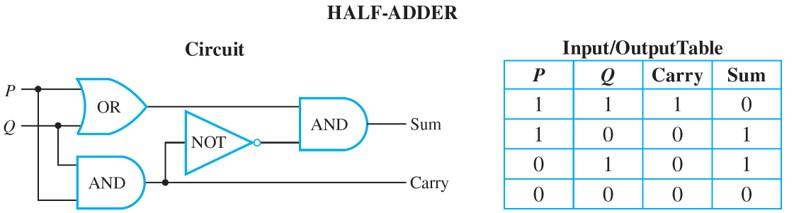
Diagram for Full adder:
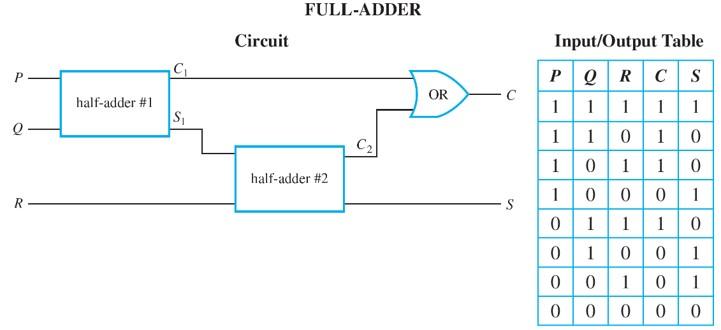
Diagram for Multiplexer 4 inputs to 1 output; and 2 selectors
Requirements
Create a function for each of the gate operations
Use an enumeration to specify the type of gates
The inputs are the truth values from the truth table
An input value is either 0 or 1. Value 0 implies false and value 1 implies true
Use "#include
To demonstrate, your program needs to test each gate operation and display the input/output table as above (half/full adder).
Hints:
- Start with the truth table
- enum GATE_TYPE { NOT, AND, OR, ...}
- You may use either array or vector to store the truth values.
EXCLUSIVE NOR EXCLUSIVE OR HALF-ADDER Innut/OutputTable FULL-ADDER Input/Output Table
Step by Step Solution
There are 3 Steps involved in it

Get step-by-step solutions from verified subject matter experts
 Study Help