







Question: Write a c++ program: - Create a dynamic array of integers (int) starting size 2 + This will be used to store user input elements.
Write a c++ program:
- Create a dynamic array of integers (int) starting size 2
+ This will be used to store user input elements.
- Create a menu interface with the options: Print Elements, Add Element, Delete Element, Return Size, and Exit. This will be how the user interacts with the array.
(1)Print Elements:
+ This option will print all the elements currently stored in the array.
(2) Add Element:
+ This option asks the user to input a number to store into the array, then inserts the number in the correct position of the array such that all elements are in ascending order.
+ If the array does not have room to add another element, the array should be expanded to 2 times its current size before adding the element.
+ Print a message of the new size of the array whenever it is expanded.
+ There should be no gaps between elements in the array.
(3) Delete Element:
+ This option should ask the user for a number to remove from the array.
+ If the specified number does not exist inside the array or if the array is empty, an appropriate error message should be displayed.
+ Anytime an element is deleted from the beginning or middle of the array, all other elements in the array should be shifted over to fill the empty gap.
+ If the number of elements is less than half the size of the array, the array should be shrunk down by half times its current size.
+ Print a message with the new size of the array whenever its shrunk.
(4)Return Size:
+ This option prints the current size of the array along with the number of elements stored within it.
(5) Exit:
+ This option deallocates all dynamic variables and ends the program.
Here is the sample output
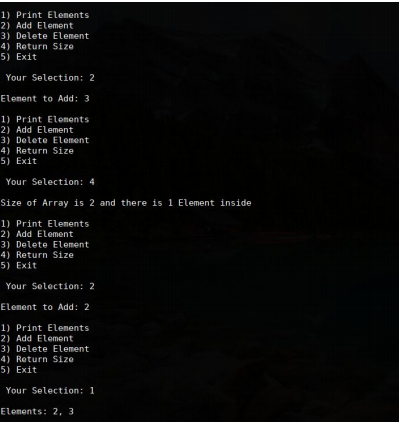
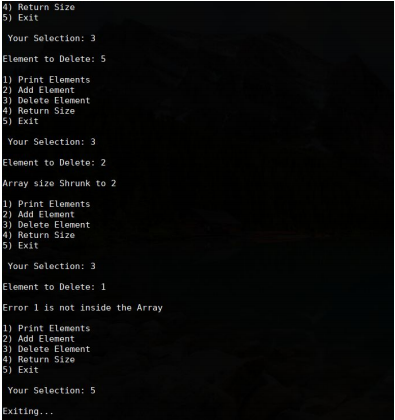
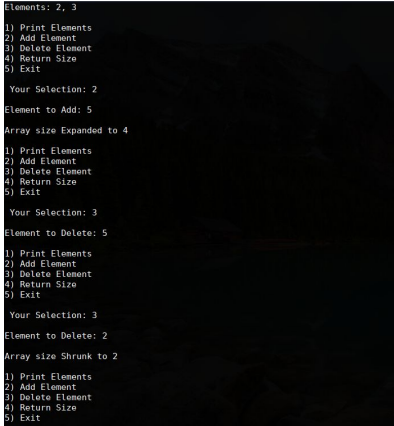
1) Print Elements 2) Add Element 3) Delete Element 4) Return Size 5) Exit Your Selection: 2 Element to Add: 3 1) Print Elements 2) Add Element 3) Delete Element 4) Return Size 5) Exit Your Selection: 4 Size of Array is 2 and there is 1 Element inside 1) Print Elements 2) Add Element 3) Delete Element 4) Return Size 5) Exit Your Selection: 2 Element to Add: 2 1) Print Elements 2) Add Element 3) Delete Element 4) Return Size 5) Exit Your Selection: 1 Elements: 2, 3
Step by Step Solution
There are 3 Steps involved in it

Get step-by-step solutions from verified subject matter experts
 Study Help