







Question: Write a C + + program that acts as a simple counting tool for collecting information extracted from bng underiine An ISBN - 1 0
Write a C program that acts as a simple counting tool for collecting information extracted from bng
underiine An ISBN consiats of four parta:
hold a group corio, a pu
a textual file of documents prepared for a simple word processing software. An input file for the
simple word processor includes three types of data: the general text of the document to be
formatted, command lines, and commented lines. A line that starts with a character and
followed by one of the defined commands is referred to as a command line, otherwise it is just a
textual line. While, a line that starts by # is a comment line, which it would be skipped by the
word processor.
The simple word processing software includes five commands. The commands begin and
end are used to define the begin and end of a paragraph, respectively, of the text being
formatted as a paragraph. Note that, each end command should be matched with a begin
command; otherwise, an error is detected in the input file. The other commands are bold
italic and underline which are used for typesetting the following words specified on the
same line. If no command name is found following the character, or the word following the
is not recognized as one of the five possible commands, an error message should be printed
out followed by the line number. The text of the document will be structured into sequences of
paragraphs according to the commands that are used to delimit the begin and end of each
paragraph. The typesetting commands can eventually appear any number of times within a
paragraph. If there are no commands for structuring the input text into paragraphs, it will be
assumed that the whole textual document has not been structured into paragraphs, and the number
of paragraphs is zero. A word is defined as a sequence of one or more nonwhitespace characters
separated by whitespace.
The program should prompt the user for the file name to read from. The program should open the
file for reading, and if the file cannot be opened, it should print out the message "File cannot be
opened followed by the filename, and exit. After reading the contents of the input file, the
program should print out the total number of lines, the number of commented lines, the number of
the paragraphs, the total number of words, and the number of bold, italic, and underline commands
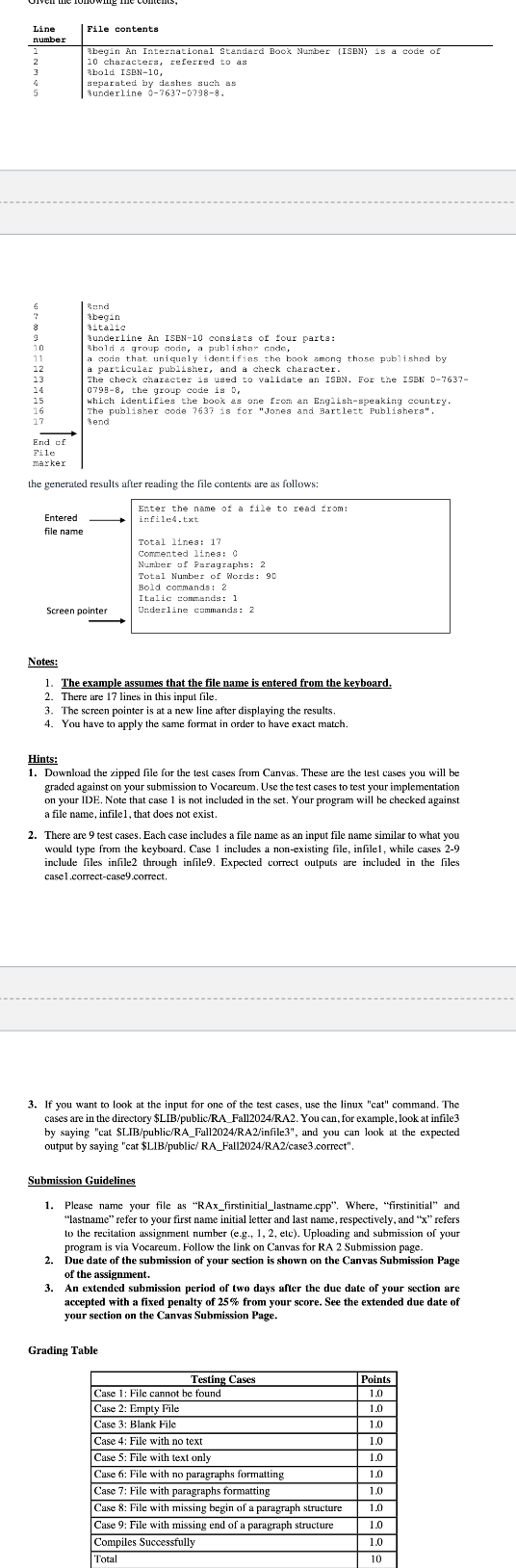
in the file. An example of an input file and the expected results after processing the file are shown
below.
Given the following file contents,
bng
underiine An ISBN consiats of four parta:
hold a group corio, a publisher rode,
code that uniquely identifies the book among, a publisher code,
particular publisher, and a check character.
chercular publisher, and a check character. phose pablishsd by
the group code is
ich ident For tne ISBN
e publisher code is for "Jones and Bartert aking country
end
the generated results after reading the file contents are as follows:
Notes:
The example assumes that the file name is entered from the keyboard
There are lines in this input file.
The sereen pointer is at a new line after displaying the results.
You have to apply the same format in order to have exact match.
Hints:
Download the cipped file for the test cases from Canvas. These are the test cases you will be
graded against on your submission to Vocareum. Use the test cases to test your implementation
on your IDE. Note that case is not included in the set. Your program will be checked against
a file name, infile that does not exist.
There are test cases. Each case includes a file name as an input file name similar to what you
would type from the keyboard. Case includes a nonexisting file, infile while cases
include files infile through infile Expected correct outputs are included in the files
case correctcase correct.
If you want to look at the input for one of the test cases, use the linux "cat" command. The
cases are in the directory $LIBpublicRAFallRA You can, for example, look at infile
by saying "cat $ publicRAFallRAinfile and you can look at the expected
output by saying "cat $LIBpublic RAFallRAcase correct".
Submission Guidelines
Please name your file as "RAxfirstinitiallastname.cpp Where, "firstinitial" and
"lastname" refer to your first name initial letter and last name, respectively, and refers
to the recitation assignment number eg etc Uploading and submission of your
program is via Vocareum. Follow the link on Canvas for RA Submission page.
Due date of the submission of your section is shown on the Canvas Submission Page
of the assignment.
Step by Step Solution
There are 3 Steps involved in it
1 Expert Approved Answer
Step: 1 Unlock

Question Has Been Solved by an Expert!
Get step-by-step solutions from verified subject matter experts
Step: 2 Unlock
Step: 3 Unlock
 Study Help