





Question: Write a C++ program that asks the user to enter the number of students in a particular class, and the number of tests that the
 Write a C++ program that asks the user to enter thenumber of students in a particular class, and the number of teststhat the students have taken. Your program should then dynamically allocate two

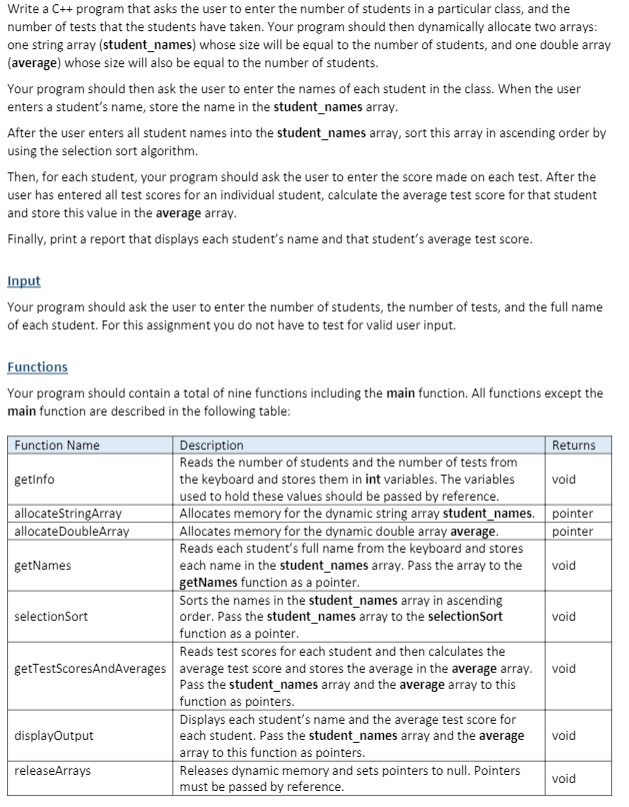
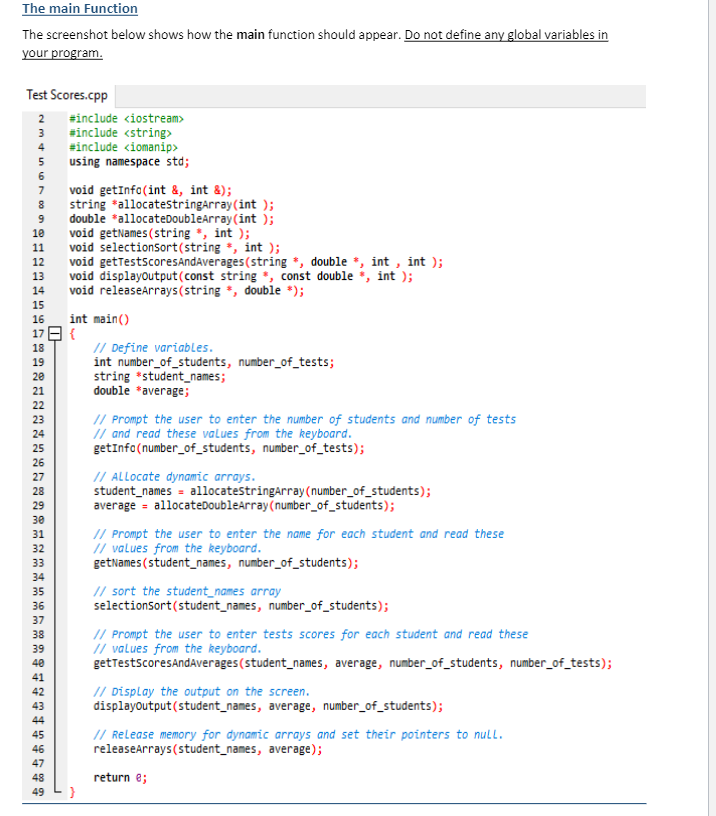
Write a C++ program that asks the user to enter the number of students in a particular class, and the number of tests that the students have taken. Your program should then dynamically allocate two arrays: one string array (student_names) whose size will be equal to the number of students, and one double array (average) whose size will also be equal to the number of students. Your program should then ask the user to enter the names of each student in the class. When the user enters a student's name, store the name in the student_names array. After the user enters all student names into the student_names array, sort this array in ascending order by using the selection sort algorithm. Then, for each student, your program should ask the user to enter the score made on each test. After the user has entered all test scores for an individual student, calculate the average test score for that student and store this value in the average array. Finally, print a report that displays each student's name and that student's average test score. Input Your program should ask the user to enter the number of students, the number of tests, and the full name of each student. For this assignment you do not have to test for valid user input. Functions Your program should contain a total of nine functions including the main function. All functions except the main function are described in the following table: void Function Name Description Returns Reads the number of students and the number of tests from getInfo the keyboard and stores them in int variables. The variables used to hold these values should be passed by reference. allocateStringArray Allocates memory for the dynamic string array student_names. pointer allocate DoubleArray Allocates memory for the dynamic double array average. pointer Reads each student's full name from the keyboard and stores getNames each name in the student_names array. Pass the array to the void getNames function as a pointer. Sorts the names in the student_names array in ascending selection Sort order. Pass the student_names array to the selectionsort void function as a pointer. Reads test scores for each student and then calculates the getTestScoresAndAverages average test score and stores the average in the average array. void Pass the student_names array and the average array to this function as pointers. Displays each student's name and the average test score for displayOutput each student. Pass the student_names array and the average void array to this function as pointers. releaseArrays Releases dynamic memory and sets pointers to null. Pointers void must be passed by reference. The main Function The screenshot below shows how the main function should appear. Do not define any global variables in your program. 4 5 6 7 8 9 1e 11 12 13 14 Test Scores.cpp 2 #include 3 #include #include using namespace std; void getInfo(int &, int &); string allocatestringArray(int); double *allocateDoubleArray(int); void getNames(string, int ); void selectionsort(string, int ); void getTestscoresAndAverages (string, double *, int , int ); void displayOutput (const string const double *, int ); void releaseArrays(string , double *); int main() // Define variables. int number_of_students, number_of_tests; string student_names; double *average; // Prompt the user to enter the number of students and number of tests // and read these values from the keyboard. getInfo(number_of_students, number_of_tests); // Allocate dynamic arrays. student_names = allocatestringArray (number_of_students); average = allocateDoubleArray (number_of_students); // Prompt the user to enter the name for each student and read these // values from the keyboard. getNames (student_names, number_of_students); // sort the student_names array selectionsort(student_names, number_of_students); // Prompt the user to enter tests scores for each student and read these // values from the keyboard. getTestscoresAndAverages (student_names, average, number_of_students, number_of_tests); // Display the output on the screen. displayoutput (student_names, average, number_of_students); // Release memory for dynamic arrays and set their pointers to null. releaseArrays(student_names, average); 15 16 17 18 19 20 21 22 23 24 25 26 27 28 29 30 31 32 33 34 35 36 37 38 39 40 41 42 43 45 46 47 48 49 return; } Output A screenshot of a sample run for this program is shown below. Design your program so it looks exactly like the one shown in the screenshot. Use one fixed-point decimal places for all numerical output. Use the setw manipulator to right-align all numerical output. Use the left manipulator to left-align the student names. C:\C++\Test Scores.exe Enter the number of students: 3 Enter the number of tests: 4 Enter Student Names Name of student 1: Zach Morris Name of student 2: Amanda Taylor Name of student 3: Henry McWillians Enter test scores for Amanda Taylor Test #1: 98 Test #2: 180 Test #3: 94 Test #14: 96 Enter test scores for Henry McWilliams Test 111: 87 Test #2: 81 Test #3: 86 Test 14: 90 Enter test scores for Zach Morris Test 11 : 91 Test 12: 89 Test #3: 85 Test #4: 84 Average Name Amanda Taylor Henry McWilliams Zach Morris 97.0 86.0 87.2 Test Your Program Test your program with the user input data shown in the screenshot above to ensure that it generates correct numerical output Save your C++ File Save your C++ file as: Test Scores Add Comment Statements Add comment statements at the top of your program that describe the following: Project, Programmer, Date, and Description. Also, add comment statements throughout the program that describe variables, constants, formulas, and output operations
Step by Step Solution

There are 3 Steps involved in it

1 Expert Approved Answer
Step: 1 Unlock blur-text-image
Question Has Been Solved by an Expert!

Get step-by-step solutions from verified subject matter experts

Step: 2 Unlock
Step: 3 Unlock

Students Have Also Explored These Related Databases Questions!