







Question: Write a C program that prompts the user to enter the number of the line that he/she would like to read, then, the program read
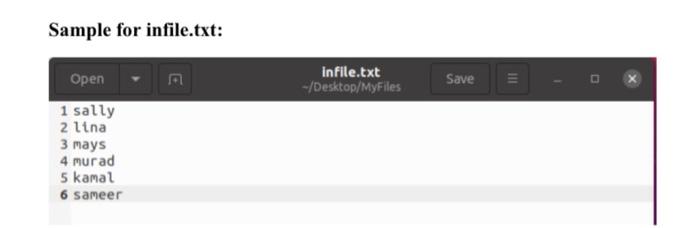
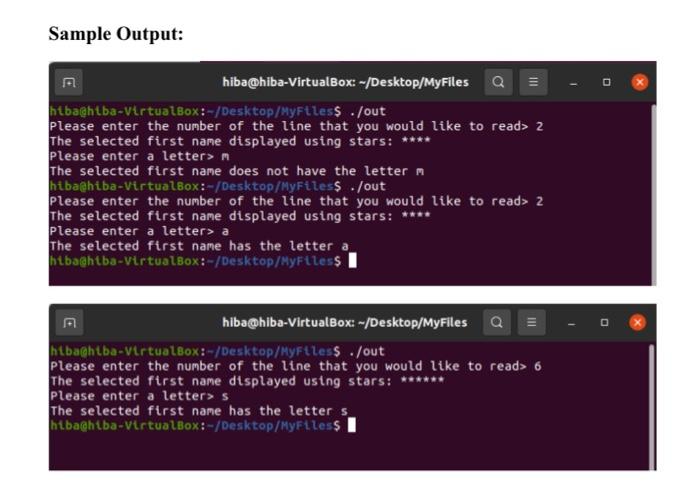
Sample for infile.txt: F1 infile.txt -/Desktop/MyFiles Save Open 1 sally 2 lina 3 mays 4 murad 5 kamal 6 sameer Sample Output: hiba@hiba-VirtualBox:-/Desktop/MyFiles Q= htba@hlba-Virtualbox:-/Desktop/Myrtless ./out Please enter the number of the line that you would like to read> 2 The selected first name displayed using stars: **** Please enter a lettern The selected first name does not have the letter m hiba@hiba-VirtualBox:-/Desktop/MyFiless ./out Please enter the number of the line that you would like to read> 2 The selected first name displayed using stars: **** Please enter a letters a The selected first name has the letter a htbaahtba-virtualBox:-/Desktop/MyFiless I hiba@hiba-VirtualBox: -/Desktop/MyFiles a = htbachtba-VirtualBox:-/Desktop/Myrtles$ ./out Please enter the number of the line that you would like to read> 6 The selected first name displayed using stars: ****** Please enter a letters The selected first name has the letter s htba@htba-VirtualBox:-/Desktop/MyFiles$
Step by Step Solution
There are 3 Steps involved in it

Get step-by-step solutions from verified subject matter experts
 Study Help