







Question: Write a C++ program that will input data from a: Comma-separated values (.csv) file. This is one file type that can be opened by Microsoft
Write a C++ program that will input data from a: Comma-separated values (.csv) file. This is one file type that can be opened by Microsoft Excel. Name the C++ file that you turn in: Your Name.cpp. This program must successfully compile and run on Visual Studio 2015. The data inputted must at some point be stored in a two dimensional vector of strings. The program will search the 2D vector for an item of the users choosing.
The program will:
1. Prompt the user for the name of the .csv file
2. Display the contents of the .csv file
3. Prompt the user for the item to search for from within the file
4. Display the row and column of where the item can be found if it exists. The column displayed needs to be the Excel column classification (A, B, C, ). If the item does not exist in the file, it will display a message indicating that the item does not exist in the file.
To open the csv file, :
""
string filename;
cout
getline(cin,filename); file.open(filename.c_str());
needs to be implemented.
""
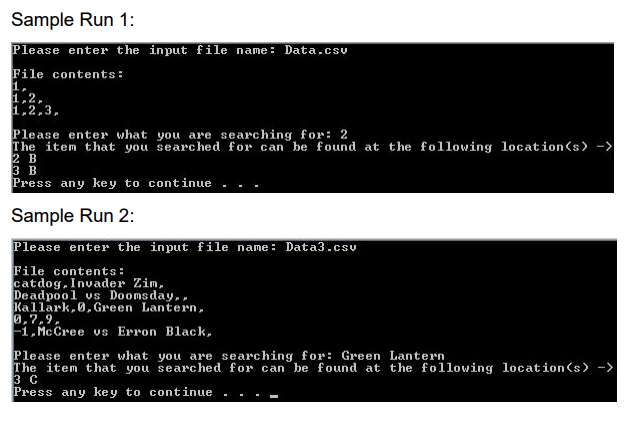
This is how the program looks.
Sample Run1: Please enter the input file name: Data.csu File contents: :2.3 Please enter what you are searching for: 2 -> The item that you searched for can be found at the following location 3 B Press any key to continue . . . Sample Run 2: Please enter the input file name: Data3.csu File contents: atdog. Invader Zim Deadpool us Doomsday. Kallark,0.Green Lantern 0,7.9 1.McCree s Erron Black Please enter what you are searching for: Green Lantern The item that you searched for can be found at the following location(s> 3 C Press any key to continue
Step by Step Solution
There are 3 Steps involved in it

Get step-by-step solutions from verified subject matter experts
 Study Help