







Question: Write a C++ program to print white lowercase 'o's on a black background across the middle of the screen. Next, have a captial 'O' move
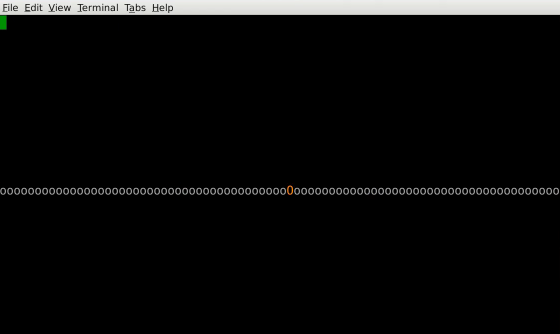
Write a C++ program to print white lowercase 'o's on a black background across the middle of the screen. Next, have a captial 'O' move from left to right, and back, on top of the lower-case 'o's using each of the colors specified by the ANSI escape sequences. After you've "bounced" a white 'O', go to the next line and end your program. You may assume a screen size of 80x25 (80 chars across by 25 lines).
Basic animation is a simple 3-step process: Draw something. Pause so the eye can see it. Erase the old and go to #1. To do this, you'll need a pause function. Since we have not discussed this you'll need to use the following code in your program:
#include //////////////////////////////////////////////////////////// // Add this line to your coded //////////////////////////////////////////////////////////// #include using namespace std; //////////////////////////////////////////////////////////// // Add this function to your code void pause( int milliseconds ) { int limit = clock() + milliseconds * CLOCKS_PER_SEC / 1000; while ( clock()
The capital O starts at the left and moves to the right one lower-case o at a time and then back to the left, changing colors every time it reaches the starting point of the leftmost lower-case o. Please keep in mind that this is expected to run properly in a Linux environment. Also, this is an introductory C++ class and cannot used advanced libraries. The animation must be done using loops. Thank you.
Here is an example:
ANSI Escape Codes:
All sequences begin with the ESC char (ASCII value 27):
| "[2J" | Clear Screen |
| "[R;Cf" | Move cursor to row R and column C |
| "[F;Bm" | Set colors (see below) |
Text colors:
| F/B | Color |
|---|---|
| 0 | Black |
| 1 | Red |
| 2 | Green |
| 3 | Yellow |
| 4 | Blue |
| 5 | Magenta |
| 6 | Cyan |
| 7 | White |
| 9 | {resetallegedly} |
Foreground = F + 30 Background = B + 40
Eile Edit View Ierminal Tabs Help 00000000000000000000000000000000000000000000000000000000000000000000000000000000
Step by Step Solution
There are 3 Steps involved in it

Get step-by-step solutions from verified subject matter experts
 Study Help