







Question: Write a class named DynamicArray that will have convenient functionality similar to JavaScript's Array object and Java's ArrayList class. The class allows to store array
Write a class named DynamicArray that will have convenient functionality similar to JavaScript's Array object and Java's ArrayList class. The class allows to store array of integers that can grow and shrink as needed, search for values, remove elements, etc.
You are not allowed to use ArrayList object as well as any methods from java.util.Arrays class.
Please see the list of required features and methods below.
- private int array[] You MUST store the data internally in a regular partially-filled array of integers. Please DO NOT USE ArrayList. The size of the allocated array is its capacity and will be discussed below.
- private int size. This variable stores the number of "occupied" elements in the array. Set to 0 in the constructor.
- Constructor with parameter. The parameter defines the capacity of initial array. Allocates array of given capacity, sets size field to 0. In case the parameter given to constructor is less than 0, IllegalArgumentException is being thrown.
- No-argument constructor. Allocates array of size 3, sets size field to 0.
- Copy constructor. The constructor takes an object of type DynamicArray as a parameter and copies it into the object it creates. The constructor throws IllegalArgumentException if the object that was passed to copy from is null.
- int getSize() returns the number of "occupied" elements in the array.
- int getCapacity() returns the actual size (length) of the partially-filled array
- int [] getArray() accessor returns the entire partially-filled array. Make sure you DO NOT return the private array field, make a copy of it.
- int [] toArray() accessor returns an "occupied" part of the partially-filled array. Make sure you DO NOT return the private array field. Instead, allocate memory for the new array, copy the "occupied" portion of the field into that new object, and return the new array.
- public void push(int num) adds a new element to the end of the array and increments the size field. If the array is full, you need to increase the capacity of the array:
- Write a new array with the size equal to double the capacity of the original one.
- Copy all the elements from the array field to the new array.
- Add the new element to the end of the new array.
- Use new array as an array field.
- Make sure your method works well when new elements are added to an empty DynamicArray.
- public int pop() throws RuntimeException removes the last element of the array and returns it. Decrements the size field. If the array is empty a RuntimeException with the message "Array is empty" must be thrown. At this point check the capacity of the array. If the capacity is 4 times larger than the number of occupied elements (size), it is time to shrink the array:
- Write a new array with the size equal to half of the capacity of the original one.
- Copy all the elements from the array field to the new array.
- Use new array as an array field.
- int get(int index) throws IndexOutOfBoundsException returns element of the array with the requested index. If the index provided is too large or negative, the IndexOutOfBoundsException is thrown with the message "Illegal index".
- int indexOf(int key) returns the index of the first occurrence of the given number. Returns -1 when the number is not found.
- void add(int index, int num) throws IndexOutOfBoundsException adds a new element (passed as parameter num) to the location of the array specified by index parameter. If the index is larger than size of the array or less than 0, IndexOutOfBoundsException is thrown. When adding the element into the middle of the array, you'll have to shift all the elements to the right to make room for the new one. If the array is full and there is no room for a new element, the array must be doubled in size. Please follow the steps listed in the push() method description to double the capacity of the array.
- int remove ( int index) throws IndexOutOfBoundsException removes the element at the specified position in this array. When the element is removed from the middle of the array, all the elements must be shifted to close the gap created by removed element. If the index value passed into the method is more or equal to the size or less than 0 the IndexOutOfBoundsException must be thrown. At this point check the capacity of the array. If the capacity is 4 times larger than the number of occupied elements (size), it is time to shrink the array.
- boolean isEmpty() returns true if the size of the array is 0.
- int findMin()throws RuntimeException returns the smallest element in the array. If the array is empty throws RuntimeException
- int findMax()throws RuntimeException returns the largest element in the array. If the array is empty throws RuntimeException
- String toString() - returns an array as a string of comma-separated values. Sample: [1, 2, 3, 4]
- boolean equals(DynamicArray obj) compares two objects (this one and the one passed as parameter) element-by-element and determines if they are exactly the same. The capacity of the two objects is not being compared and can be different.
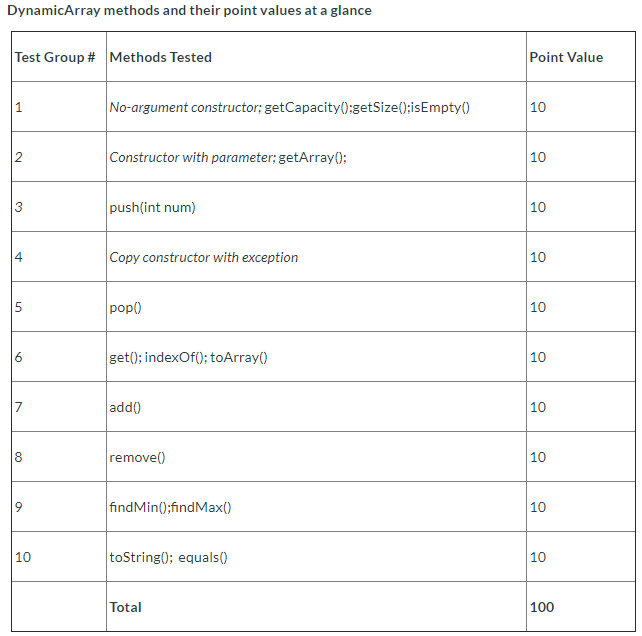
DynamicArray methods and their point values at a glance
\f
Step by Step Solution
There are 3 Steps involved in it
1 Expert Approved Answer
Step: 1 Unlock

Question Has Been Solved by an Expert!
Get step-by-step solutions from verified subject matter experts
Step: 2 Unlock
Step: 3 Unlock
 Study Help