







Question: Write a code in matlab 1. Write a function with the following prototype function robot- fwdSim(robotdt this function should update the robot pose, dt seconds
Write a code in matlab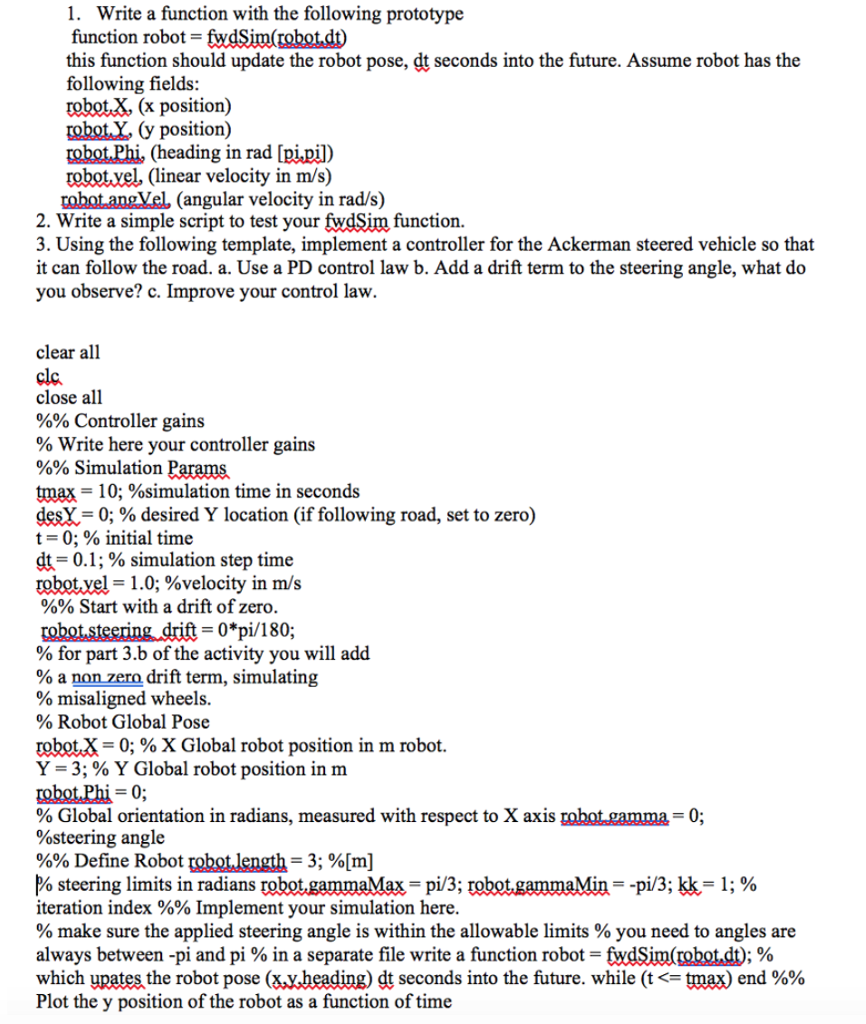
1. Write a function with the following prototype function robot- fwdSim(robotdt this function should update the robot pose, dt seconds into the future. Assume robot has the following fields: robot.X, (x position) robot Y (y position) robotPhi, (heading in rad [pi.pil) robotvel, (linear velocity in m/s) robot angVel, (angular velocity in rad/s) 2. Write a simple script to test your fwdSim function. 3. Using the following template, implement a controller for the Ackerman steered vehicle so that it can follow the road. a. Use a PD control law b. Add a drift term to the steering angle, what do you observe? c. Improve your control law. clear all clc close all %% Controller gains % write here your controller gains %% Simulation Parama tmax 10; %simulation time in seconds dea-0; % desired Y location (if following road, set to zero) t 0: % initial time d.-0.1 ; % simulation step time tobot,yel= 1.0: %velocity in m/s %% Start with a drift of zero 0*pi/180; % for part 3.b of the activity you will add % a nonzero drift term, simulating % misaligned wheels. % Robot Global Pose obot.. 0; % X Global robot position in m robot. Y 3; % Y Global robot position in m robot Phi-0; % Global orientation in radians, measured with respect to X axis %steering angle %% Define Robot obotlength-3; %[m] Pa steering limits in radians robot gammaMa, pi/3: Obot gammaMin -pi/3; kk-1 ; % iteration index %% Implement your simulation here % make sure the applied steering angle is within the allowable limits % you need to angles are always between-pi and pi % in a separate file write a function robot-twdSim(mbotdD which upates the robot pose (&y,heading) dt seconds into the future. while (t
Step by Step Solution
There are 3 Steps involved in it

Get step-by-step solutions from verified subject matter experts
 Study Help