







Question: write a code using Python with this requirement # @author First Last from random import randint def main(): MAX_LIST_SIZE = 20 LOW_VALUE = 1 HIGH_VALUE
write a code using Python with this requirement
# @author First Last
from random import randint def main(): MAX_LIST_SIZE = 20 LOW_VALUE = 1 HIGH_VALUE = 50 ## ADD CODE # Loop until a valid size between 1 and MAX_LIST_SIZE (inclusive) # is entered. The value stored in MAX_LIST_SIZE is flexibly placed into # the prompt: If the value stored in MAX_LIST_SIZE is changed above, # the prompt and loop condition automatically adjust for it. No code # needs changing
# ADD CODE # Create an empty list named data and append random integers # in the range LOW_VALUE through HIGH_VALUE. The number of random numbers # appended is based upon the size the user previously entered. # Keep the code flexible -- use LOW_VALUE and HIGH_VALUE in your code, # not the literal values stored inside LOW_VALUE and HIGH_VALUE ## ADD CODE # Put the data list in increasing sorted order
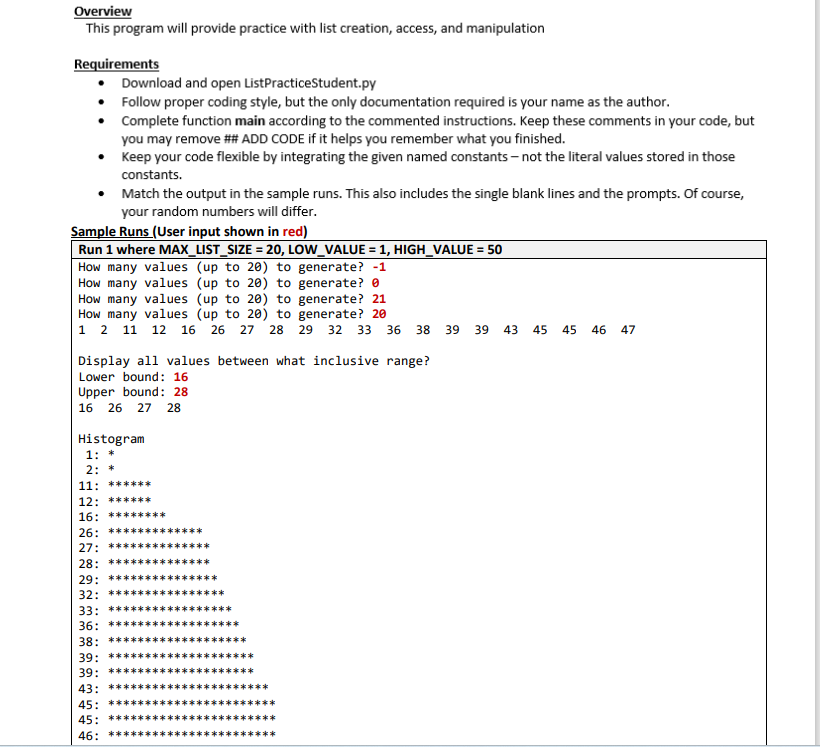
## ADD CODE # Loop to display each data value on the same line with space delimiters print(" Display all values between what inclusive range?") ## ADD CODE # Prompt for and retrieve the lower and upper bound as integers
## ADD CODE # Loop to display the values lying in the given range by the user # This will be a loop with an if statement inside of it.
print(" Histogram") ## ADD CODE # Display a histogram for each value in data where a * # is displayed for how many times 2 evenly divides into # (value + 1). For example if the data value is 1, # 1 + 1 is 2, so one * is shown, If the data value is 2, 2 + 1 is 3, # so one * is shown, If the data value is 3, 3 + 1 is 4, so two *'s # are shown, etc. # The data values in the histogram are accessed in sorted order.
main()
overview This program will provide practice with list creation, access, and manipulation Requirements - Download and open ListPracticeStudent.py - Follow proper coding style, but the only documentation required is your name as the author. - Complete function main according to the commented instructions. Keep these comments in your code, but you may remove \#\# ADD CODE if it helps you remember what you finished. - Keep your code flexible by integrating the given named constants - not the literal values stored in those constants. - Match the output in the sample runs. This also includes the single blank lines and the prompts. Of course, your random numbers will differ
Step by Step Solution
There are 3 Steps involved in it

Get step-by-step solutions from verified subject matter experts
 Study Help