







Question: Write a complete command that will use ps -ef and others to produce a list of your current processes but sorted by PPID. Pay attention
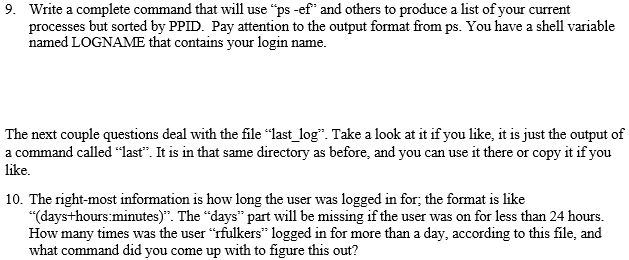
Write a complete command that will use "ps -ef" and others to produce a list of your current processes but sorted by PPID. Pay attention to the output format from ps. You have a shell variable named LOGNAME that contains your login name. 9. The next couple questions deal with the file "last log". Take a look at it if you like, it isjust the output of a command called "last. It is in that same directory as before, and you can use it there or copy it if you like 10. The right-most information is how long the user was logged in for, the format is like "days+hours:minutes)". The "days" part will be missing if the user was on for less than 24 hours. How many times was the user "rfulkers" logged in for more than a day, according to this file, and what command did you come up with to figure this out? Write a complete command that will use "ps -ef" and others to produce a list of your current processes but sorted by PPID. Pay attention to the output format from ps. You have a shell variable named LOGNAME that contains your login name. 9. The next couple questions deal with the file "last log". Take a look at it if you like, it isjust the output of a command called "last. It is in that same directory as before, and you can use it there or copy it if you like 10. The right-most information is how long the user was logged in for, the format is like "days+hours:minutes)". The "days" part will be missing if the user was on for less than 24 hours. How many times was the user "rfulkers" logged in for more than a day, according to this file, and what command did you come up with to figure this out
Step by Step Solution
There are 3 Steps involved in it

Get step-by-step solutions from verified subject matter experts
 Study Help