







Question: Write a complete PowerShell script to print a receipt (for a Daily Needs Store) based on a fixed number of input quantities (8 food items
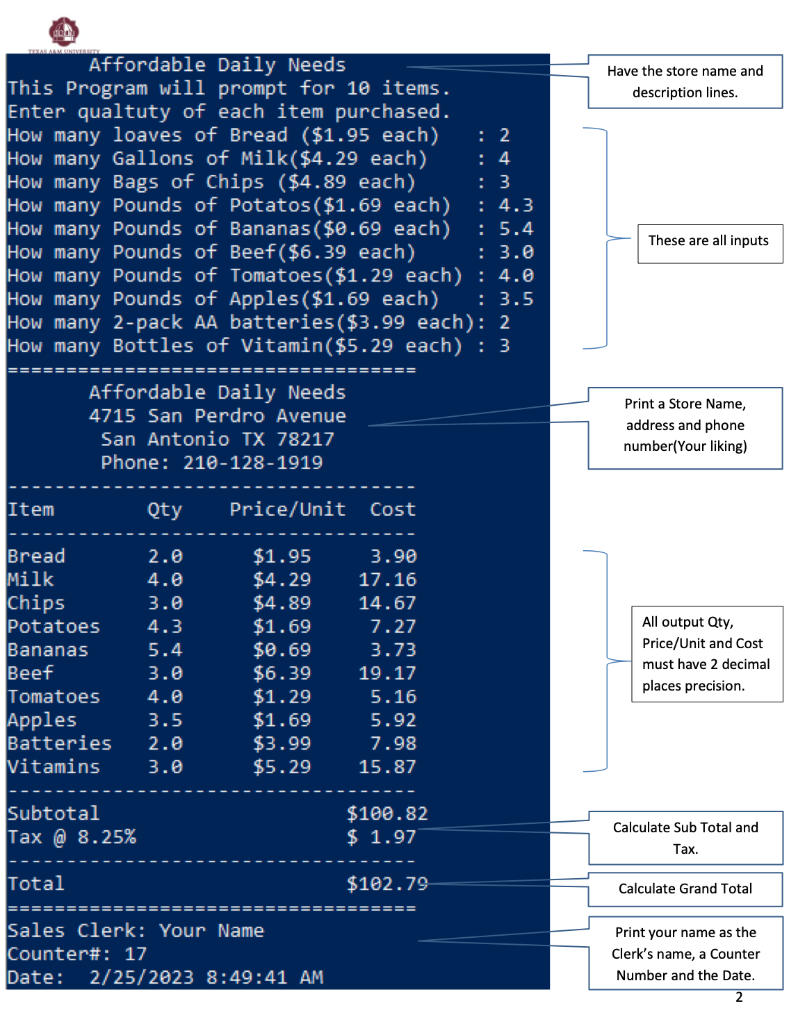
Write a complete PowerShell script to print a receipt (for a Daily Needs Store) based on a fixed number of input quantities (8 food items and 2 other items) as shown in figure below. User enters ONLY the quantity. Price is fixed for each item as shown in each echo statement. Then the script must print the receipt for the items purchased as shown in the figure: Note: 8.25% tax is charged ONLY on non-food items such as Batteries and Vitamins. Note: Full credit is given only if you produce the output exactly as shown below. Neatness, column alignment, $signs, date, clerk name and counter# (any number between 1 and 30) are essential items in addition to the body of the receipt.
Powershell
Item Qty Price/Unit Cost BreadMilkChipsPotatoesBananasBeefTomatoesApplesBatteriesVitamins2.04.03.04.35.43.04.03.52.03.0$1.95$4.29$4.89$1.69$0.69$6.39$1.29$1.69$3.99$5.293.9017.1614.677.273.7319.175.165.927.9815.87 All output Qty, Price/Unit and Cost must have 2 decimal places precision. Subtotal $100.82 Tax@8.25\% $1.97 Calculate Sub Total and Tax. Total $102.79 Calculate Grand Total Sales Clerk: Your Name Print your name as the Counter\#: 17 Clerk's name, a Counter Date: 2/25/20238:49:41 AM Number and the Date. Item Qty Price/Unit Cost BreadMilkChipsPotatoesBananasBeefTomatoesApplesBatteriesVitamins2.04.03.04.35.43.04.03.52.03.0$1.95$4.29$4.89$1.69$0.69$6.39$1.29$1.69$3.99$5.293.9017.1614.677.273.7319.175.165.927.9815.87 All output Qty, Price/Unit and Cost must have 2 decimal places precision. Subtotal $100.82 Tax@8.25\% $1.97 Calculate Sub Total and Tax. Total $102.79 Calculate Grand Total Sales Clerk: Your Name Print your name as the Counter\#: 17 Clerk's name, a Counter Date: 2/25/20238:49:41 AM Number and the Date
Step by Step Solution
There are 3 Steps involved in it

Get step-by-step solutions from verified subject matter experts
 Study Help