







Question: Write a computer program using Python to implement the K-means clustering algorithm that was explained in the class. Your program should start by prompting the
Write a computer program using Python to implement the K-means clustering algorithm that was explained in the class. Your program should start by prompting the user to enter the file name where the data are stored and the number of clusters (K). Assume that the dataset is stored as comma-separated values similar to the examples that we used in the class. The first line is a header for the attributes. The data records starts from the second line where every line represents one record. Your program should be able to ignore any attribute (column "UNS" for the dataset). The results will show the centroids of the clusters, the number of instances in each class, the total square error, and the number iterations that was used to get this result. You need to submit your complete source code and a project report that include: Discussion of the complexity of the implemented algorithm, The advantage and disadvantages of the algorithm Any possible enhancement to this algorithm. Screen shots of the results with different number of clusters Discussion of the testing results of the implemented algorithm for different datasets that was used for testing.
This is a portion of the dataset called Data_User_Modeling_Dataset.csv (There are 145 records in total):
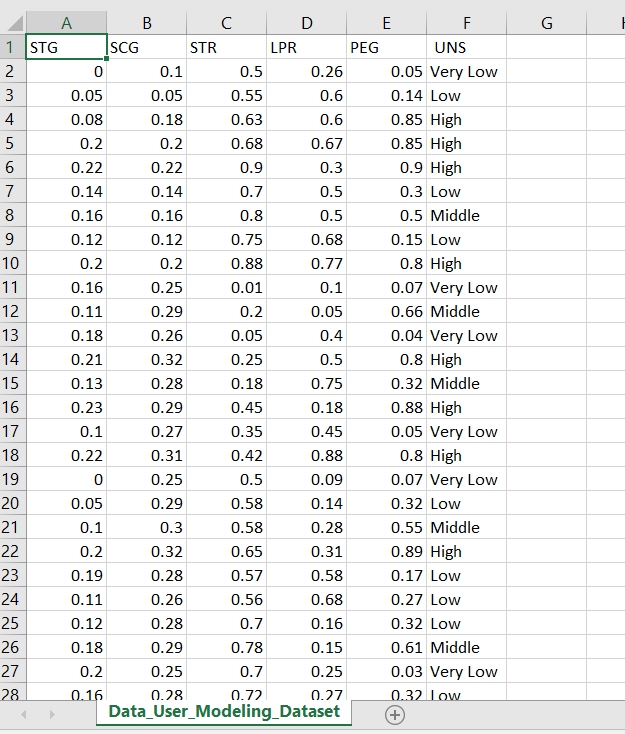
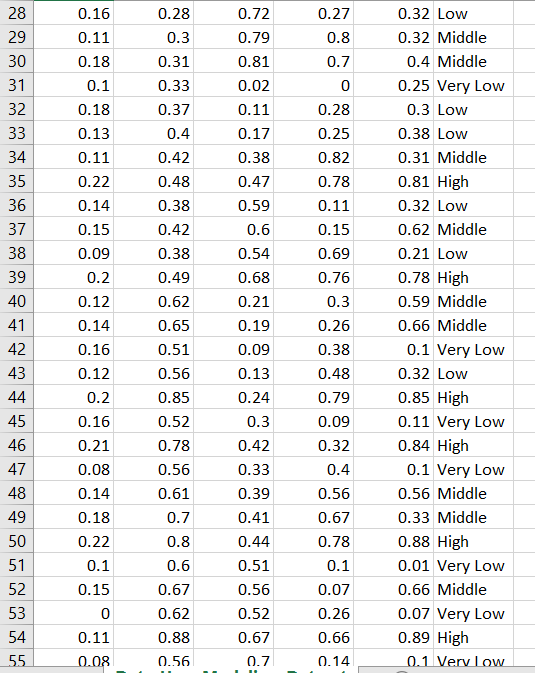
1 STG SCG STR LPR PEG UNS 0.26 0 0.05 0.08 0.05 Very Low 0.14 Low 0.85 High 0.85 High 0.05 0.18 0.55 0.63 0.68 0.67 0.9 High 0.3 Lovw 0.5 Middle 0.22 0.22 0.16 0.12 0.16 0.1 20.75 0.88 0.01 0.68 0.15 Low 0.8 High 0.07 Very Low 0.16 0.11 0.18 0.21 0.13 0.23 0.25 0.29 0.26 0.32 0.28 0.29 0.27 0.31 0.25 0.29 0.05 0.66 Middle 13 0.05 0.25 0.18 0.45 0.35 0.42 0.04 Very Low 0.8 High 0.32 Middle 0.88 High 0.05 Very Low 15 0.75 0.18 0.45 0.8 High 0.07 Very Low 0.32 Low 0.55 Middle 0.89 High 0.17 Low 0.27 Low 0.32 Low 0.61 Middle 0.03 Very Low 0.22 0 0.05 o.S0.88 0.09 0.58 0.58 0.65 0.57 0.56 0.28 0.31 0.58 0.68 0.16 0.15 0.25 0.27 Data-User-Modeling-Dataset 0.32 0.28 0.26 0.28 0.29 0.25 0.78 0.19 0.11 0.12 0.18 0.72
Step by Step Solution
There are 3 Steps involved in it

Get step-by-step solutions from verified subject matter experts
 Study Help