







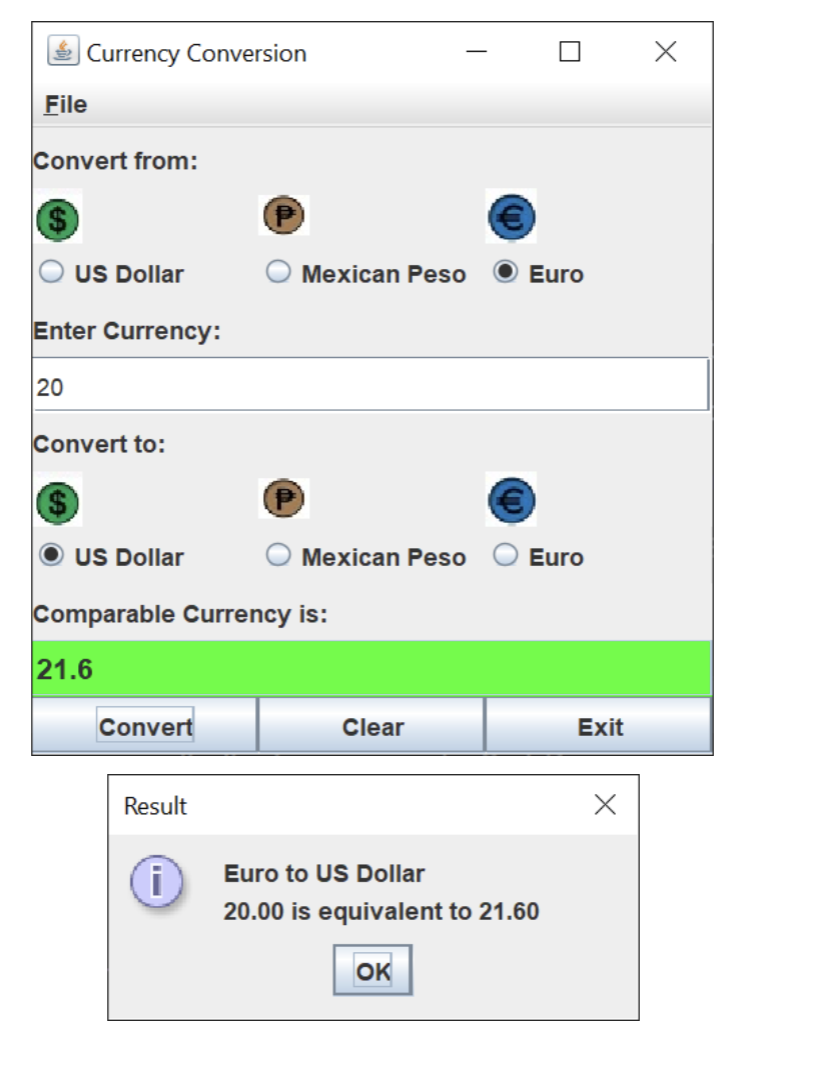
Question: Write a currency - conversion GUI application as shown in the picture. The input currency should be entered from the keyboard ( via a JTextField
Write a currencyconversion GUI application as shown in the picture. The input currency should be entered from the keyboard via a JTextField A readonlyJTextField should be used to display the converted currency. Use the given images to create currency icons using JLabels. The application should allow the user to make a conversion between any two types Currency Conversion images dollar.png euro.png peso.png userloginpng
File
Convert from:
US Dollar
Mexican Peso
Euro
Enter Currency:
Convert to:
$
US Dollar
Mexican Peso
Euro
Comparable Currency is:
Convert
Clear
Exit
Result
Euro to US Dollar
is equivalent to
Step by Step Solution
There are 3 Steps involved in it
1 Expert Approved Answer
Step: 1 Unlock

Question Has Been Solved by an Expert!
Get step-by-step solutions from verified subject matter experts
Step: 2 Unlock
Step: 3 Unlock
 Study Help