







Question: Write a detailed pseudocode for the problem in the picture. You must include all variable declarations and programming logic necessary to complete the task described.
Write a detailed pseudocode for the problem in the picture. You must include all variable declarations and
programming logic necessary to complete the task described. Someone should be able to
read through your pseudocode and completely understand the functionality of the sketch.
ARDUINO
This is the code in page 126
//Sending Multiple Variables at Once
//Define LED pins
const int RED =11;
const int GREEN =10;
const int BLUE =9;
//Variables for RGB levels
int rval = 0;
int gval = 0;
int bval = 0;
void setup()
{
Serial.begin(9600); //Serial Port at 9600 baud
//Set pins as outputs
pinMode(RED, OUTPUT);
pinMode(GREEN, OUTPUT);
pinMode(BLUE, OUTPUT);
}
void loop()
{
//Keep working as long as data is in the buffer
while (Serial.available() > 0)
{
rval = Serial.parseInt(); //First valid integer
gval = Serial.parseInt(); //Second valid integer
bval = Serial.parseInt(); //Third valid integer
if (Serial.read() == ' ') //Done transmitting
{
//set LED
analogWrite(RED, rval);
analogWrite(GREEN, gval);
analogWrite(BLUE, bval);
}
}
}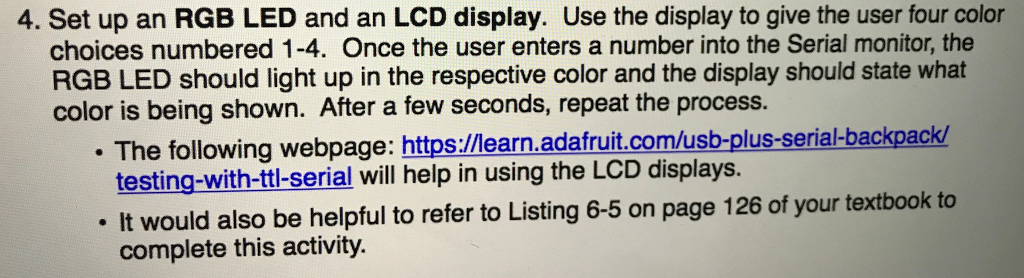
4. Set up an RGB LED and an LCD display. Use the display to give the user four color choices numbered 1-4. Once the user enters a number into the Serial monitor, the RGB LED should light up in the respective color and the display should state what color is being shown. After a few seconds, repeat the process. The following webpage: https://learn.adafruit.com/usb-plus-serial-backpack/ testing-with-ttl-serial will help in using the LCD displays. It would also be helpful to refer to Listing 6-5 on page 126 of your textbook to complete this activity
Step by Step Solution
There are 3 Steps involved in it

Get step-by-step solutions from verified subject matter experts
 Study Help