







Question: Write a full report with C program examples that differentiate between the several functions from the standard input/output library (Conio.h & stdio.h) (full report contains
Write a full report with C program examples that differentiate between the several functions from the standard input/output library (Conio.h & stdio.h) (full report contains a description for each functions . Then compare between them based on their output)
#include
#include
#include
#include
using namespace std;
void foodmenu();
void drinkmenu();
void checkout();
void mainmenu();
int totalCart=0;
string item[999];
float price[999];
int qty[999];
void foodmenu()
{
int optionF, quantityF;
float priceF;
char N,contF;
do
{
printf(" #Food Menu# ");
printf("1. Nasi Ayam -RM 08.00/unit ");
printf("2. Nasi Beryani -RM 10.00/unit ");
printf("3. Nasi Arab -RM 12.50/unit ");
printf("Select Your Option :");
scanf("%d", &optionF);
if (optionF==1)
{
item[totalCart]="Nasi Ayam";
printf(" you selected Nasi Ayam ");
}
else if(optionF==2)
{
item[totalCart]="Nasi Beryani";
printf(" You selected Nasi Beryani ");
}
else if(optionF==3){
item[totalCart]="Nasi Arab";
printf(" You selected Nasi Arab ");
}
printf(" Quantity : ");
scanf("%d", &quantityF);
qty[totalCart]=quantityF;
switch(optionF)
{
case 1 :
priceF = 8*quantityF;
break;
case 2 :
priceF = 10*quantityF;
break;
case 3 :
priceF = 12.5*quantityF;
break ;
default : printf (" Your selection is invalid please input the valid number.");
}
price[totalCart]=priceF;
totalCart++;
printf(" Price Total is %0.2f ", priceF);
printf(" Do you want to take another food menu ? (Y/N)");
contF = getch();
}while(contF == 'Y' || contF =='y');
mainmenu();
return;
}
void drinkmenu()
{
int optionD, quantityD;
float priceD;
char contD;
do
{
printf(" #Drink Menu ");
printf("1. Fresh Orange -RM3.00 ");
printf("2. Mango Lassi -RM3.50 ");
printf("3, Strawberry -RM4.00 ");
printf("Your Option :");
scanf("%d", &optionD);
if (optionD==1)
{
item[totalCart]="Fresh Orange";
printf(" you selected Fresh Orange ");
}
else if(optionD==2)
{
item[totalCart]="Mango Lassi";
printf(" You selected Mango Lassi ");
}
else if(optionD==3){
item[totalCart]="Strawberry";
printf(" You selected Strawberry ");
}
printf(" Quantity : ");
scanf("%d", &quantityD);
qty[totalCart]=quantityD;
switch(optionD)
{
case 1 : priceD = 3*quantityD;
break;
case 2 : priceD = 3.5*quantityD;
break;
case 3 : priceD = 4*quantityD;
break ;
default : printf (" Your selection is invalid please input the valid number.");
}
price[totalCart]=priceD;
totalCart++;
printf("Price Total is %0.2f", priceD);
printf(" Do you want to take another food menu ? (Y/N)");
contD = getch();
}while (contD == 'Y' || contD=='y');
mainmenu();
}
void checkout()
{
float cash;
float totalPrice=0;
printf(" Check Out ");
printf("===================================== ");
for(int i=0; i
{
cout
cout
totalPrice+=price[i];
}
printf("===================================== ");
printf(" Total : RM %0.2f",totalPrice);
printf(" Enter the Cash Ammount : ");
scanf("%f", &cash);
if(cash
printf("You don't have sufficient balance, your order has been canceled");
}else{
printf("Your change : %0.2f ", (cash-totalPrice));
printf("THANK YOU!!");
}
}
void mainmenu()
{
int menuM;
char contM;
printf(" #Main Menu ");
printf("1. Food Menu ");
printf("2. Drink Menu ");
printf("3. Checkout ");
printf("Select your option :");
scanf("%d", &menuM);
switch (menuM)
{
case 1 : foodmenu();
break;
case 2 : drinkmenu();
break;
case 3 : checkout();
break;
default :
printf(" Thank You");
break;
}
}
int main ()
{
int option;
char cont;
do
{
mainmenu();
printf(" Do you want to buy again? (Y/N) ");
cont = getch();
}while(cont == 'Y' || cont == 'y');
return 0;
}
Do description for each functions and explain the program step by step
these are some picture for sample functions description.
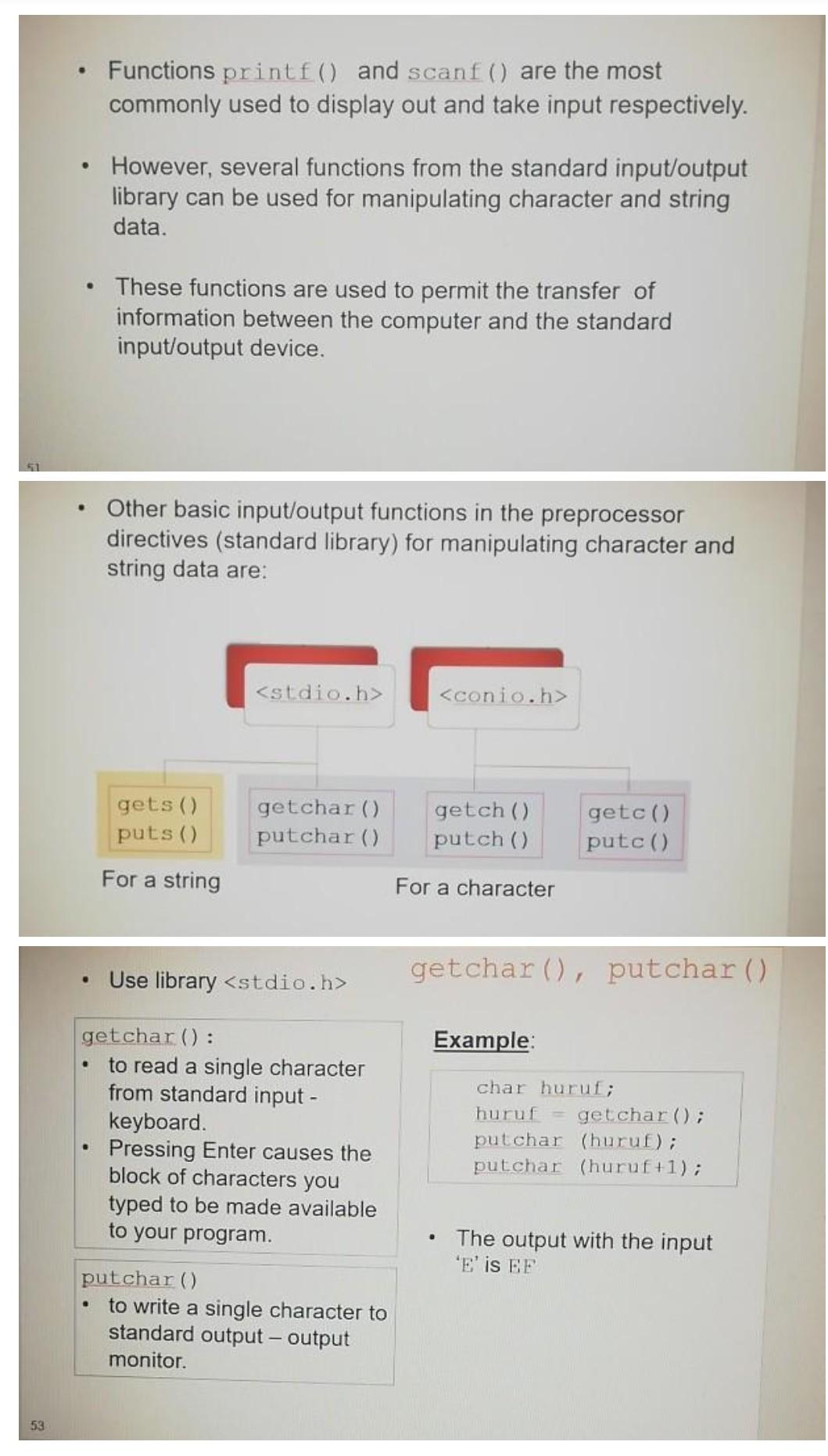
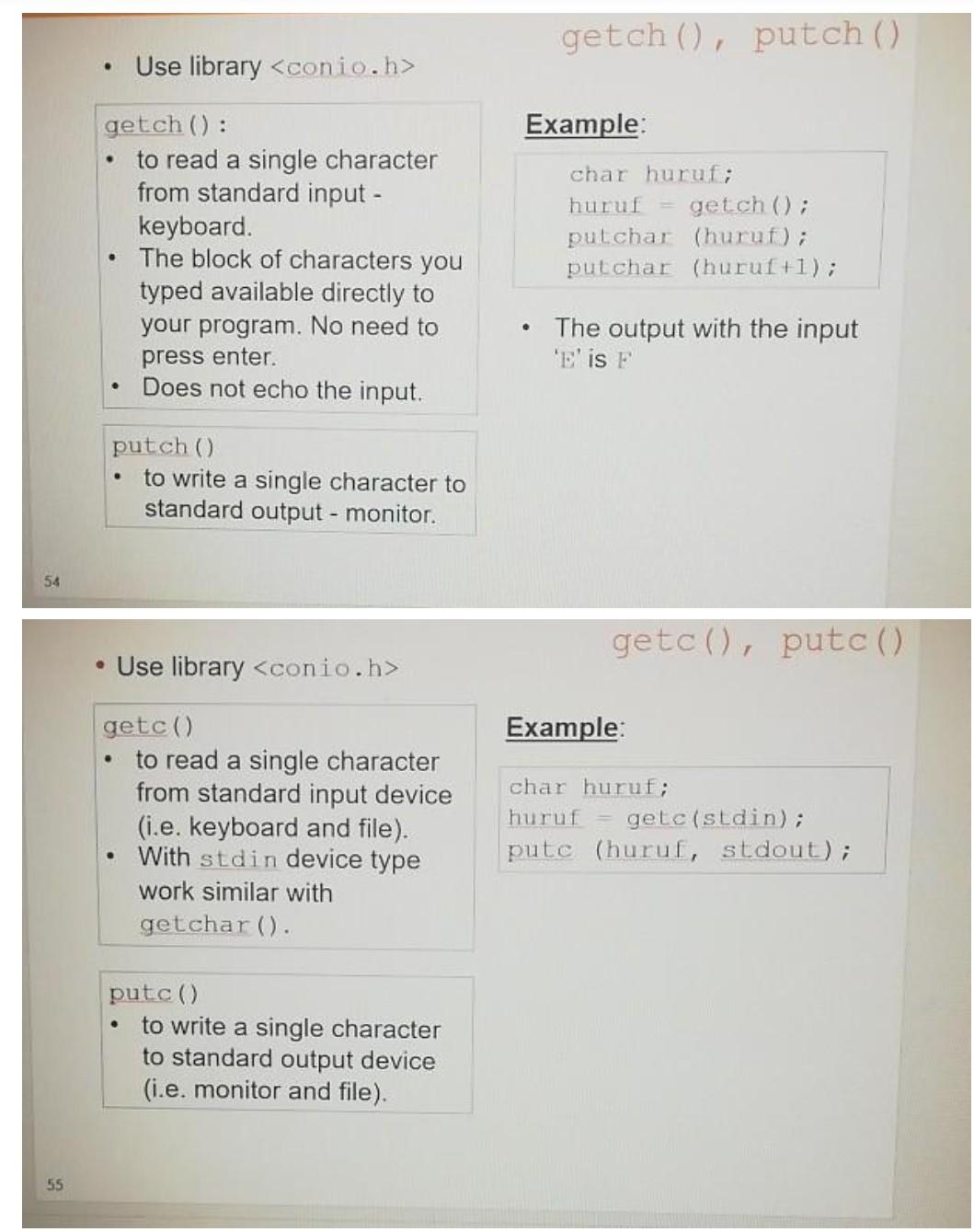
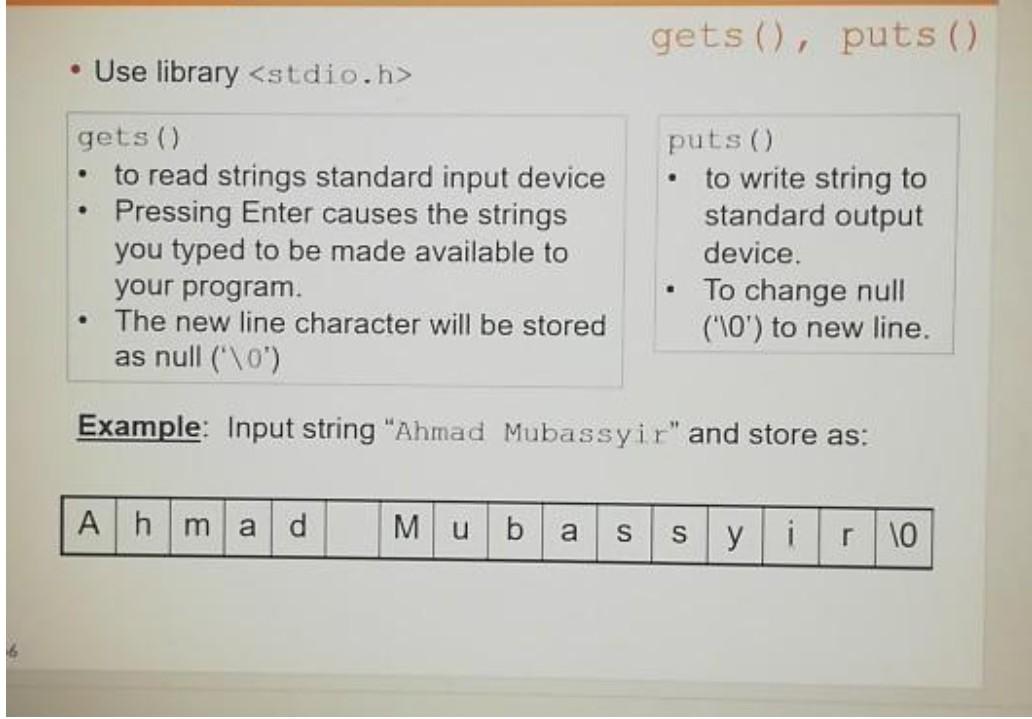
Functions printf() and scanf() are the most commonly used to display out and take input respectively. . However, several functions from the standard input/output library can be used for manipulating character and string data. . These functions are used to permit the transfer of information between the computer and the standard input/output device. Other basic input/output functions in the preprocessor directives (standard library) for manipulating character and string data are:
Step by Step Solution
There are 3 Steps involved in it

Get step-by-step solutions from verified subject matter experts
 Study Help