







Question: Write a function fixed point to floating point() that takes only one argument, a string called value that contains a binary fixed-point number with exactly
Write a function fixed point to floating point() that takes only one argument, a string called value that contains a binary fixed-point number with exactly 23 digits to the right of the radix point.
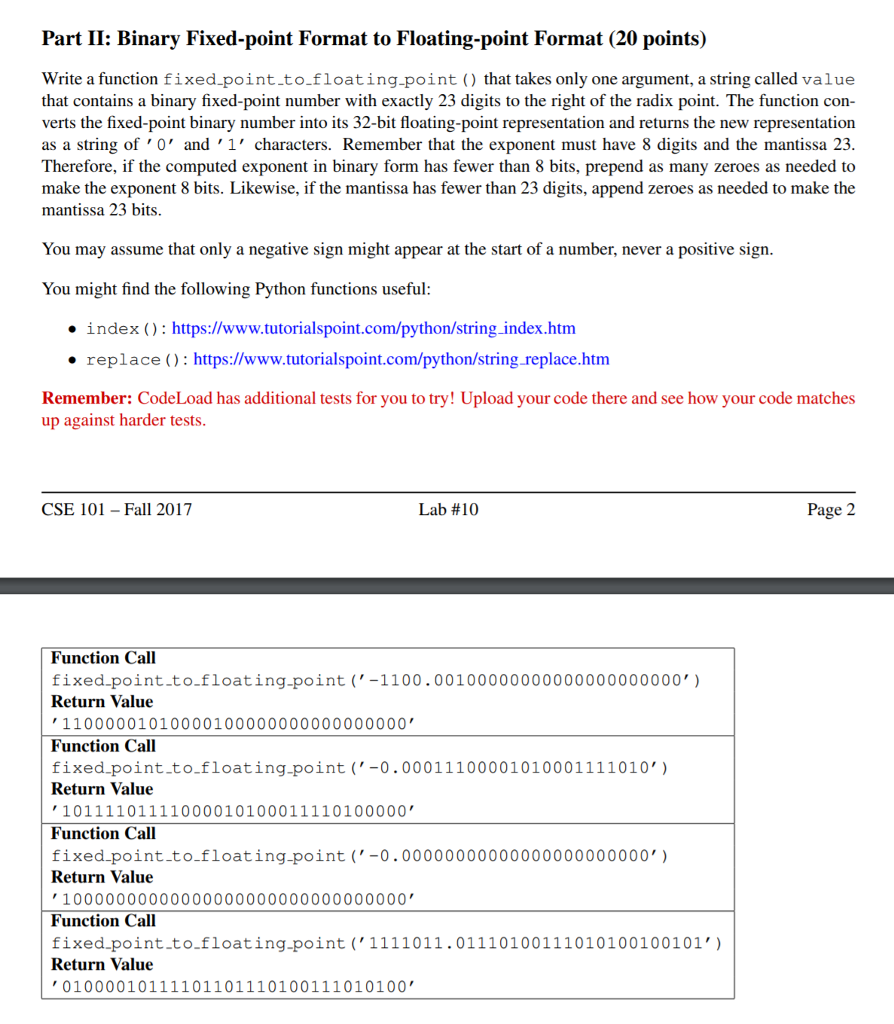
Part II: Binary Fixed-point Format to Floating-point Format (20 points) Write a function fixed point.to.floating-point ) that takes only one argument, a string called value that contains a binary fixed-point number with exactly 23 digits to the right of the radix point. The function con- verts the fixed-point binary number into its 32-bit floating-point representation and returns the new representation as a string of '0' and '1' characters. Remember that the exponent must have 8 digits and the mantissa 23 Therefore, if the computed exponent in binary form has fewer than 8 bits, prepend as many zeroes as needed to make the exponent 8 bits. Likewise, if the mantissa has fewer than 23 digits, append zeroes as needed to make the mantissa 23 bits You may assume that only a negative sign might appear at the start of a number, never a positive sigrn You might find the following Python functions useful . index (): https://www.tutorialspoint.com/python/string_index.htm replace ( ) : https://www.tutorialspoint.com/python/string.replace.htm Remember: CodeLoad has additional tests for you to try! Upload your code there and see how your code matches up against harder tests CSE 101- Fall 2017 Lab #10 Page 2 Function Call fixed-point-to-floating-point ('-1100. 00100000000000000000000, ) Return Value 11000001010000100000000000000000 Function Call fixed point.to.floating-point(-0.00011100001010001111010') Return Value 10111101111000010100011110100000' Function Call fixed.point.to.floating-point ('-0.00000000000000000000000') Return Value 10000000000000000000000000000000' Function Call fixed point.to.floating-point ('1111011.01110100111010100100101') Return Value 01000010111101101110100111010100
Step by Step Solution
There are 3 Steps involved in it

Get step-by-step solutions from verified subject matter experts
 Study Help