







Question: Write a function in MIPS assembly by using the provided test_harness.s to complete the following requirements. Modify only the Place your function here part! #
Write a function in MIPS assembly by using the provided test_harness.s to complete the following requirements. Modify only the "Place your function here" part!
# test_harness.s
#-------------------------------------------------------------------------
# PLACE YOUR FUNCTION HERE
#-------------------------------------------------------------------------
.text
#-------------------------------------------------------------------------
# DO NOT MODIFY BELOW THIS COMMENT
#-------------------------------------------------------------------------
# Test harness
# Ask user to enter the hex string.
# Print the resulting integer, or report overflow.
# An empty string will terminate the program.
.data
# User prompt strings
prompt_str: .asciiz "Enter your hexadecimal string. Just hit enter to
quit: "
your_str: .asciiz "Your string: "
linefeed: .asciiz " "
dbl_linefeed: .asciiz " "
value_str: .asciiz "Value : "
overflow_str: .asciiz "Overflow detected! "
all_done_str: .asciiz " Good luck with your program!. Goodbye. "
hex_str_buf: # Space for input string from user.
.space 256
.text
.globl main
.globl convert_hex_str
main:
get_input_string:
# display prompt
li $v0,4 # code for print_string
la $a0,prompt_str # point $a0 to prompt string
syscall # print the string
# get the input string from the user
li $v0,8 # code for read_string
la $a0,hex_str_buf # $a0 - input buffer address
li $a1,256 # $a1 - Input buffer length
syscall # Get the string
# The string is NUL terminated.
la $s0,hex_str_buf # Save string in $s0
# SPIM puts a closing NEW LINE (ASCII 0xa) on the end of the string.
# We need to strip that off, since that is not a legal character in
our hex format.
# We just overwrite it with NUL (ASCII 0)
move $s1, $s0 # $s1 char pointer
strip_nl:
lbu $s2, ($s1) # $s2 Get the current character
beqz $s2, remove_nl
addi $s1, $s1, 1 # Next character
j strip_nl
remove_nl:
li $s2, 10 # Expected NL = ASCII 10 (0xa)
lbu $s3, -1($s1) # Character just before the NUL terminator
bne $s3, $s2, check_for_exit
li $s2, 0 # NUL Char (0)
sb $s2, -1($s1) # Wipe out NL
check_for_exit:
# Check if the input string is empty.
lbu $s2, ($s0) # Load first byte of the string.
beq $s2, $0, all_done # Exit if first byte is NUL terminator
# print result string
# - Prompt string
li $v0,4 # code for print_string
la $a0, your_str
syscall # print the string
# - The string
li $v0,4 # code for print_string
move $a0, $s0
syscall # print the string
# - LF
li $v0,4 # code for print_string
la $a0,linefeed # point $a0 to string
syscall # print the string
# Call Hex Converter
move $a0, $s0
jal convert_hex_str
move $s1, $v0 # Save value result in $s0
move $s2, $v1 # Save error result in $s1
beq $v1, $0, no_overflow
# - Overflow detected
# Print overflow message
li $v0,4
la $a0, overflow_str
syscall # print the string
j get_input_string # Repeat
# - Value
no_overflow:
# Print value message.
li $v0,4 # code for print_string
la $a0, value_str
syscall # print value prompt
li $v0,1 # code for print_int
move $a0, $s1
syscall # print the value itself.
li $v0,4
la $a0,dbl_linefeed
syscall # print the linefeed
j get_input_string # Repeat
# - Prompt string
li $v0,4 # code for print_string
la $a0, error_str
syscall # print the string
# All done, thank you!
all_done:
li $v0,4 # code for print_string
la $a0, all_done_str
syscall # print the string
li $v0,10 # code for exit
syscall # exit program
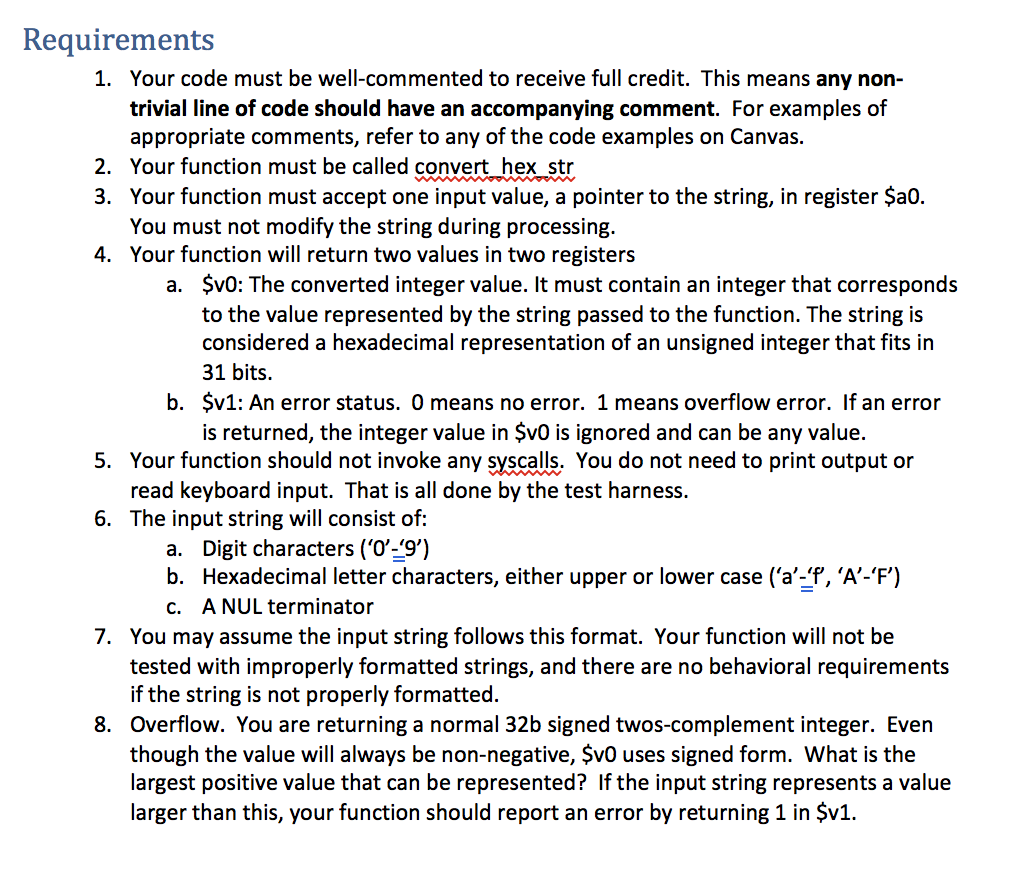
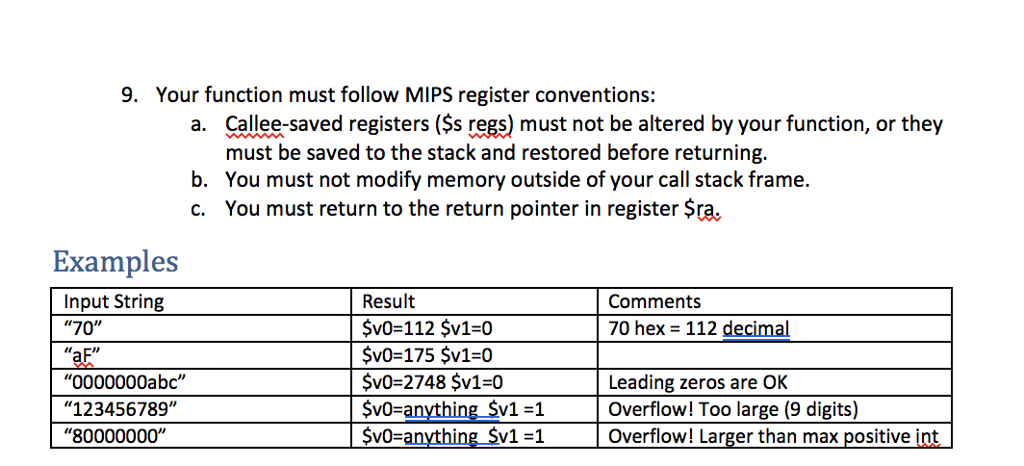
Requirements Your code must be well-commented to receive full credit. This means any non- trivial line of code should have an accompanying comment. For examples of appropriate comments, refer to any of the code examples on Canvas. Your function must be called convert hex str Your function must accept one input value, a pointer to the string, in register $ao. You must not modify the string during processing. Your function will return two values in two registers 1. 2. 3. 4. a. $v0: The converted integer value. It must contain an integer that corresponds to the value represented by the string passed to the function. The string is considered a hexadecimal representation of an unsigned integer that fits in 31 bits. $v1: An error status. 0 means no error. 1 means overflow error. If an error is returned, the integer value in Sv0 is ignored and can be any value. b. Your function should not invoke any syscalls, You do not need to print output or read keyboard input. That is all done by the test harness. 5. 6. The input string will consist of: a. Digit characters ('O-9) b. Hexadecimal letter characters, either upper or lower case ('a'-'f, 'A'-'F') A NUL terminator c. You may assume the input string follows this format. Your function will not be tested with improperly formatted strings, and there are no behavioral requirements if the string is not properly formatted. Overflow. You are returning a normal 32b signed twos-complement integer. Even though the value will always be non-negative, $vO uses signed form. What is the largest positive value that can be represented? If the input string represents a value larger than this, your function should report an error by returning 1 in $v1. 7. 8
Step by Step Solution
There are 3 Steps involved in it

Get step-by-step solutions from verified subject matter experts
 Study Help