







Question: Write a function with the header: function [uniqueWords] = myWordCloud(bunchOfWords) which takes a cell array of strings called bunchOfWords, counts the number of times each
Write a function with the header:
function [uniqueWords] = myWordCloud(bunchOfWords)
which takes a cell array of strings called bunchOfWords, counts the number of times each word in the array appears, and orders them according to frequency. The output, uniqueWords is an nx2 cell array in which n is the number of unique words, the first column contains each of the unique words, and the second column contains the number of times that word appeared. HINTS:
1. Make a cell array called uniqueWords in which the first column contains each unique word (strings) and the second column contains the number of times that word appeared (integers). For example, after running the test case below:
>> uw{5,1}
ans = 'Work'
>> uw{5,2}
ans = 77.00
2. Make an outer loop which cycles through each word in bunchOfWords
3. Make an inner loop which compares each word in bunchOfWords to the current list of uniqueWords.
4. If you encounter a word from bunchOfWords which is already in uniqueWords, increment the integer in column 2 of the row in uniqueWords containing the word by 1.
5. If you encounter a word from bunchOfWords which is NOT already in uniqueWords, concatenate that word to the end of uniqueWords and make the second column equal to 1.
6. Use strcmpi to compare bunchOfWords{i} to uniqueWords{j,1}
?7. At the end of your code, outside both loops, call sortrows on uniqueWords to sort it
![Write a function with the header: function [uniqueWords] = myWordCloud(bunchOfWords) which takes](https://dsd5zvtm8ll6.cloudfront.net/si.experts.images/questions/2024/09/66f3d73da8f8c_38166f3d73d468c1.jpg)
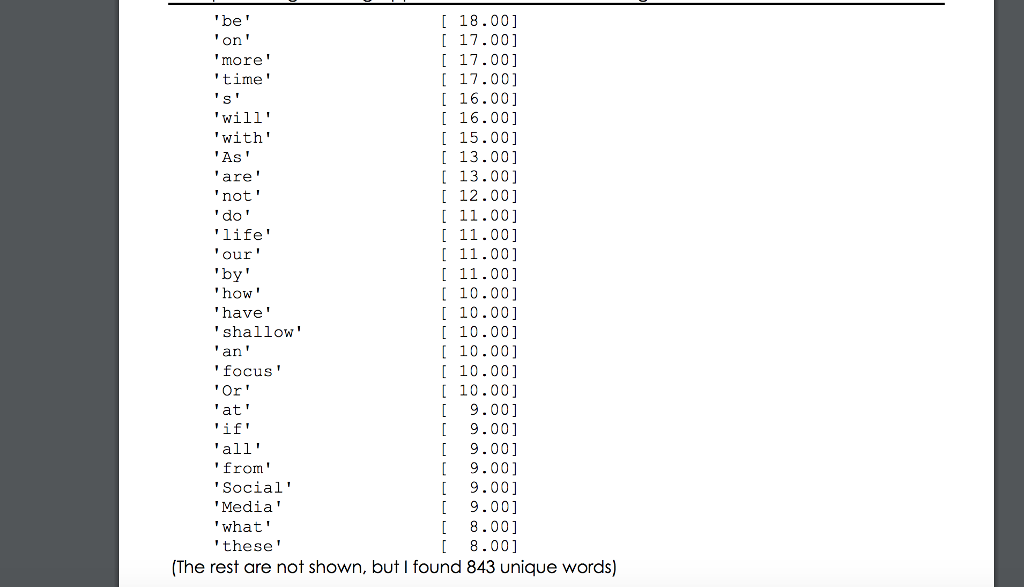
Test Case: > Epfopen ('DeepWork.txt', r >AmyWordCounter (fp, delimVec); >>fclose all; >> uwmyWordCloud (A) 843x2 cell array [106.00) 1106.00] [ 81.00] [ 81.00] 77.00) 59.00] t59.00] 46.00] [ 46.00] [45.00] 43.00] [ 43.00] [ 30.00] 27.00] I 22.00] [ 21.00] 21.00] to the' you Work' your of' that' Deep' it' Newport' this' for' Can
Step by Step Solution
There are 3 Steps involved in it

Get step-by-step solutions from verified subject matter experts
 Study Help