







Question: Write a involve function, in matlab graphical implementation ( if applicable, used MATLAB GUI ), for that method. The program should display (explain) the steps
-
Write a involve function, in matlab graphical implementation (if applicable, used MATLAB GUI), for that method. The program should display (explain) the steps of the selected method. Refer to the attached project.
-
Compare the selected method with one of a numerical method youve studied in class.
-
for example
-
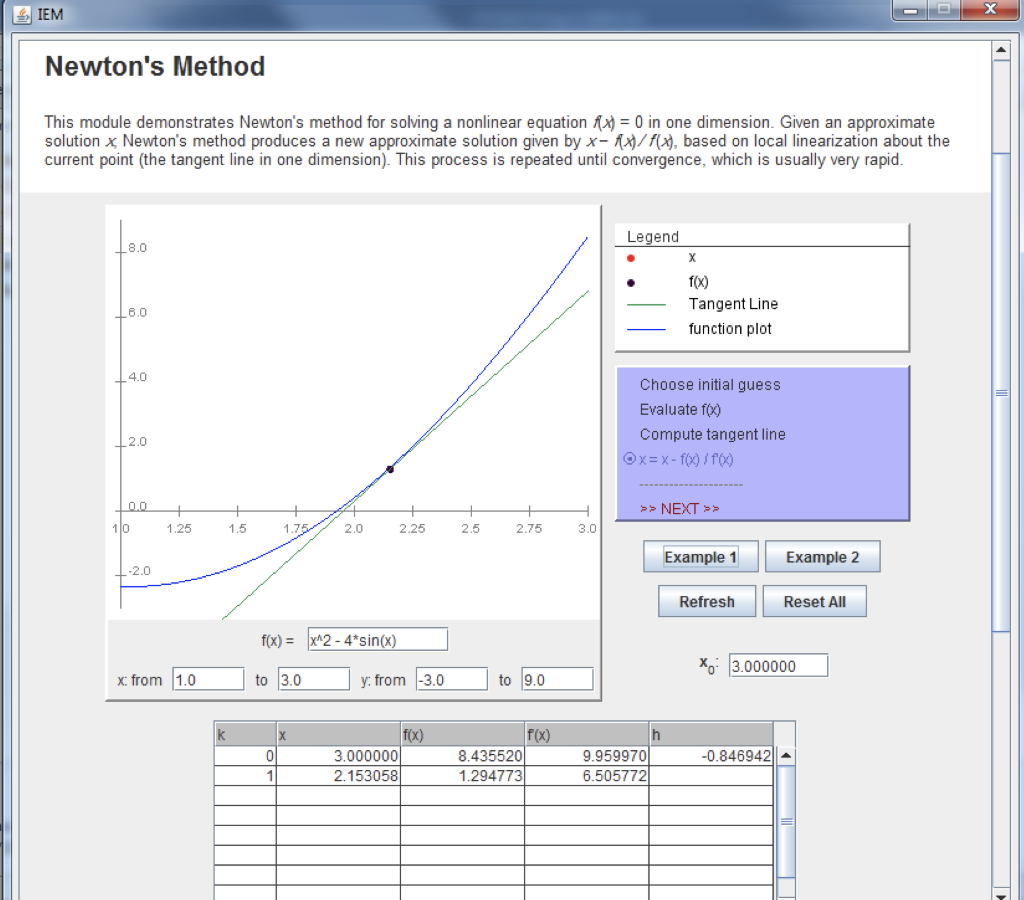
IEM Newton's Method This module demonstrates Newton's method for solving a nonlinear equation f(x) = 0 in one dimension. Given an approximate solution x Newton's method produces a new approximate solution given by x-)/(x), based on local linearization about the current point (the tangent line in one dimension). This process is repeated until convergence, which is usually very rapid. L8.0 Legend X 16.0 f(x) Tangent Line function plot 4.0 Choose initial guess Evaluate fo Compute tangent line Ox= x - foto L 2.0 >> NEXT >> H 3.0 10 1.25 1.5 1.75 2.0 2.25 2.5 2.75 Example 1 Example 2 -2.0 Refresh Reset All f(x) = x^2-4*sin(x) * 3.000000 x: from 1.0 to 3.0 y: from -3.0 to 9.0 ol f(x) 3.000000 2. 153058 f(x) 8.435520 1.294773 -0.846942|| 9.959970 6.505772 1 IEM Newton's Method This module demonstrates Newton's method for solving a nonlinear equation f(x) = 0 in one dimension. Given an approximate solution x Newton's method produces a new approximate solution given by x-)/(x), based on local linearization about the current point (the tangent line in one dimension). This process is repeated until convergence, which is usually very rapid. L8.0 Legend X 16.0 f(x) Tangent Line function plot 4.0 Choose initial guess Evaluate fo Compute tangent line Ox= x - foto L 2.0 >> NEXT >> H 3.0 10 1.25 1.5 1.75 2.0 2.25 2.5 2.75 Example 1 Example 2 -2.0 Refresh Reset All f(x) = x^2-4*sin(x) * 3.000000 x: from 1.0 to 3.0 y: from -3.0 to 9.0 ol f(x) 3.000000 2. 153058 f(x) 8.435520 1.294773 -0.846942|| 9.959970 6.505772 1
Step by Step Solution
There are 3 Steps involved in it

Get step-by-step solutions from verified subject matter experts
 Study Help