







Question: Write a java application that allows the user to read, display, sort, and search the name (type String), height and weight as well as body
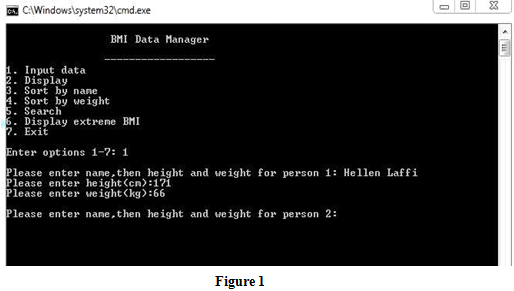
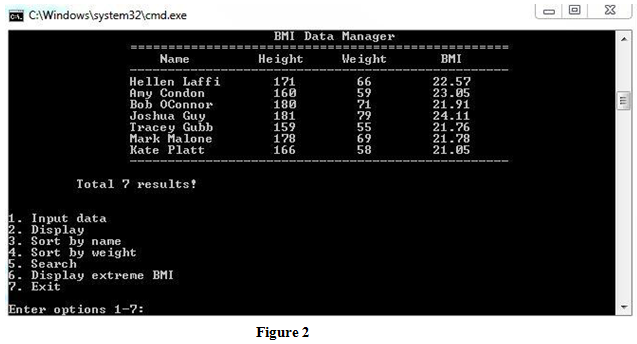
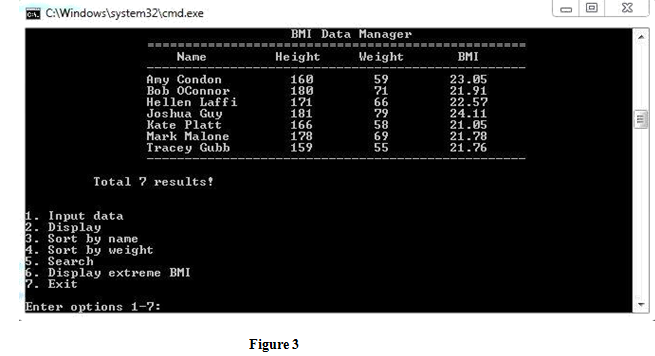
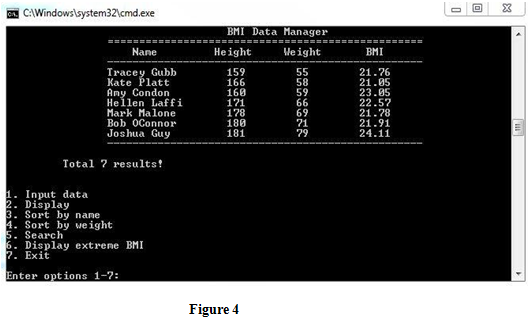
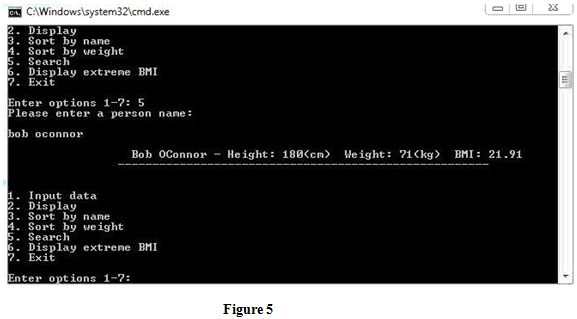
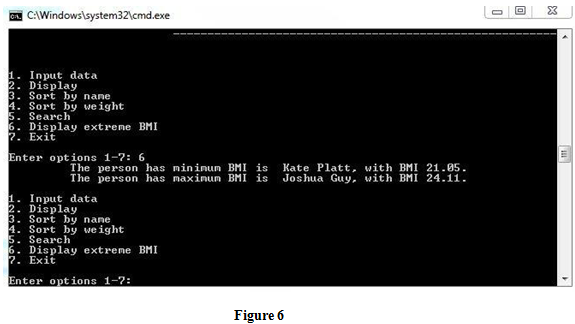
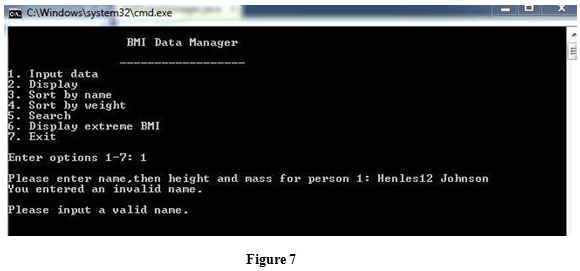
Write a java application that allows the user to read, display, sort, and search the name (type String), height and weight as well as body mass index (BMI) of a person for N people. N should be declared as a constant and should be either equals to the largest digit of your student ID number or N=9 (if the highest digit of your student ID number is less than 9). The method of calculating BMI after input of height and weight is the same as Assignment 1 specification. The name, height, weight and BMI must be stored in separate single dimension arrays/arrayLists. This requires that your implementation must use parallel arrays (or arrayLists). If there are any uses of an array of records or structures/objects, it will be penalized under the heading Using techniques not covered in the course. The ranges for height (in unit of cm) and weight (in unit of kg) of a person should be in 100220, and 0300 respectively. They are assumed to be integers. These data must be entered from the keyboard and a validation for minimum and maximum values for each input data variable must be done. In addition, the input of a persons name must be validated in such a way that a valid name is assumed only to contain English letters and a space between first name and surname. An example of an invalid input of name can be shown in the Figure 7 on page 5. Your application should display and execute a menu with the following options. A switch statement must be used to execute the following menu options. 1. Input data 2. Display 3. Sort by name 4. Sort by weight 5. Search 6. Display extreme BMI 7. Exit 1.Input data The details for each option are described as below. 1. Input data This option reads each persons name, height and weight for N people from the keyboard and stores them in separate one-dimension arrays/arraylists. Figure 1 shows a sample input for a personal data. If the input of height or weight exceeds the ranges defined on the last page, then an appropriate message should be displayed and the user should be asked to re-enter a new value. In addition, the input of name also must be validated as required on page 1. 2. Display This option displays the names, heights, weights and calculated BMI data stored in Arrays/ArrayLists for all people, as shown in Figure 2. 3. Sort by name When this option is selected, the names of people are sorted in ascending order and this option also displays sorted names with their height, weight, and BMI data, as shown in Figure 3.You can use any sorting algorithm which uses at least two while loops and one if statement. A built-in sort should not be used. 4. Sort by weight This option sorts the weights in ascending order and displays the corresponding changes of heights, names, and BMI, as shown in Figure 4. 5. Search When the Search option is executed and the user enters a persons name regardless of the lower case or upper case in the name spelling, then the height, weight and BMI for that person will be displayed as shown in Figure 5 (In this example, the persons name bob oconnor is entered). If the entered name doesnt match any existed one, it will show a warning message. 6. Display extreme BMI If the user selects this option, the program will calculate and display the minimum value of BMI, maximum value of BMI as well as their corresponding persons name, as shown in Figure 6. 7. Exit Selecting Exit option will exit the execution of the program.
Program design
You may use any design that meets the specification. However, a good design will adhere to the following guidelines: be logically correct be easy to read and maintain be well-designed use UML class diagram use following methods and class public class BMIDataManager { //constructor public BMIDataManager( ) public void displayMenu() public void inputData() public void sortByName( ) public void sortByWeight( ) public void search( ) public void displayExtremes( ) private boolean isValidName(String name) helper methods here if any public static main(String [ ] args) { } }
Testing
Testing is important. You should: list the different types of test cases. display the results of each test case.
Step by Step Solution
There are 3 Steps involved in it

Get step-by-step solutions from verified subject matter experts
 Study Help