







Question: Write a Java application that creates a GUI with three textboxes and two buttons. The user enters two numbers in the first two textboxes.
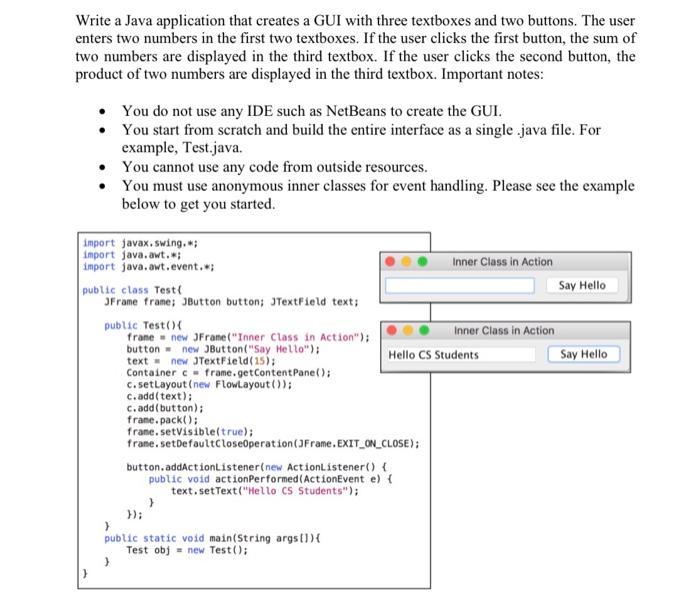
Write a Java application that creates a GUI with three textboxes and two buttons. The user enters two numbers in the first two textboxes. If the user clicks the first button, the sum of two numbers are displayed in the third textbox. If the user clicks the second button, the product of two numbers are displayed in the third textbox. Important notes: You do not use any IDE such as NetBeans to create the GUI. You start from scratch and build the entire interface as a single java file. For example, Test.java. You cannot use any code from outside resources. You must use anonymous inner classes for event handling. Please see the example below to get you started. import javax.swing.*; import java.awt.*; import java.awt.event.*; public class Test ( JFrame frame; JButton button; JTextField text; public Test() { frame new JFrame("Inner Class in Action"); button = new JButton("Say Hello"); text= new JTextField(15); Container c= frame.getContentPane(); c.setLayout (new FlowLayout()); c.add(text); } c.add(button); frame.pack(); frame.setVisible(true); frame.setDefaultCloseOperation(JFrame.EXIT_ON_CLOSE); }); } public static void main(String args[]) { Test obj= new Test(); button.addActionListener(new ActionListener() { public void action Performed (ActionEvent e) { text.setText("Hello CS Students"); Inner Class in Action Hello CS Students Inner Class in Action Say Hello Say Hello
Step by Step Solution
3.59 Rating (149 Votes )
There are 3 Steps involved in it
SOLUTION Program import javaawt import javaawtevent import javaxswing class Calculator ... View full answer

Get step-by-step solutions from verified subject matter experts
 Study Help