







Question: Write a Java application using JavaFx which allows the user to enter student information (see the sample design below).
Write a Java application using JavaFx which allows the user to enter student information (see the sample design below).
The user will enter full name, address, city, province, postal code, phone number and email in text field controls. The student's major (Computer Science or Business) will be selected from two radio buttons.
A combo box will display the list of courses for each program whenever the user selects the desired program.
A course will be added to a list box whenever the user selects a course from the corresponding combo box. Make sure that the user cannot add a course several times.
Additional information about the student will be provided from a group of check boxes (such as involvement in various activities, etc).
All the information about the student will be displayed in a text area component. Use simple JavaFX layout managers, such as FlowPane, BorderPane, and GridPane to create the JavaFX GUI of this application
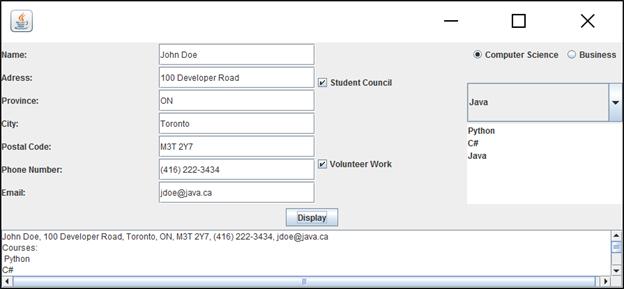
Name: Adress: Province: City: Postal Code: Phone Number: Email: John Doe 100 Developer Road ON Toronto M3T 2Y7 (416) 222-3434 jdoe@java.ca Display John Doe, 100 Developer Road, Toronto, ON, M3T 2Y7, (416) 222-3434, jdoe@java.ca Courses: Python C# Student Council Volunteer Work Computer Science Java Python C# Java X Business D D
Step by Step Solution
3.37 Rating (163 Votes )
There are 3 Steps involved in it
Sure heres a simple JavaFX application that fulfills the requirements youve outlined This example uses FlowPane BorderPane and GridPane for layout import javafxapplicationApplication import javafxgeom... View full answer

Get step-by-step solutions from verified subject matter experts
 Study Help