







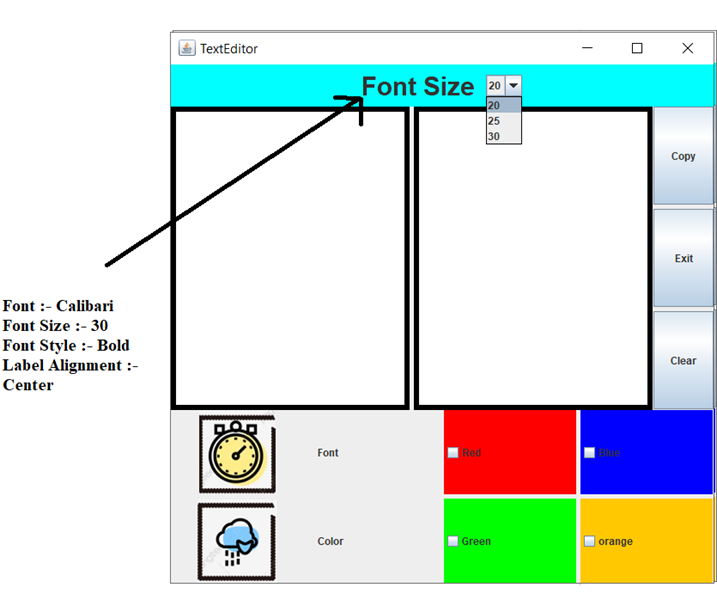
Question: Write a java code to generate the illustrated GUI Write the code only for design GUI and follow the given instructions. The size of GUI
Write a java code to generate the illustrated GUI Write the code only for design GUI and follow the given instructions.
The size of GUI 650 * 650.
The title of GUI is Text Editor
. Only one checkbox can be selected at any time.
The back color for checkboxes {red, blue, green, orange } respectively.
The back color used in the north region is cyan.
The font specifications for the label in the north region as illustrated in the attached figure is {font name:- Calibari, style: Bold, size of font :30}
The alignment of label text in the north region is center
The name of the two images used clock.png, weather.png respectively.
The text areas used surrounded by line border color =black, thinness =6.
The Combox contains the following items 20, 25,30 respectively
TextEditor X Font Size 20 20 25 30 Copy Exit Font :- Calibari Font Size :- 30 Font Style :- Bold Label Alignment :- Center Clear Font Red Blue Color Green orange
Step by Step Solution
There are 3 Steps involved in it

Get step-by-step solutions from verified subject matter experts
 Study Help