







Question: Write a Java program that generates GUI (Graphical User Interface). Your program should provide labels and textfields to a user to enter information regarding clubs.
Write a Java program that generates GUI (Graphical User Interface). Your program should provide labels and textfields to a user to enter information regarding clubs. The GUI of your program should contain two tabs. The first tab is labeled "Club creation" and the second tab is labeled "Club Selection". (The size of the applet here is approximately 900 X 400). The section under the first tab should be divided into two parts: The left part contains labels, textfields, and a button for a user to enter a club information. The right part shows "No Club" at the beginning (it is done using TextArea).
A user can enter the information of a club, and push "Create a Club" button. Then the club information should appear on the right hand side panel (note that the format of the club information can use toString() method of the Club class). A message "Club added" should also appear with red color at the top of the panel.
Error Handling:
1. If a user forgets to enter some field and pushes "Create a Club" button, show a message "Please fill all fields" with red color, and nothing should be added to the right hand side panel.
2. If a user enters non integer in the field for the number of member, and pushes "Create a club" button, show a message "Please enter an integer for a number of members." with red color and nothing should be added to the right hand side panel.
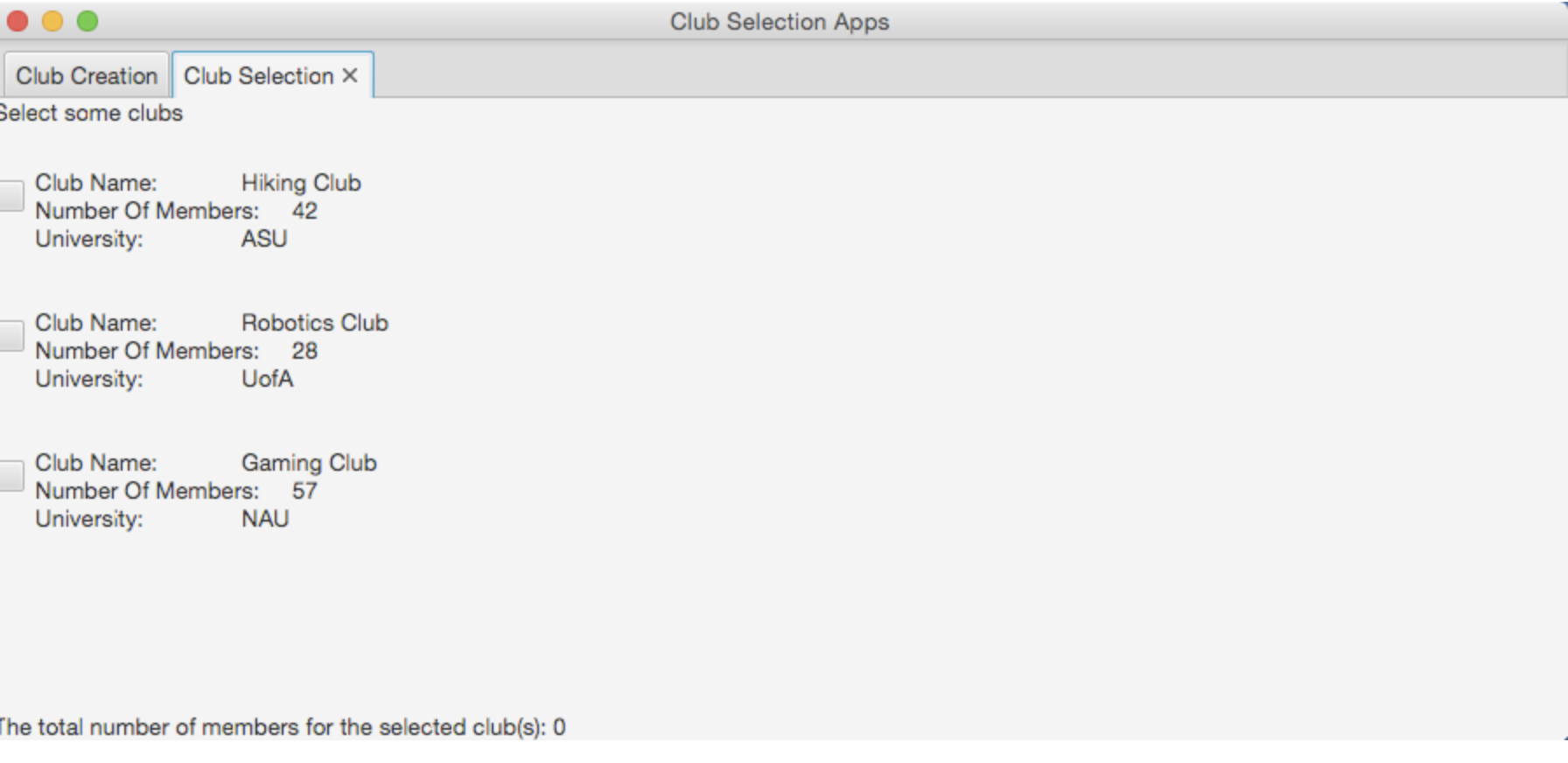
Under the "Club Selection" tab, a user can select from those created clubs. The list of created clubs should be made using a pane containing multiple check boxes. Above the pane containing check boxes, there should be a label to display Select some clubs. Below the pane with check boxes, there should be a label to display The total number of members for the selected club(s): 0. However this label should change to show a different number of members every time a check box is checked or unchecked.
The list of clubs under the Club Selection tab should be exactly same as the list under "Club Creation" tab.
import javafx.application.Application;
import javafx.stage.Stage;
import javafx.scene.Scene;
import javafx.scene.control.Tab;
import javafx.scene.control.TabPane;
import javafx.scene.layout.StackPane;
import java.util.ArrayList;
public class Assignment6 extends Application {
private TabPane tabPane;
private CreatePane createPane;
private SelectPane selectPane;
private ArrayList
public void start(Stage stage) {
StackPane root = new StackPane();
//clubList to be used in both createPane & selectPane
clubList = new ArrayList
selectPane = new SelectPane(clubList);
createPane = new CreatePane(clubList, selectPane);
tabPane = new TabPane();
Tab tab1 = new Tab();
tab1.setText("Club Creation");
tab1.setContent(createPane);
Tab tab2 = new Tab();
tab2.setText("Club Selection");
tab2.setContent(selectPane);
tabPane.getSelectionModel().select(0);
tabPane.getTabs().addAll(tab1, tab2);
root.getChildren().add(tabPane);
Scene scene = new Scene(root, 900, 400);
stage.setTitle("Club Selection Apps");
stage.setScene(scene);
stage.show();
}
public static void main(String[] args)
{
launch(args);
}
}
import java.util.ArrayList;
import javafx.scene.layout.HBox;
import javafx.event.ActionEvent; //**Need to import
import javafx.event.EventHandler; //**Need to import
//import all other necessary javafx classes here
//----
public class CreatePane extends HBox {
ArrayList
//The relationship between CreatePane and SelectPane is Aggregation
private SelectPane selectPane;
//constructor
public CreatePane(ArrayList
this.clubList = list;
this.selectPane = sePane;
//initialize each instance variable (textfields, labels, textarea, button,
etc.)
//and set up the layout
//----
//create a GridPane hold those labels & text fields.
//you can choose to use .setPadding() or setHgap(), setVgap()
//to control the spacing and gap, etc.
//----
//You might need to create a sub pane to hold the button
//----
//Set up the layout for the left half of the CreatePane.
//----
//the right half of the CreatePane is simply a TextArea object
//Note: a ScrollPane will be added to it automatically when there are no
//enough space
//Add the left half and right half to the CreatePane
//Note: CreatePane extends from HBox
//----
//register/link source object with event handler
//----
} //end of constructor
//Create a ButtonHandler class
//ButtonHandler listens to see if the button "Create" is pushed or not,
//When the event occurs, it get a club's Title, its number of members, and its university
//information from the relevant text fields, then create a new club and add it inside
//the clubList. Meanwhile it will display the club's information inside the text area.
//using the toString method of the Club class.
//It also does error checking in case any of the textfields are empty,
//or a non-numeric value was entered for its number of members
private class ButtonHandler implements EventHandler
//Override the abstact method handle()
public void handle(ActionEvent event) {
//declare any necessary local variables here
//---
//when a text field is empty and the button is pushed
//if ( //---- )
//{
//handle the case here
//}
//else //for all other cases
//{
//when a non-numeric value was entered for its number of
members
//and the button is pushed
//you will need to use try & catch block to catch
//the NumberFormatException
//When a club of an existing club name in the list
//was attempted to be added, do not add it to the list
//and display a message "Club not added - duplicate"
//at the end, don't forget to update the new arrayList
//information on the SelectPanel
//}
} //end of handle() method
} //end of ButtonHandler class
}
import javafx.scene.control.Label;
import javafx.scene.control.CheckBox;
import javafx.scene.layout.*;
import javafx.event.ActionEvent; //**Need to import
import javafx.event.EventHandler; //**Need to import
import java.util.ArrayList;
import javafx.collections.ObservableList;
import javafx.scene.Node;
//import all other necessary javafx classes here
public class SelectPane extends BorderPane {
private ArrayList
//constructor
public SelectPane(ArrayList
//initialize instance variables
this.clubList = list;
//set up the layout
//create an empty pane where you can add check boxes later
//SelectPane is a BorderPane - add the components here
} //end of constructor
//This method uses the newly added parameter Club object
//to create a CheckBox and add it to a pane created in the constructor
//Such check box needs to be linked to its handler class
public void updateClubList(Club newClub)
{
//-------
}
//create a SelectionHandler class
private class SelectionHandler implements EventHandler
//Override the abstact method handle()
public void handle(ActionEvent event){
//When any radio button is selected or unselected
//the total number of members of selected clubs should be updated
//and displayed using a label.
}
} //end of SelectHandler class
} //end of SelectPane class
public class Club {
private String clubName;
private int numberOfMembers;
private String university;
//Constructor to initialize all member variables
public Club() {
clubName = "?";
university = "?";
numberOfMembers = 0;
}
//Accessor method for club name
public String getClubName() {
return clubName;
}
//Accessor method for university
public String getUniversity() {
return university;
}
//Accessor method for number of members
public int getNumberOfMembers() {
return numberOfMembers;
}
//mutator/modifider method for club name
public void setClubName(String someClubName) {
clubName = someClubName;
}
//mutator/modifider method for university
public void setUniversity(String someUniversity) {
university = someUniversity;
}
//mutator/modifider method for number of members
public void setNumberOfMembers(int someNumber) {
numberOfMembers = someNumber;
}
//toString() method returns a string containg its name, number of members, and
university
public String toString() {
String result = " Club Name:\t\t" + clubName
+ " Number Of Members:\t" + numberOfMembers
+ " University:\t\t" + university
+ " ";
return result;
}
}
Club Selection Apps Club Creation Club Selection X Select some clubs Club Name: Hiking Club Number Of Members: 42 University: ASU Club Name: Robotics Club Number Of Members: 28 University: UofA Club Name: Gaming Club Number Of Members: 57 University: NAU The total number of members for the selected club(s): 0 Club Selection Apps Club Creation Club Selection X Select some clubs Club Name: Hiking Club Number Of Members: 42 University: ASU Club Name: Robotics Club Number Of Members: 28 University: UofA Club Name: Gaming Club Number Of Members: 57 University: NAU The total number of members for the selected club(s): 0
Step by Step Solution
There are 3 Steps involved in it

Get step-by-step solutions from verified subject matter experts
 Study Help