







Question: write a JAVA program that will accept a single word from a user, which you store in a String variable. With the use of loops
write a JAVA program that will accept a single word from a user, which you store in a String variable. With the use of loops and nested loops you are to produce a specific pattern with the characters of the word as illustrated in the figures below. So after initializing your variables, you are to retrieve a single word String input from the user and then find the appropriate combination of for loops to display each character exactly as displayed in the two samples below. Your code must work no matter what word the user enters. The box below illustrates how your program should behave and appear.
REMEMBER in the output: is a space, is a tab and is a new line. Text in green is user input
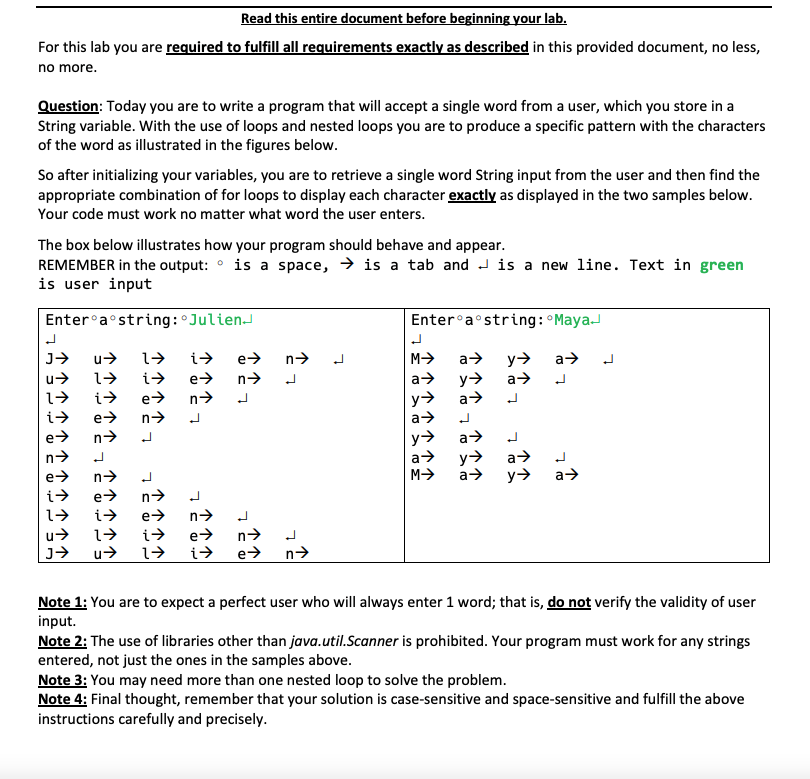
Read this entire document before beginning your lab. For this lab you are required to fulfill all requirements exactly as described in this provided document, no less, no more. Question: Today you are to write a program that will accept a single word from a user, which you store in a String variable. With the use of loops and nested loops you are to produce a specific pattern with the characters of the word as illustrated in the figures below. So after initializing your variables, you are to retrieve a single word String input from the user and then find the appropriate combination of for loops to display each character exactly as displayed in the two samples below. Your code must work no matter what word the user enters. The box below illustrates how your program should behave and appear. REMEMBER in the output: is a space, is a tab and is a new line. Text in green is user input Enter a string: Julien- Enter a string: Maya u n a a e n J u 1 i i e n M a> 1 i e n y a y a> i e n L +++ a y a . L a y M a> n e i 1 1 u J n e i 1 n e i n e n Note 1: You are to expect a perfect user who will always enter 1 word; that is, do not verify the validity of user input. Note 2: The use of libraries other than java.util.Scanner is prohibited. Your program must work for any strings entered, not just the ones in the samples above. Note 3: You may need more than one nested loop to solve the problem. Note 4: Final thought, remember that your solution is case-sensitive and space-sensitive and fulfill the above instructions carefully and precisely
Step by Step Solution
There are 3 Steps involved in it

Get step-by-step solutions from verified subject matter experts
 Study Help