







Question: Write a Java program to accept an integer, indicating a year, from the command line and then print the calendar for that year. If an
Write a Java program to accept an integer, indicating a year, from the command line and then print the calendar for that year. If an integer is not available from the command line, your program will use the current year as input (no hardcode value please!). Scanner class is NOT ALLOWED. A sample output is given below.
Additional Requirements: 1. No arrays are allowed. 2. Your output should be closely similar to the output of the sample program (see below). 3. To determine whether a year is a leap year or not:
a. If the year is a century year, the year must be divisible by 400.
b. If the year is not a century year, the year only needs to be divisible by 4.
4. To determine the current year, please use this code.
currentYear = Calendar.getInstance().get(Calendar.YEAR);
(note: please import java.util.Calendar;)
5. Allow user to input the selected year using Jgrasps run argument as an option, if an user chooses to do so. 6. To indicate the current month, if the input year matches the current year i.e. that is 2018, mark the current month (i.e Febuary) with dashed-lines (top/bottom lines). Otherwise, the marker lines should not be displayed.
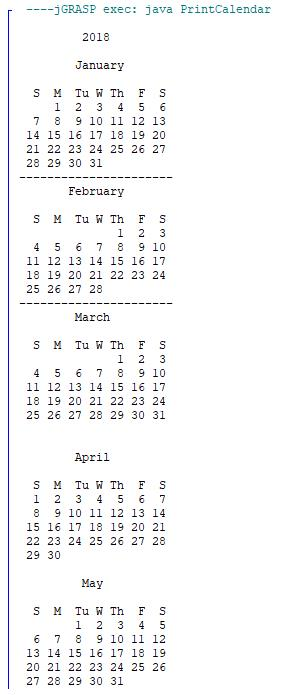
jGRASP exec: java PrintCalendar 2018 January S M Tu W Th F S 1 2 3 4 5 6 7 8 9 10 1I 12 13 14 15 16 17 18 19 20 21 22 23 24 25 26 27 28 29 30 31 February S M Tu W Th FS 4 5 6 78 9 10 11 12 13 14 15 16 17 18 19 20 21 22 23 24 25 26 27 28 March S M Tu W Th FS 4 5 6 7 8 9 10 11 12 13 14 15 16 17 18 19 20 21 22 23 24 25 26 27 28 29 30 31 April S M Tu W Th F S 1 2 3 4 5 67 8 9 10 11 12 13 14 15 16 17 18 19 20 21 22 23 24 25 26 27 28 29 30 May S M Tu W Th FS 6 78 9 10 11 12 13 14 15 16 17 18 19 20 21 22 23 24 25 26 27 28 29 30 31
Step by Step Solution
There are 3 Steps involved in it

Get step-by-step solutions from verified subject matter experts
 Study Help